Using WindowsXP to Make RAID 5 Happen
Features
By
Patrick Schmid
published
Follow us
Add us as a preferred source on Google
Subscribe to our newsletter
Transfer Performance
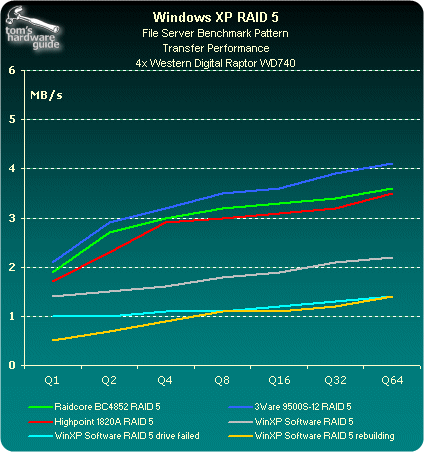
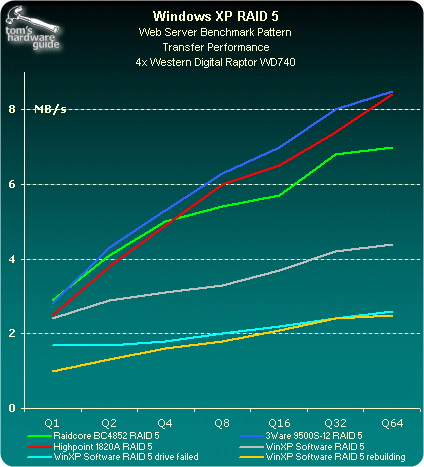
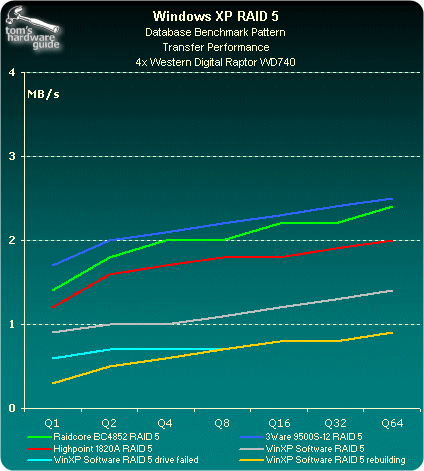
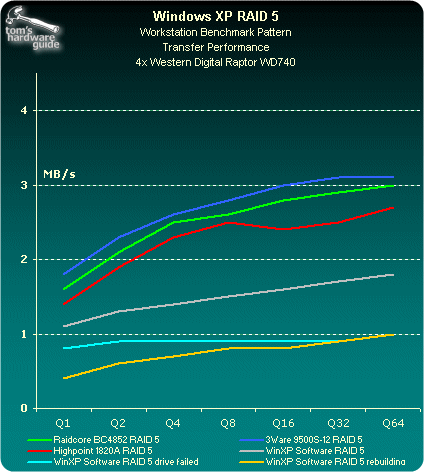
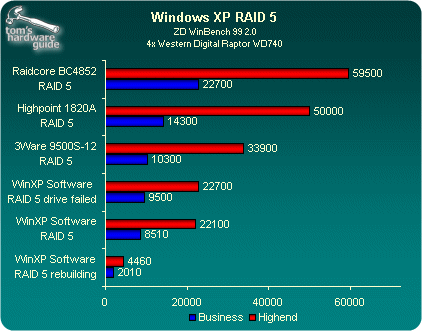
ZD WindBench
Stay On the Cutting Edge: Get the Tom's Hardware Newsletter
Get Tom's Hardware's best news and in-depth reviews, straight to your inbox.
TOPICS

Editor-in-Chief (2005-2006)
Patrick Schmid was the editor-in-chief for Tom's Hardware from 2005 to 2006. He wrote numerous articles on a wide range of hardware topics, including storage, CPUs, and system builds.
19 Comments
Comment from the forums
-
Can I grow an array made this way? That is, add another disk without having to lose the data currently held on the raid?Reply
-
op365 From past experience with Hardware RAID, you would have to first backup your data and then break the RAID and put in the higher capacity drives and create a new container.Reply
The feature that you want/asking about is called X-RAID -
micokeman I have used this hack and it works, but there are some problems that can occur. First of all, if you do this on SP2 and upgrade to SP3, XP will no longer see the RAID5 drives. Uninstalling SP3 allowed me to regain access to the RAID5 devices, but I would continuously get blue screens. After a repair of XP I no longer got blue screens, but I could also no longer see the data on the RAID5 drives. I suspect XP saw them as foreign drives and XP can't import foreign RAID drives!!! Yes, the hack works, but be aware that a service pack upgrade might render the data inaccessible.Reply
For those of you wondering, I was able to get my data back by installing Server 2003 and importing the RAID5 drives. No data lost, WHEW! You can also use a trial Windows Server 2003 to access your data for 30 days. Get the download from here. -
This works with SP3 and also with the x64 version of XP.Reply
To get it to work with SP3, you just have to redo the changes above.
To get it to work with x64, just locate those same strings in the files and apply the changes. Notice how the changes are only swapping the locations of the words SERVERNT and WINNT. I'd post the exact changes here, but it would take forever to type out all of those hex values. UltraEdit doesn't seem to allow one to copy the hex data to the clipboard.
-
I have also notice the problem when upgrading to SP3 that the RAID no longer works. Even after changing the files (dmboot.sys, dmconfig.dll, dmadmin.exe) on the SP3 release I still could not get RAID to work correctly. I have taken the 3 files from a system running SP2 and copied them to the system running SP3. It looks like the SP2 files work on SP3 but I have only had the system running for about a week.Reply
-
SlAoTkAiN I was lucky and installed sp3 and then used the hack and got a the raid working. The only problem I'm seeing is that XP doesn't start up the raid at boot. I have to go into manage and re-activate the drive. Anyone have any suggestions?Reply -
I got it working again after migrating from sp2 to sp3, but I have to go into manage and re-activate the drive every time I reboot.Reply
Anyone has a solution for this? -
tiborakos After spent a week wondering what went wrong with my XP SP2 raid5 setup...i fell into this, and remembered i hd installed SP3 as well!!!Reply
Is there a way to get those SP2 files from somewhere please? Else i think i might try the server2003 solution.
As for the "re-activate the drive every time I reboot" it has happened to me in my old PC after the mod, but could not find a way to solve it -
cwilk I am lost with the hex editing. I tried a fix from Randem Systems but that doesnt work. Anyone have a copy of the files i can get?Reply -
tiborakos Cannot help with the files unless you want mine. btw, i managed to get the Raid5 volume working again, after uninstalling SP3 and getting back to SP2.Reply
What if i copy the files, install SP3 again and just replace them with the current ones? Do you think it might work? Or i will end up needing "reactivate the drive every time i reboot" ?