Why you can trust Tom's Hardware Our expert reviewers spend hours testing and comparing products and services so you can choose the best for you. Find out more about how we test.
PBO Performance
We’re going to start our benchmarks section by focusing on traditional thermal tests, and at the end, we’ll cover DDR5 thermal tests with Silverstone’s IMF70 VRM fans.
While some of y’all prefer to run coolers at low noise levels, I know a lot of you just want maximum performance. This first test lets the fans run at their max speeds, to test the full potential of the AIO’s cooling capabilities.
Turning on PBO allows AMD’s Ryzen 9 9950X3D to stretch its legs to an extent. With the Ryzen 9 9950X (non-3D), the CPU will guzzle as much power as possible and hit TJMax no matter what cooler is paired with. However, at least with MSI’s X870E Carbon Wifi motherboard, power consumption averages ~250W with peaks of up to ~265W.

The result shown here of only 84.9 degrees C is one of the best on the market, providing cooler temperatures than the vast majority of competing liquid coolers. There have only been four AIOs I’ve tested capable of such thermal excellence. When I first tested Sudokoo’s Proteus 360 on our last 9950X3D setup and encountered similar thermal performance, I was first worried that there was something wrong with my system, because I had a hard time believing my own results!
I’ve included those results below, but keep in mind we’re using a different case for testing now – so thermals aren’t 100% comparable.

200W thermal benchmarks
For the next thermal test, I leave motherboard settings at their defaults, which results in a power limit of 200W when running Cinebench R23. CPU temperatures averaged 68.4 degrees Celsius, which is again one of the strongest results from any liquid cooler I’ve tested.

150W + GPU thermal results
Our next test runs Cinebench on the CPU with a 150W power limit, while also running Furmark on MSI’s RTX 4070 Ti Super Ventus 3x OC, which causes the GPU to consume ~295W. This test is designed to emulate the thermals of games, which primarily stress the CPU and GPU (but do not stress RAM).

With a CPU temperature of only 58.6 C, Silverstone’s IceMyst Pro 360 continues to demonstrate industry-leading thermal performance. I’ve included the results of this same test on our last 9950X3D testing system below, but please keep in mind they are not 100% comparable, as we’re using a different computer case.

Noise levels
To give you an idea of much noise this cooler creates when running, we’ve measured noise levels at full speed and in a scenario emulating high-intensity gaming.

Looking at this from a dBA perspective alone, you would think that the IceMyst Pro runs very loudly – but this chart doesn’t account for factors like the pitch of the fan noise. And regardless, it runs very effectively even when set to low noise levels, as you’ll see in the next section featuring noise-normalized tests.

In a scenario that emulates the thermal load of a high-intensity game, the noise level only reaches 38.9 dBA (when tied to my motherboard’s default fan curve). This is relatively quiet, and means that in most scenarios the cooler will run whisper-quiet.
Noise-normalized testing
Most testing is performed with the cooler tied to the default fan curve of my MSI X870E Carbon motherboard, but some of y’all prefer to see tests when the noise levels of coolers are equalized. This is especially important to those of you who prefer silent computers.
This next test has the CPU cooler noise-normalized to 38.9 dBA, with PBO enabled for the Ryzen 9 9950X3D CPU.

With a result of only 85C, Silverstone’s IceMyst Pro shows some of the strongest thermal performance possible – despite the fans running at low noise levels. What’s more is that there’s only a 0.1C increase compared to our full speed results, which means there’s no point in letting the cooler run loudly – at least with a consumer CPU. The IceMyst Pro features support for hotter, more powerful Threadripper Pro CPUs – which would likely benefit from the fans working harder.
Karhu DDR5 RAM thermals testing
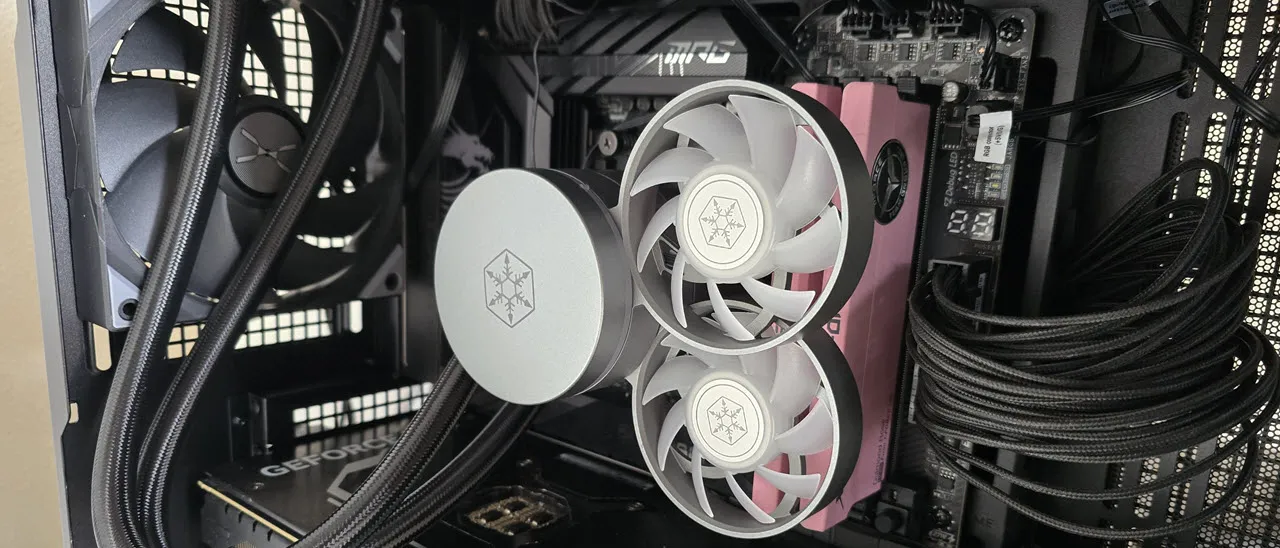
One of the principles I’ve tried to explain in my reviews is that your CPU cooler does not operate in isolation. It has an impact on not just your CPU’s temperatures, but other components in your build as well, like your RAM and GPU. The optional Silverstone IMF70 fans, which cost about $25 each and can be added to this cooler, are designed to help cool your RAM and VRMs, ideal for users who prefer to overclock their memory to the fastest possible speeds.
To that end, I’ve run the Karhu RAM stress test. This places a load of ~153W on the CPU and ensures system RAM (DDR5 in my case) is fully stable.

In this type of scenario, most AIOs tend to produce poorer results than air coolers. Adding a single fan drops DDR5 temperatures by 9 degrees Celsius, which can significantly improve stability while overclocking. Using more than one fan doesn’t seem to make much of a difference, with temperatures dropping by only 0.1C.
But that’s not all – I’ve also tested Karhu while also running Furmark. This should be similar to a high-intensity gaming scenario that stresses the GPU and RAM, such as e-sports titles.

When you add the heat of a GPU to the mix, air coolers seem to lose the advantages shown in the previous chart. Adding the IMF70 VRM fans drops temperatures almost 9 degrees C here, which is important if you’re considering DDR5 overclocking.
Conclusion

Silverstone’s IceMyst Pro 360 is one of the strongest thermal solutions available for consumer CPUs – and it supports professional processor in the form of Threadripper Pro. It runs very quietly in normal scenarios and has excellent noise-normalized performance.
The optional IMF70 fans provide excellent cooling for VRMs or DDR5 RAM, dropping temperatures by 9 degrees C (21 degrees Fahrenheit) – a capability not offered by most competitors. Just note that you’ll need to pay extra for those IMF70 fans. They’re currently for sale at Amazon for $25 each, and that’s on top of the $189 cost of the cooler itself.