Useful Preparation: Install Windows In AHCI Mode
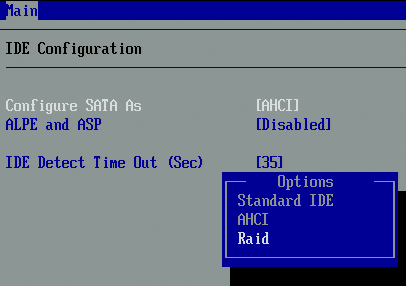
Whether you want to operate an RAID array or not, we recommend activating the AHCI mode for your SATA controller first and installing Windows using this mode. Compared to proprietary controller modes (these can be identified in BIOS through "standard" or "IDE" settings), the Advanced Host Controller Interface is an open standard. Therefore, manufacturers don’t have to engineer specific drivers for several operating systems anymore. Instead, operating systems are able to communicate with Serial ATA controllers directly.
With Serial ATA, AHCI also makes it possible to operate other devices as hard drives, such as DVD drives. Serial ATA hot-plugging is also available with only AHCI. Windows XP has supported AHCI since Service Pack 2, but there still are some issues. Windows Vista supports AHCI without any difficulty.
In any case, you need to install the AHCI driver in Windows if you intend to switch the standard mode of your controller to AHCI mode (which is possible with current motherboards and SATA controllers). Otherwise, Windows will refuse to boot up and you get the dreaded blue screen (inaccessible boot device). If you don’t provide the required driver via disc or a slipstream-procedure (integration with the installation CD), installing Windows XP from a CD without Service Pack 2 will fail. Opting for AHCI instead of proprietary controller drivers is definitely the better choice.

Changing Standard SATA Mode To AHCI-SATA
If you decide to reconfigure your controller to AHCI mode to set up an RAID array on a system on the fly, you need to install the AHCI driver using Windows XP with Service Pack 2 or by activating the appropriate driver with Windows Vista. Microsoft’s Knowledge Base offers instructions how to activate the AHCI driver in Windows Vista. Don’t worry: You won’t break anything by changing the mode. Windows will start again after you reverse your changes.
