LSI MegaRAID SATA 300-8ELP

LSI Logic is best known for its high-end storage adapters in the professional space - mostly based on SCSI or SAS technology. The MegaRAID SATA300-8ELP is almost an entry-level product, although it carries as many as eight Serial ATA ports for 150 and 300 MB/s bandwidth each.
LSI went for multi-lane SATA ports. As a result, the card has only two of them to power all eight drives. It comes at a low-profile form factor, making the card suitable for almost all types of rackmount servers. It has an Intel IOP333 I/O processor, which takes care of accelerating XOR operations in hardware. Yet the performance level cannot reach the numbers that we got from AMCC and others.
This product has 128 MB DDR333 buffer memory and since LSI Logic caters to professional users, it also offers an optional battery backup unit. Luckily, the card does not require active cooling, which makes it suitable for workstation solutions as well.

Although the MegaRAID SATA 300-8ELP did well and offers a plethora of features, its street price of approximately $600 is twice as much as you have to pay for most of the competitors. Given that LSI doesn’t support Solaris or Mac OS X and the practical differences aren’t that huge, we need to ask LSI Logic to reconsider its pricing.


Array Creation
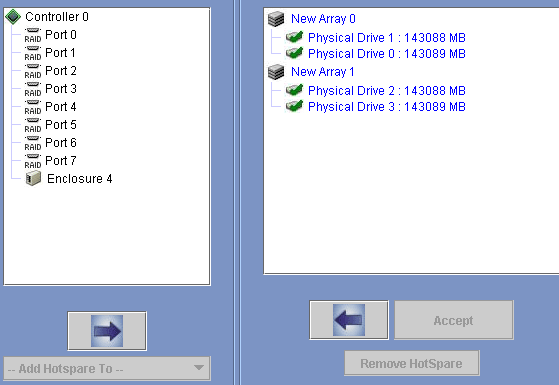
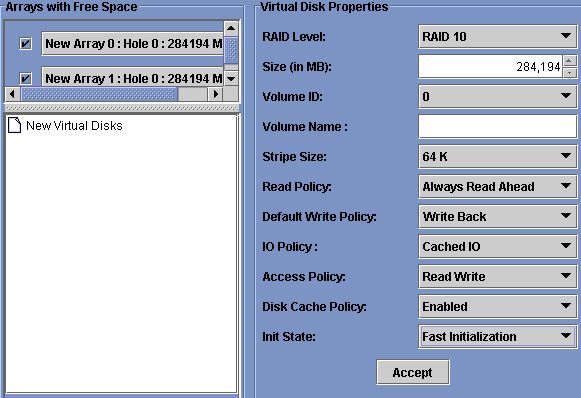
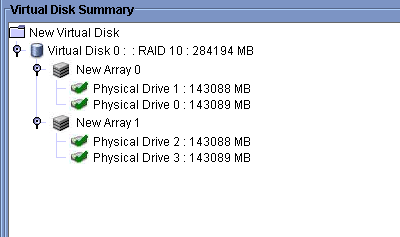
The software interface is not self-explanatory. For the creation of a RAID 1+0 you have to add two drives to an array and then build the second array. On the next page you have to select the second array to choose RAID 1+0. If you put all four drives into one array you can only create a RAID 0 or RAID 5.