Grading Performance and Presentation, Continued
As with the Radeon, Nvidia's GeForce 7800 GTX shows improved frame rates with antialiasing and anisotropic filtering settings at 2x, although the overall score at a level of 4x is virtually identical. The next trio of screenshots depicts the 7800 benchmarks with both antialiasing and anisotropic properties incremented by a power of two. A jump from 4x to 8x shows a fairly consistent drop of about 20 maximum frames across the board, with negligible differences for the final score (except for the AS-Convoy and ONS-Torlan tests).
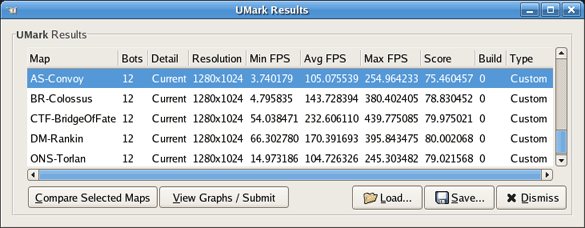
The 7800 benchmarks exceptionally well with antialiasing and anisotropic settings of 2.
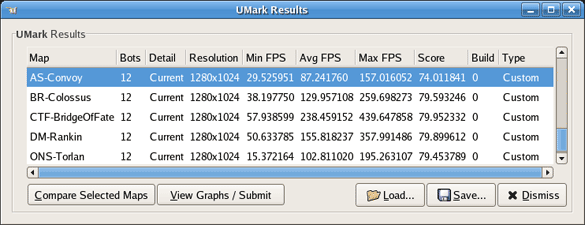
The 7800 shows only marginal differences with antialiasing and anisotropic set to 4.

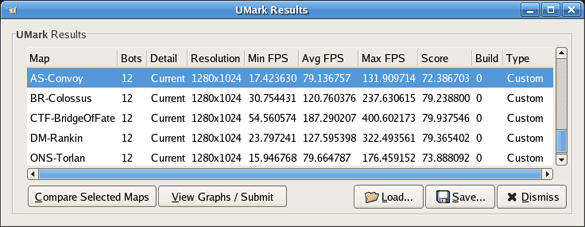
Performance drops appreciably with antialiasing and anisotropic set to 8.
Based on these results, GTX and XTX performance under their respective Linux drivers more or less match up across the board, whether antialiasing settings are used or not. Also notable is the fact that while the XTX never dips below 25 FPS for any given test, the GTX does decrease sharply to 14 FPS during the ONS-Torlan stage. Overall, the GTX averages higher frame rates than the XTX card in almost every category, under all resolutions and settings. Both cards provide excellent visual quality, with sharp detail at every resolution. Perhaps the most telling aspect about these numbers is that while they show no clear winner, they do demonstrate that gaming isn't just for Windows anymore.
