Target Configuration
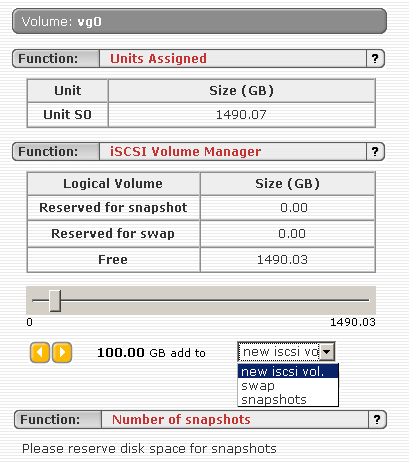
You may recall that we have a powerful SATA RAID controller and four drives that are ready to be used. All important settings, including the physical array creation, can be done using the nicely structured Web-based interface. The only action that requires the user to perform locally is the deletion of RAID arrays. For security reasons this can only be done using the RAID controller's local interface. We used this interface to create one large RAID 0 array prior to booting the Open-E iSCSI. At this point we should mention that the latest Open-E iSCSI version 1.51 also supports host system based RAID, which allows for the integration of several drives with one another in order to set up a RAID 0, 1, 0+1 or RAID 5 array.
Our four 400 GB hard drives result in a total net capacity of 1,490 GB, because one of these drives features 372 rather than 400 GB in reality. A kiloByte represents in reality 1,024 Bytes and not 1,000 Bytes, according to the definition of the storage industry.
The slider (see screenshot above) can be used to select the size for your iSCSI target. You can also opt to create a snapshot space, which can be used to backup the state of a target volume.

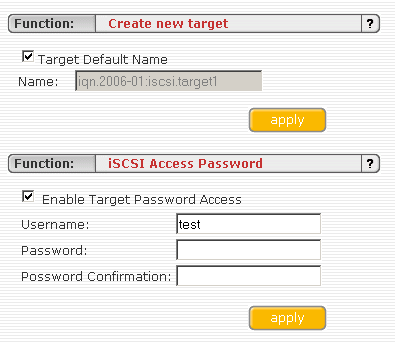
The next step in creating an iSCSI target is to provide a target name and access data.
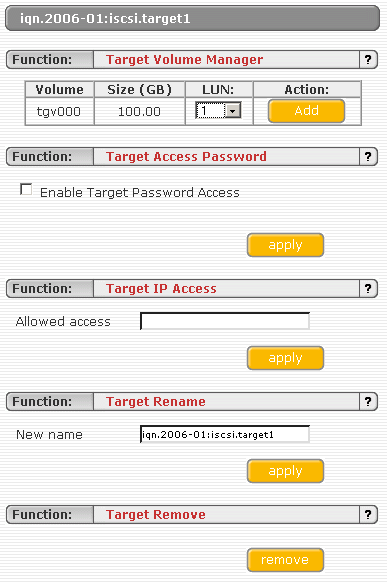
Don't forget the checkbox to enable the login access control that you just defined. As an additional security feature, it is possible to restrict access to certain IP addresses only.
