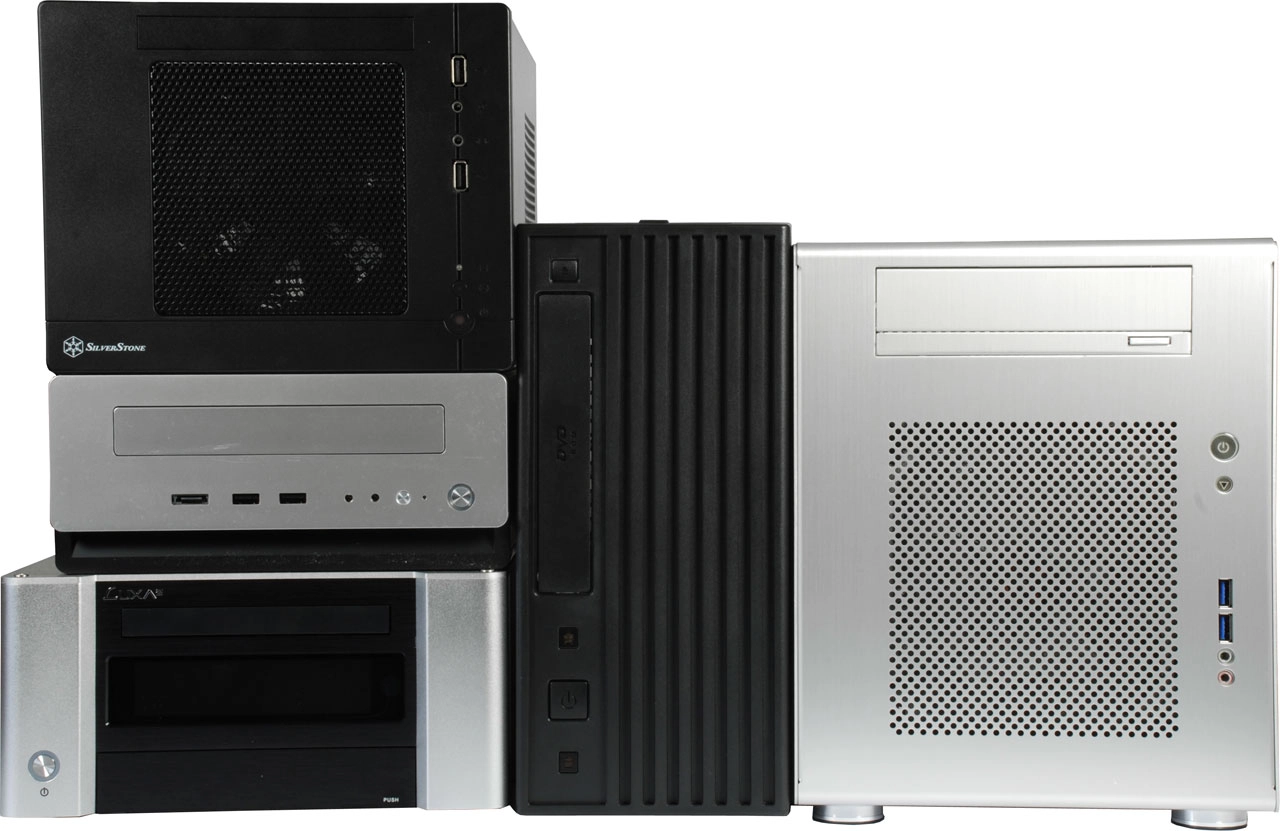
Mini-ITX-based systems are attractive because they generally combine low-power operation and decent performance in a small package. But you need a good case to accommodate the restrictions of compact hardware. Today we try five different Mini-ITX cases.
Mini-ITX systems are much more compact than standard desktop computers. The format revolves around motherboards that measure just 170x170 mm and the standard is now well-adapted. Mini-ITX 2.0 was actually set and defined by VIA back in 2008, but initially created in 2001, and it is perfectly suitable for creating some of the smallest PC platforms thinkable today. Mini-ITX is about 61 percent smaller than full-size ATX, takes less than half the area consumed by microATX, and it is even a third smaller than FlexATX.

More Powerful Than Standard PCs
The first Mini-ITX computers were based on relatively weak CPUs like VIA's Eden, and thus were at best only suitable for thin clients or entry-level PC applications. However, manufacturers have shaped up since then, and now offer a wide range of Mini-ITX motherboards that can, in fact, compete with standard PCs in terms of performance. An increasing number of highly-integrated platforms ensure that all key features and interfaces are available, even in this smallest form factor. As a result, the possible applications have expanded considerably, and the small computers no longer live a niche existence.
Crucial: The Mini-ITX Case
Current Mini-ITX computers can make just as good gaming PCs as they make home theater PCs (HTPCs). But there are very different demands on the system because of the various possible applications. Therefore, you have to take into consideration the inside and the outside of the case when buying one. Even the very best Mini-ITX motherboard is of little use if the chassis it drops into doesn't offer enough space for a graphics card, if the PSU is too weak, if the USB connections are all in the wrong place, if the ventilation is inadequate, or if there is no room for expansion.
Five Mini-ITX Cases Tried
Choosing the right Mini-ITX motherboard and matching the right CPU can be a science in itself. Of course, the first question you should ask yourself is what you are actually going to use the computer for. The same goes for the Mini-ITX enclosure. According to the manufacturers, there are considerable differences in appearance, internal volume, and accessories/expansion. So, depending on whether the case will host a miniature workstation, a gaming rig for LAN party duty, or a multimedia system for the living room, you will have to make sure that the chassis is apropos.
We put five current cases for Mini-ITX boards to the test. We reveal strengths and weaknesses in order to determine what role they play best. As reference hardware, we're using Gigabyte's H55N-USB3, fitted with an Intel Core i5 and standard (boxed) Intel CPU cooler. These are the test candidates: Antec's ISK 310-150, the Chieftec BT-02B, Lian Li's PC-Q08, LUXA2's LM100, and the SilverStone SG05. The cases all ship empty and, apart from the Lian Li, they all come with a power supply.
Not All PC Hardware Fits
The small dimensions of most Mini-ITX cases don't always make it hard to fit standard size PC components. In many cases, plenty of standard hardware pieces fit just fine. Almost all of our test candidates simultaneously accommodate a 3.5” hard drive and a standard 5.25” optical drive. More likely is that some CPU coolers and graphics cards will be too large or too long to fit. And things might still be extremely cramped, even if the case is supposedly ready for the installation of discrete graphics cards and components like that.


They are reliable little boxes :-)
All the best,
Sharro
i5 2500@3.5GHz can be really cool with Big Shuriken@800rpm.
http://www.chenbro.com/corporatesite/products_detail.php?sku=167
Yeah prob would have gone another direction than the H50 should i buy something now since performance pr dollar isnt that high. However the new SB cpu's do overclock better than my 860..so its really no suprise you get good temps at 3,5 ghz with your I5..you prob would with stock cooler as well..at least from what i have read around the interwebs..
I ended up buying the Shuttle SH55-J2. This is a Mini-ITX case plus an ITX motherboard for an Intel LGA1156 processor. The case accepts a double-slot graphics card and a standard optical drive. And unlike past Shuttle products, you can upgrade the system with any standard ITX motherboard. It's also very quiet, which is a big plus for home theater.
http://img842.imageshack.us/img842/1414/dsc0348n.jpg
I built a small gamer in a PC-Q08R using a GTX460 and an i5/650. It runs a little warmer compared to when it had a HD5770 in it, but not too bad. It has gone back to being my secondary, so I need to switch the cards again (or I may put a HD6670 in it if they're decent). I'm using a semi-modular 550W Truepower New in it.
http://www.hfx.at/index.php?option=com_content&view=article&id=140:hfxr-micro-m2-&catid=51:heatsink-cases&Itemid=1
I'm planning to combine it with an i5-2400S to replace my crapple mac mini.
Couldn't agree more with you.
Tom's please take a look at Lightbox or something equivalent to it: http://www.huddletogether.com/projects/lightbox2/#overview
Thanks!
Dual 2.5" hard drive spaces make it work for an Atom-powered file server too. Use a Supermicro server-grade mini-ITX Atom motherboard and you're laughing.
FYI: Can we get information about the Radeon HD 6450? Does it do Hybrid Crossfire? Does the Fusion APU? Does the PCIe-x4 slot on the Fusion boards slow down the 6450 considerably, or does this make for a good, cheap upgrade for increasing the performance of the E-350's integrated graphics? This might be a good option for the lo-pro mini-ITX cases like the Antec without getting into one of those larger desktop-wannabe sized monstrosities. Plus, the whole idea of using a desktop-class PSU in a mini-ITX case defeats the purpose of using such a case IMO. Mini-ITX isn't just about size, but energy efficiency too.
A 5450 lo-pro would work, but it depends on the CPU. Anything above that and you're gonna blow the PSU. Remember that some CPU's are rated up to 135W. If you use something like a 65W, and you consider the drives, the motherboard requirements, RAM, USB devices, etc., and the life-span/efficiency of the PSU, you can't just allow for 150W.
Just FYI though: AMD recommends a MINIMUM 400W PSU for even a 5450. That's for a complete desktop system mind you, but 150W is a huge step down for that.
If you look at Antec's PSU calculator, without putting any system specs in beyond a baseline mobo config, it sits at 34W. With a 5450 added, it jumps to 96W. So according to Antec, a 5450 uses about 63W by itself. That doesn't leave much headway for the rest of the system. If you used a 45W CPU, you might have enough for a 5450 with a bit of headroom left, but that's assuming the PSU is going to put out 150W of clean power, all the time, which is extremely unlikely. You should include at least a 10-15% low-point buffer in the wattage as a best practise, to allow for capacitor aging. 10% less of 150W is only ~136W. Keep that in mind.
Word of advice: if you want to use a video card, get a case with a bigger power supply (250W+ depending on the card). Check Antec's PSU calculator for more precise requirements of each video card too. Remember that by using a PSU that's less than spec for the card, you're taking some risks with reliability. Mini-ITX components often (but not always) take less power than a comparable desktop. Most of this is attributed to using notebook parts due to the small size of the case though (2.5" hard drives vs. 3.5", slimline ODD's vs. half-height desktop ODD's, LV CPU's, sometimes SODIMM's, etc.)
Also FYI: I built a system with the ASUS 880G Mini-ITX mobo in the ISK-310 with an Athlon II X4 605e and slot-load DVDRW and it's pretty nice as an HTPC. Gaming is okay, considering it's just a Radeon HD 4250 integrated - far better than anything Intel has for integrated video in mini-ITX. I'm curious to know how the new Stars GPU cores are going to perform in the upcoming Llano APU's though. Stars is what they use in the 56x0-series GPU's, so I think that's going to make for an awesome integrated PC if it keeps the same performance as the 5650/5670. Llano is set to replace the current Athlon II X2 and X4 CPU's, so the price will be very reasonable (Athlon II quad cores sell for