Port Forwarding, DynDNS And Setting Up The Remote Object
If you dial into the Internet via a router, you will need to modify to forward incoming VPN requests on Port 1723 to your desktop computer by means of port forwarding. Since this procedure varies from router to router, we cannot supply you with any universally applicable instructions. The same applies to the forwarding of the TCP/IP protocol 47, Generic Route Encapsulation (GRE). Some router manufacturers call the conveyance of the GRE protocol "PPTP Pass-Through" or "VPN Pass-Through". You will need to consult the router manual for specific details regarding setting up Port Forwarding and PPTP Pass Through.
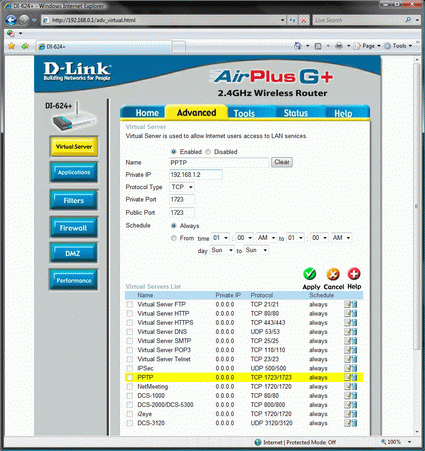
The forwarding rules for PPTP as well as...
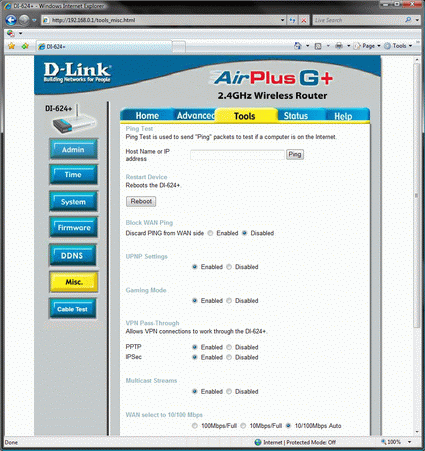
... the pass though settings are easy to find in the menu of our test router

The same applies to setting up a dynamic DNS address. As already mentioned, the router support for providers of dynamic DNS servers differs from manufacturer to manufacturer. To ensure that this article doesn’t get too long and complicated, we will assume that both Port Forwarding and PPTP Pass Through, as well as registration with a provider of DNS services, have all been completed successfully.
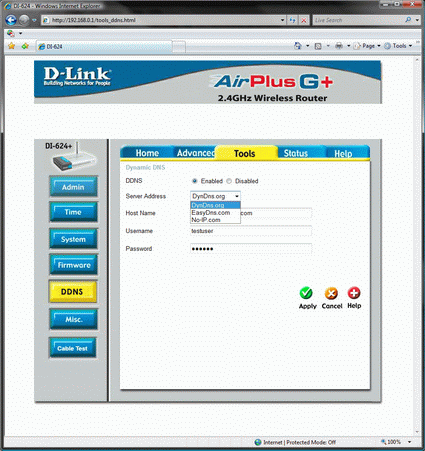
The selection and range of supported DNS providers varies from manufacturer to manufacturer
