We've seen doubters out there skeptical of whether the TouchPad actually employs an IPS screen. Based on our observations under the microscope, we can confirm that this is an S-IPS panel. In fact, based on the subpixel structure, HP appears to be using glass from Samsung.


Even though mobile operating systems don't honor ICC color profiles, native color management does occur at the hardware level. When a GPU sends 10 different hues of blue to an LCD only capable of displaying three, the subpixels display the closest matching color. So, in a way, smartphones and tablets behave as if they’re using relative colorimetric rendering. For more information, read Tom's Hardware Benchmarks Inkjet Printer Paper!
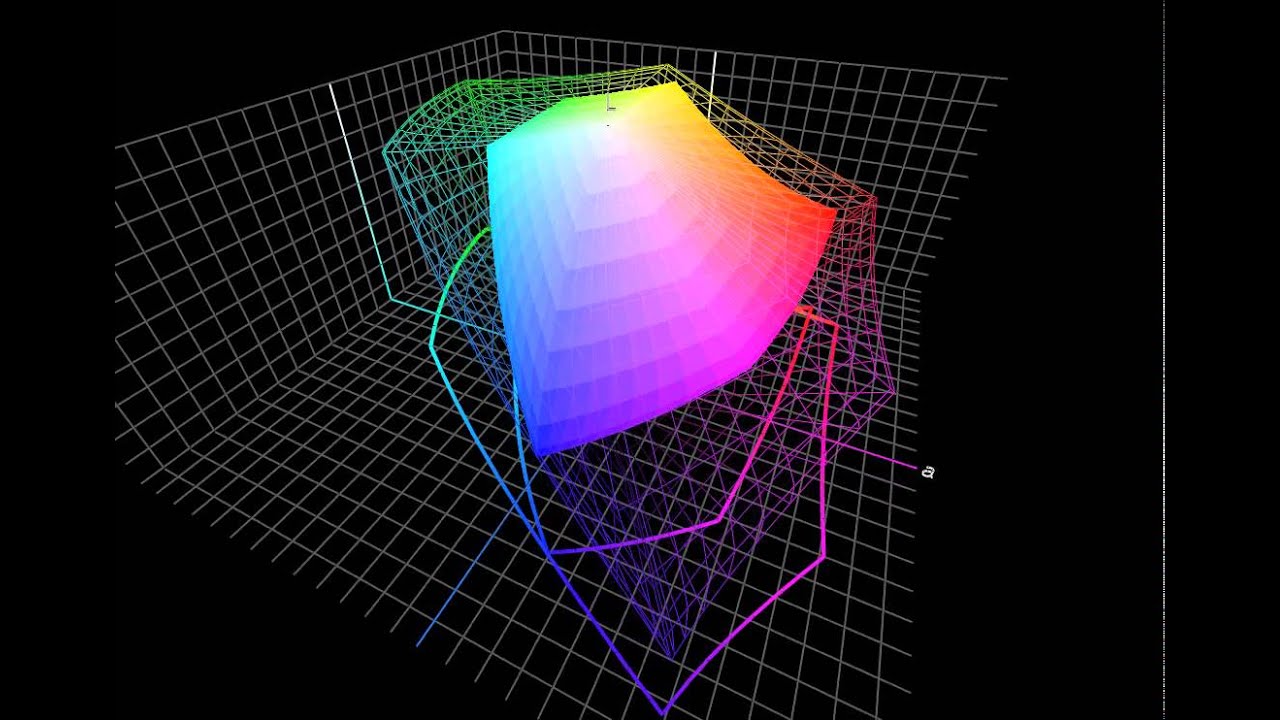
In terms of color quality, the TouchPad delivers the most color that we've seen from any tablet. Even though it uses a panel similar to the iPads, HP achieves a higher gamut volume by using a default calibration closer to the AdobeRGB 1998 spec.


We have to make a couple of adjustments in order to generate these gamut measurements. First, we disable dynamic brightness because it doesn’t facilitate an accurate (or reproducible) measurement of the display’s potential. Second, brightness is set to the highest value. If you don't use the same settings, your color gamut is going to look smaller than what we're showing here.


Compared to the S-IPS panels on the iPads, HP achieves a slightly lower contrast ratio due to stunted white luminance. The color temperature is exactly at 6500 K, resulting in accurate color representation, but the low gamma distorts color perception. Gamma doesn't affect black or white performance, but it does affect midtones. If gamma is set too high, they appear too dark. If it's set too low, midtones appear too pale.
Adobe, Apple, and Microsoft all recommend a gamma of 2.2. It's an arbitrary value carried over from the NTSC standard, but it was originally chosen because it allows colors to appear more natural in slightly dim environments. The TouchPad's slightly lower gamma value suggests that it's best used in a darker environment. This is really the only weak point of the TouchPad's display. In every other attribute, HP seems to be hitting the AdobeRGB 1998 reference spec.
- HP's TouchPad Battles It Out With WebOS
- Meet HP's TouchPad
- webOS 3.0: Navigation And Notifications
- webOS 3.0: Email And Multitasking
- webOS 3.0: Media And Documents
- webOS 3.0: Screenshots And File Transfers
- webOS 3.0: Adobe Flash
- webOS 3.0: Synergy
- HP's App Catalog
- The Developer's Dilemma
- Third-Generation Snapdragon: The Dual-Core Scorpion
- The Adreno GPU: An AMD Bloodline
- Gamer Spotlight: HP TouchPad
- Display Quality: Color Gamut
- Display Quality: White And Black Uniformity
- Battery Life And Real-World Benchmarks
- Is The TouchPad An iPad Or Xoom Competitor?

The one thing lacking in this review, which is also lacking in everything being written about webos, is the mention of what I consider one of the standout features of webos: The openness of the platform. With preware installed (free), you have access to thousands of patches and homebrewed apps as well as linux applications. It is possible, for example, to run a full Debian Linux in a chrooted environment (without any cracking or jailbreaking), giving access to OpenOffice, and all other x-server Linux software out there. HP/Palm is the only tablet OS developer that actively encourages the homebrew/open source community in its efforts. As a developer, it is not only the ease of development that is compelling but the huge amount of expressive and creative freedom you get. With the Apple appstore, the walled garden may protect consumers well, but also creates a completely controlled and often repressive and capricious environment for a developer. This openness is the secret sauce behind much of the loyalty of webos users. The os is a joy to use, a joy to explore, and a joy to create new code in. And unfortunately, most reviewers can't or won't take the time to understand this extremely compelling aspect of the OS.
Thank you again for the best review of the touchpad I've seen yet.
Thanks again, Andrew!
HP just announced the $100 off sale from this last weekend is now permanent.
"Effective immediately, the HP TouchPad 16GB Wi-Fi will now be available for $399.99 and the HP TouchPad 32GB Wi-Fi will now be available for $499.99"
http://vdccnz2prof.houston.hp.com/view_email.asp?eid=10048010&mid=055f0aa5-75fa-414f-9913-9aa980bb0ef7
With preware and some patches... 1.5ghz or even 1.7ghz... amazing!
as the first WebOS tablet, i think its a home run.
http://www.youtube.com/watch?v=OpCJzdWxEbQ
Intel in under the impression that with die shrinks of 22nm and less that x86 will fit in the same power envelope as ARM but be able to run full applications, so they are not playing with ARM. But you have to believe that they are sitting on some ARM tech that will come out if their die shrinks are not as effective as they hope.
"Effective immediately, the HP TouchPad 16GB Wi-Fi will now be available for $399.99 and the HP TouchPad 32GB Wi-Fi will now be available for $499.99"
That's $100 cheaper than the initial price, and -$50 cheaper than what the article states.
So what do you do in-order to get software ?