The absolute best part about webOS has nothing to do with its well-laid-out GUI. It has to do with Synergy. HP uses this term to refer to a feature in webOS that merges multiple sources of information into one interface. For example, when I register my Google and Facebook accounts, all of my scheduled events appear color coded in the Calendar app.
Facebook pictures are integrated into the Photos & Videos App. But webOS goes one step further. It's also possible to print directly to wireless HP printers.
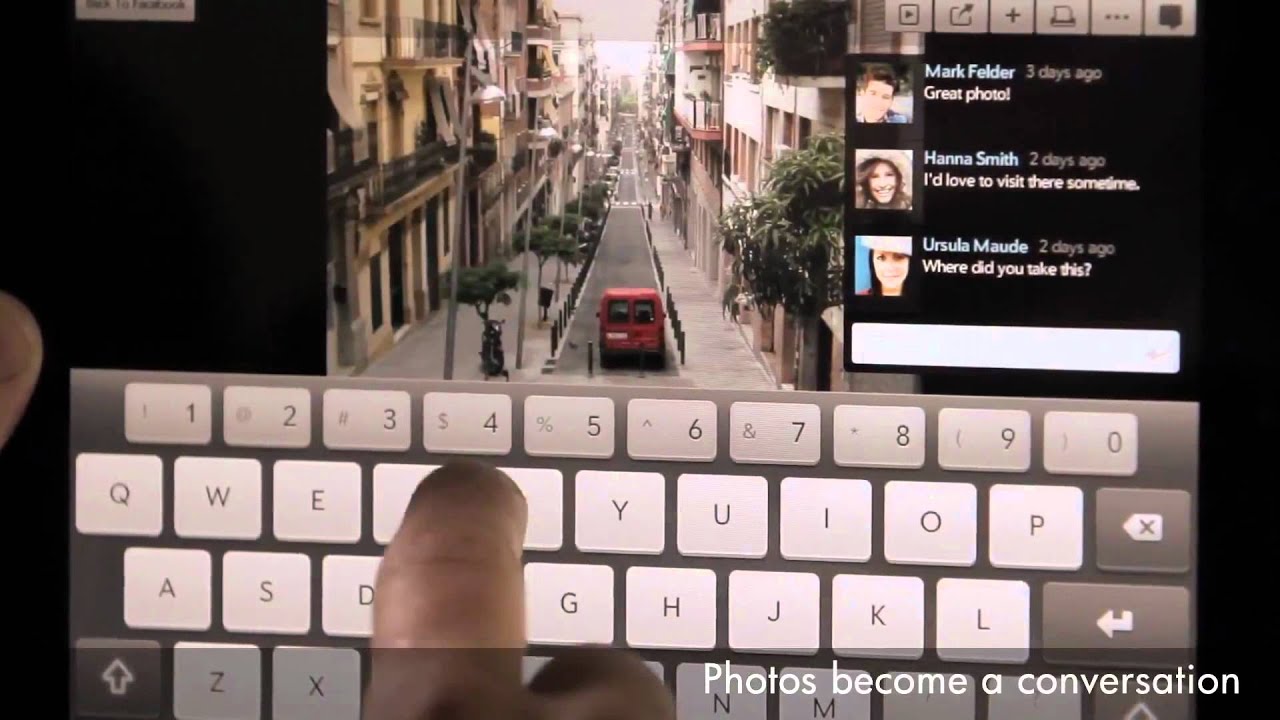
Integration is even better when it comes to contacts and messaging. You can register multiple accounts, such as Facebook, LinkedIn, Yahoo, Skype, Microsoft Exchange, AIM, and Google. The names are automatically sorted in such a way that “John E Smith” listed in LinkedIn is tied to the “John E Smith” friend from Facebook.

If the user names from one account to the next are a little different, then you need to manually associate your contacts. Once that's done, though, the data is automatically backed up to your webOS account.
- HP's TouchPad Battles It Out With WebOS
- Meet HP's TouchPad
- webOS 3.0: Navigation And Notifications
- webOS 3.0: Email And Multitasking
- webOS 3.0: Media And Documents
- webOS 3.0: Screenshots And File Transfers
- webOS 3.0: Adobe Flash
- webOS 3.0: Synergy
- HP's App Catalog
- The Developer's Dilemma
- Third-Generation Snapdragon: The Dual-Core Scorpion
- The Adreno GPU: An AMD Bloodline
- Gamer Spotlight: HP TouchPad
- Display Quality: Color Gamut
- Display Quality: White And Black Uniformity
- Battery Life And Real-World Benchmarks
- Is The TouchPad An iPad Or Xoom Competitor?


The one thing lacking in this review, which is also lacking in everything being written about webos, is the mention of what I consider one of the standout features of webos: The openness of the platform. With preware installed (free), you have access to thousands of patches and homebrewed apps as well as linux applications. It is possible, for example, to run a full Debian Linux in a chrooted environment (without any cracking or jailbreaking), giving access to OpenOffice, and all other x-server Linux software out there. HP/Palm is the only tablet OS developer that actively encourages the homebrew/open source community in its efforts. As a developer, it is not only the ease of development that is compelling but the huge amount of expressive and creative freedom you get. With the Apple appstore, the walled garden may protect consumers well, but also creates a completely controlled and often repressive and capricious environment for a developer. This openness is the secret sauce behind much of the loyalty of webos users. The os is a joy to use, a joy to explore, and a joy to create new code in. And unfortunately, most reviewers can't or won't take the time to understand this extremely compelling aspect of the OS.
Thank you again for the best review of the touchpad I've seen yet.
Thanks again, Andrew!
HP just announced the $100 off sale from this last weekend is now permanent.
"Effective immediately, the HP TouchPad 16GB Wi-Fi will now be available for $399.99 and the HP TouchPad 32GB Wi-Fi will now be available for $499.99"
http://vdccnz2prof.houston.hp.com/view_email.asp?eid=10048010&mid=055f0aa5-75fa-414f-9913-9aa980bb0ef7
With preware and some patches... 1.5ghz or even 1.7ghz... amazing!
as the first WebOS tablet, i think its a home run.
http://www.youtube.com/watch?v=OpCJzdWxEbQ
Intel in under the impression that with die shrinks of 22nm and less that x86 will fit in the same power envelope as ARM but be able to run full applications, so they are not playing with ARM. But you have to believe that they are sitting on some ARM tech that will come out if their die shrinks are not as effective as they hope.
"Effective immediately, the HP TouchPad 16GB Wi-Fi will now be available for $399.99 and the HP TouchPad 32GB Wi-Fi will now be available for $499.99"
That's $100 cheaper than the initial price, and -$50 cheaper than what the article states.
So what do you do in-order to get software ?