Black Is Black
| Header Cell - Column 0 | Black spot | White spot | Contrast |
|---|---|---|---|
| VX924 | 0.26 | 159 | 611:1 |
| VP191b | 0.34 | 220 | 647: 1 |
| L90D+ | 0.39 | 259 | 664:1 |
These values were at the calibration point - that is, with the brightness, contrast, and color adjustments that resulted in the best calibration curve. When you move away from this calibration point by adjusting the contrast and/or brightness, the calibration curve deteriorates.
The VX924 is the best monitor we've seen in a long time from this point of view. The black was very deep (0.26 nits) with a good brightness level that's not blinding - 159 nits. This is good to see at a time when most manufacturers are pushing brightness excessively at the expense of user comfort. The resulting contrast is excellent. It's comparable with the best available reasonably-priced LCDs.
We then measured the stability of contrast when the panel's brightness level is changed.

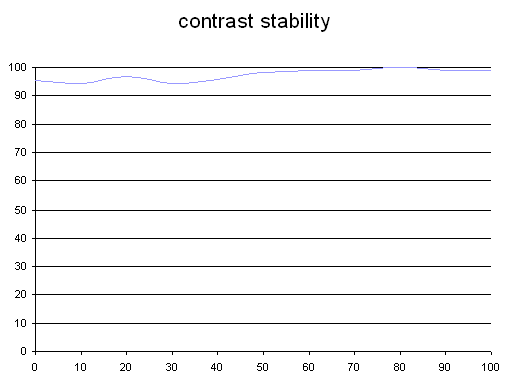
This curve indicates the contrast value measured at a given brightness adjustment on the on-screen display (OSD). In theory, brightness and contrast are two independent parameters, and good contrast is a requirement regardless of the brightness adjustment. Unfortunately such is not the case in practice.
The brightness adjustment is shown on the X-axis, contrast on the Y-axis. Contrast is expressed here as a percentage of the maximum value measured using the ANSI test protocol.
As we're accustomed to seeing with ViewSonic products, the VX924 performed extremely well.