Virtual Disks And So On
The storage strategy is very important.
The virtual machines are insulated from the host operating system, so if you will be careful your Windows or Linux will not be damaged or corrupted.
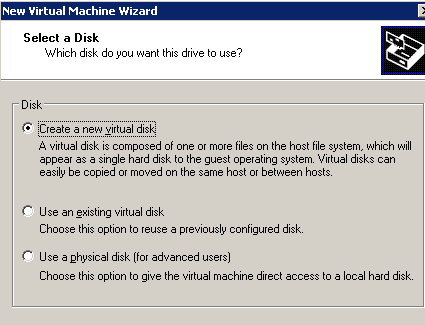
For advanced users: Read this warning carefully.

It is a matter of choosing between using a physical disk, a partition or a virtual one. The first option brings higher performance and a more transparent use of the file system, but you should avoid it if you are not a systems expert.
The virtual disk is the easiest approach: you choose how much disk space you want to reserve. Afterwards you decide if you want to use a fixed or dynamic file size. If you check "Allocate all disk space now," VMware Workstation will create a fixed size file (i.e. 10 GB), this will result in better performances and less fragmentation. With the default option (dynamic sizing), the virtual disk starts small and then grows up as data is added, never exceeding the maximum size specified.
This system is very practical and lets you transfer virtual machines between different PCs simply by copying one directory. You can also rest assured that you will not damage your PC.
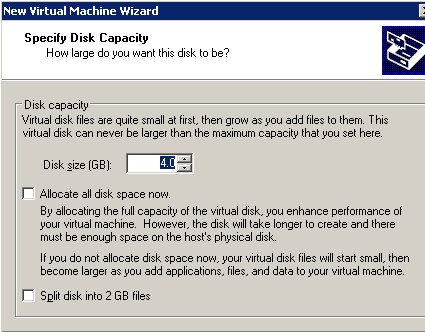
We choose how much disk space to reserve to the virtual machine and whether to use dynamic or fixed virtual disk.
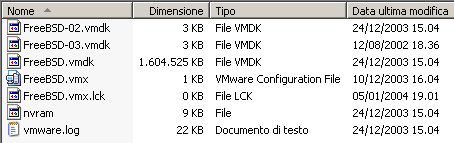
The file list of the virtual machine directory.