Bambu Lab is back at it with an awesome deal on one of its best 3D printers, and you won't have to wait for it to be delivered. This Bambu Lab P1S printer is back in stock, ready for delivery within days, and with a price that'll save you $300 on its MSRP. The $399 sale price for this Bambu Lab P1S 3D printer is a brilliant one for the specs you're seeing, and one that makes it a must-have buy if you're thinking about a new printer purchase. Our Bambu Lab P1S review will show you the value you're getting here, gaining a near-perfect star score for its troubles.
One big advantage of the Bambu Lab P1S over some of its other budget-friendly rivals is how easy it is to set up. As our review will explain, the P1S arrives semi-assembled, ready to get up and running within 15 minutes. It also comes equipped with features like automatic bed leveling and easy-to-apply presets in the slicer software that make it a much more approachable option for 3D printer novices.
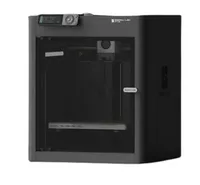
The P1S features a fully enclosed environment for printing, so it's a good option if you're thinking about advanced, high-temperature prints. It has a max build volume of 256 x 256 x 256 mm, which is a large bed size, especially on a budget-conscious printer, although larger print areas can be found elsewhere. It uses a textured PEI spring steel sheet bed, which, in our experience, should help you to remove your models once the print process finishes.
Bambu Lab uses a proprietary 0.4mm nozzle for this printer, attached to a direct drive extruder. Extruders like this are great for pressure control while you print, which should help improve the accuracy of your prints and avoid wasting any filament. That includes during fast printing, too, with the P1S able to achieve a 20,000 mm/s² acceleration limit.
You'll see plenty of wireless connectivity with the Bambu Lab P1S if you don't want to be chained to your desk, with both Wi-Fi and Bluetooth options available. You can also load your models directly onto the printer using the supplied microSD card slot, with the P1S's built-in screen and controls letting you navigate through your desired print options and settings. It also has a time-lapse camera built in so you can watch (and rewatch) the print process later.
Our best 3D printer guide might list the Bambu Lab's successor, the P2S, as our overall favorite, but there's still plenty for novices and pros alike to love about the OG model here. The $399 sale price for this Bambu Lab P1S printer makes it a serious option to consider on a budget, but with stock levels only just recently replenished, there's no guarantee that either the stock or the price will be around for very long, so jump on this deal quickly if you want it.
If you're looking for more savings, check out our Best PC Hardware deals for a range of products, or dive deeper into our specialized SSD and Storage Deals, Hard Drive Deals, Gaming Monitor Deals, Graphics Card Deals, Gaming Chair, Best Wi-Fi Routers, Best Motherboard, or CPU Deals pages.