









Tom's Hardware Verdict
HyperX’s $110 Alloy Origins is a well-designed, colorful and compact mechanical keyboard that’s good for those who want a quality product but also want to skip the fuss and just get down to gaming.
Pros
- +
Attractive, compact design
- +
Excellent RGB lighting
- +
Three-level rear height adjustment
Cons
- -
No dedicated media controls or macro keys
- -
Shorter 1.8mm switch actuation (versus 2mm) feels like a gimmick
- -
NGenuity software could be more intuitive
- -
No USB pass-through ports
- -
A little expensive
Why you can trust Tom's Hardware Our expert reviewers spend hours testing and comparing products and services so you can choose the best for you. Find out more about how we test.

Update 10/5/2020: After its initial launch with HyperX Red switches and follow-up update with HyperX Aqua tactile switches, HyperX today announced a version of this keyboard debuting its HyperX Blue clicky switches. We’ve updated the switch section below with our experience and thoughts about the keyboard with this switch, which is most similar to Cherry MX Blues. The Blue version of the Allow Origins is now available via HyperX's website.
What do you want from your best gaming keyboard, a truckload of features that you’ll want to futz around with for hours, or a sleek, solid, compact and colorful package that feels great while letting you get down to gaming? If the latter sounds like you, HyperX’s $110 Alloy Origins is well worth considering. Its metal shell is compact, sleek and solid. HyperX’s in-house linear switches feel familiar, in a good way. And the RGB backlighting looks about as vivid as any I’ve seen on a mechanical clacker.
HyperX Alloy Origins Specs
| Switches | HyperX Blue (clicky), HyperX Red (linear) or HyperX Aqua (tactile) |
| Lighting | RGB LED |
| Onboard Storage | Yes |
| Media Keys | With FN |
| Game Mode | Yes |
| Interface | 1x USB Type-C port |
| Cable | 5.9 feet (1.8m), braided, detachable |
| Additional Ports | None |
| Key Caps | ABS plastic |
| Construction | Aluminum top and bottom plate |
| Software | NGenuity lighting and macro software |
| Dimensions (WxDxH) | 17.4 x 5.2 x 1.4 inches (442.5 x 132.5 x 36.4mm) |
| Weight | 2.4 pounds (1,075g) |
| Warranty | 2-year limited |
| Price | $109.99 |
Design
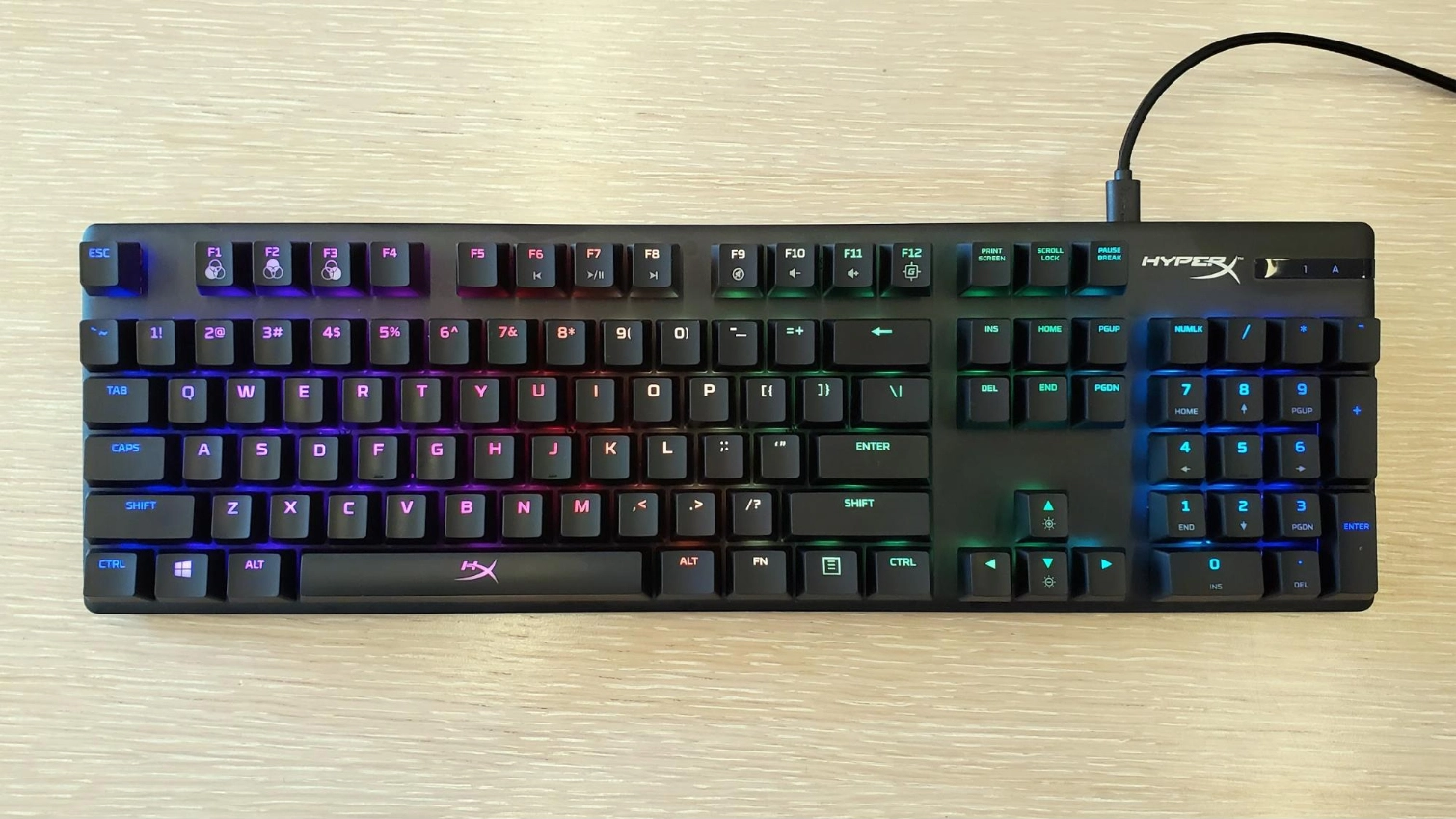
Measuring 1.4 x 17.4 x 5.2 inches (36.4 x 442.5 x 132.5mm) and weighing 2.4 pounds (1,075g), the Alloy Origins is pretty compact for a full-size mechanical keyboard. And a removable braided USB-C cable (that’s nearly 6 feet long) helps make the keyboard more travel-friendly. The slim, aluminum shell looks attractive and feels solid, while giving the exposed switches and keys a nice surface to reflect off of, resulting in bright, attractive lighting effects.


View Original

View Original

View Original

View Original

In short, this is one of the nicest-looking mechanical keyboards I’ve used in recent memory. It’s certainly prettier (and feels more premium) than the pricier, switch-swapping Logitech G Pro X. The only features I miss when using the Alloy Origins are dedicated media controls and (ideally) some sort of volume wheel. But there isn’t enough physical space on the keyboard’s frame for more than one or two extra buttons anyway, and HyperX at least integrated media controls (as well as basic lighting controls and a Game Mode switch) into the Function row. A strip above the numpad on the right looks like a tiny monochrome screen (similar to the SteelSeries Apex Pro), but it’s only used as an indicator for Num Lock, Caps Lock and Game Mode.

There’s a couple things worth pointing out on the underside of the keyboard as well. First, the bottom shell is one curved-edge, cool-feeling piece of aluminum, just like the top, which helps lend the keyboard a very premium and solid feel. Second, the feet at the back of the Alloy Origins can be flipped up to two different heights, letting you adjust the angle to three different positions (the third with the feet flipped down) to whatever feels right for you -- I liked typing and gaming with the feet at their maximum height.

Typing and Gaming Experience
This keyboard comes with your choice of HyperX-branded Red linear switches, Aqua tactiles or Blue Clicky ones.
The HyperX Red switches to my fingers feel about the same as the Cherry MX Reds in the Corsair keyboard I use for gaming at home. According to HyperX, the HyperX Red switches have the same 45g actuation force as Cherry MX Reds. But HyperX has cut both the actuation distance (1.8mm) and total travel distance (3.8mm) down by 0.2mm. Cherry MX Reds have rated distances of 2mm and 4mm, respectively.
Get Tom's Hardware's best news and in-depth reviews, straight to your inbox.

Honestly, in both typing and gaming, I didn’t really notice the 0.2mm difference. And you probably won’t either, unless maybe you’re legitimately an elite-class gamer. Even then, if it’s shorter activation that gives you an edge, Cherry’s MX Silver switches have a significantly shorter 1.2mm activation point. So if you’re convinced a shorter key throw will help you excel in competitive gaming, there are better keyboard models out there.
Because I’m pretty familiar with linear switches, and HyperX hasn’t done anything crazy with the layout, the Alloy Origins felt immediately comfortable to me -- at least until I reached out with one hand for media controls that aren’t there. Red switches aren’t the best for typing, but they didn’t bother me too much while banging out this review. If anything, I noticed fewer repeated keystrokes while typing with this keyboard than I normally make when typing with the Cherry MX Red switches on my Corsair keyboard.

Since the initial launch HyperX has also started offering tactile (HyperX Aqua) switches with the Alloy Origins. The company sent us Aqua model, which is most similar to Cherry’s MX Brown switches, after we put up our initial review.

Like the Red switches, the Aquas also have a slightly shorter 1.8mm actuation than Cherry’s competing Browns. And there’s an actuation bump you can feel when pressing the key down, right before it bottoms out.
I put the Aqua switches through the craziness of a few Borderlands 3 battles, and I do prefer them to the Red switches, if only slightly. But comparing them to MX Brown switches I have on a Das Keyboard 4 Professional, I couldn’t physically feel the 0.2mm shorter travel and actuation of the Aqua switches over the Browns. The main difference I noted is that the sound of the keys bottoming out is a bit hollower on the HyperX keyboard, and feels a bit softer, compared to the keys on the Das Keyboard, which have a sharper sound and feel when the keys hit the end of their travel distance.

Finally filling out the Alloy Origins’ mechanical switch offering, this keyboard is now available with HyperX Blue switches. This is the first time we’re seeing these switches, which have 3.8mm total travel and actuate at 1.8mm with 50G of force and are supposed to last for up to 80 million presses. They’re similar to Cherry MX Blues, which have 4mm total travel, actuating at 2.2mm with 60G of force.
In a side-by-side comparison to the Cherry Blues, HyperX’s take on a sky-colored switch had less of a plastic-like ring to its clicks and a subtly more hollow sound overall. The HyperX’s switches’ shorter travel, again, wasn’t obviously noticeable compared to Cherry’s offering. But the Cherry Blue tactile bump does feel more substantial, contributing to why HyperX’s switches require less force to register an input, with more of a pop feeling on the way back up.
In the Alloy Origin’s case, the HyperX Blue switches made for a snappy space bar that bounces back into place quickly with a satisfying hollow ‘thock’ noise accompanying the click, for a sound reminiscent of an old cash register.
When gaming with HyperX Blue switches, I enjoyed a satisfying sound that didn’t quite overpower the game’s audio -- although teammates who could hear me may beg to differ. The switches were light and easy to press for tactile switches, and the keys snapped back quickly. That helped in gaming, but the HyperX Blues still aren’t ideal when you have to press a key quickly or repeatedly. But when it came to typing, the clicks were a delight and the lighter bump and force needed to actuate the switches made it so my speed wasn’t hindered. Combined with the smooth keycaps, the Blue switches were great for heavy typing sessions.
Switch preference is a personal thing but I don’t think, for most people, the shorter actuation will make a noticeable difference in feel or gaming performance. Personally, I’d go for the Aqua switches over the Reds for pure gaming, but I still by far prefer clicky Blue switches for typing and other kinds of productivity work.
While I didn’t notice anything funky about the layout of the keys, HyperX has done something that’s visually odd and potentially distracting with the Alloy Origin’s keycaps. Note in the image above that the primary and secondary functions of each key are placed beside one another, rather than above and below, as is typical. Of course, this won’t bother some people at all, but something about glancing down and seeing a glowing semicolon and colon right next to each other kept distracting me.

I also put the Alloy Origins through its paces while playing a few hours of Borderlands 3 and found it a worthy weapon in the battle against the Calypso Twins. The HyperX Red switches felt familiar and responsive (though no more so than the Cherry MX Red switches I’m more used to). With my office lights switched off, the RGB lighting was arguably too bright at the default maximum setting, though it certainly looked vibrant.
Thankfully, dialing down the lumens is as easy as mashing the Function and down arrow keys. And if you want to watch a movie or just give your eyes a rest from the constant RGB rainbow, a combo of FN and F3 engages a reactive lighting preset where nothing lights up until you press a key, and then the lights fade out a second or so later.
Software
As noted above, basic lighting controls can be handled by key combinations. But if you want to truly customize the lighting of individual keys, add effects, create macros and save profiles (up to three) on the keyboard’s internal memory, you’ll need to install HyperX’s questionably named NGenuity software.


View Original

View Original

View Original

View Original

Despite its name, NGenuity works fairly well and is reasonably attractive, letting you choose between 10 different lighting effects, tweak the speed and direction and decide whether the whole keyboard or individual keys get lit. Any reassigning of keys or recording and assigning of macros also happens here.
Overall, I like the way the software looks, hate the name and just wish parts of it were more intuitive. For instance, there are 30 or so presets, most based on games, under a Library tab. But every time I clicked on one, the lights would flash for a second, then go immediately back to the previously selected lighting effect--I couldn’t get any of them to stick easily.
Bottom Line
While its custom switches aren’t worth getting excited about and there’s little else in the way of ground-breaking features here, HyperX’s Alloy Origins keyboard still manages to flirt with excellence. Both the keys and the frame look and feel premium. The RGB lighting is about as vivid and bright as it gets, and the overall design is compact and comfortable to use.
At $109.99, the price seems a little high given that the software isn’t quite great and there are no dedicated media controls or other flashy features. But for those looking for a premium gaming clacker that works well without much fuss (while letting you adjust the back end to three different heights for maximum comfort), the Alloy Origins is easy to recommend--especially if you can find it at or below $100.
If you're willing to sacrifice the number pad for a lower price point, HyperX also now sells a tenkeyless version, the HyperX Alloy Origins Core for $90. It looks to sport the same design and a similar feature set as the original Origins, just with a smaller footprint thanks to its lack of a numberpad.
Image Credits: Tom's Hardware
MORE: Best Gaming Keyboards
MORE: All Keyboard Content

After a rough start with the Mattel Aquarius as a child, Matt built his first PC in the late 1990s and ventured into mild PC modding in the early 2000s. He’s spent the last 15 years covering emerging technology for Smithsonian, Popular Science, and Consumer Reports, while testing components and PCs for Computer Shopper, PCMag and Digital Trends.
-
Soul_keeper Thanks for the review.Reply
My take after reading this:
No media keys or silly knobs = good thing.
I'd rather see a brightness/color knob on the board to control that rgb stuff, and not require the use of any software ever (so linux/osx or even just simple office folk can use the board).
I had to modify my Corsair keyboard to remove the media keys, bondo and repaint because no boards with quality keys existed without that clutter.
Also several of the led backlights burnt out, so I had to desolder the led controller chip from the board's pcb (really would have liked to have backlighting).
My corsair mouse has similar problems, the leds couldn't be turned off without using windows software, so I had to take it apart and desolder the leds from the pcb and put it back together. I've only ever needed 2 buttons and a roller on my mice and prefer laser over optical.
I won't even get into razer product quality, i've broken 3 of their mice and one of their keyboards. They last about a week before parts snap off.
The joys of NOT being a windows gamer using proprietary nonsense software for each device you buy.
It's difficult to find a mouse with a quality sensor and no extra keys or led nonsense (impossible). And it's difficult to find a keyboard with quality mechanical switches and no extra nonsense. Backlighting might be nice, but really, RGB purple blinking stuff that can't be turned off ... no thanks. How about white, red, blue, green with a selector switch and a brightness knob.
K.I.S.S. -
PsyaNyde If you like this KB, you should really take a look at the cheaper ET ROBOT RGB mechanical keyboard, mine came with clicky blue switches, but they are 'hot swappable' so you can fit pretty much whatever switches you like, I intend to replace them with some ice dark purples, in my humble opinion it's a much better value buy and looks better, because it also has customizable lighting all around its edge.Reply