A Half-Cast?
We put the PM17T-S through the calibration tests.
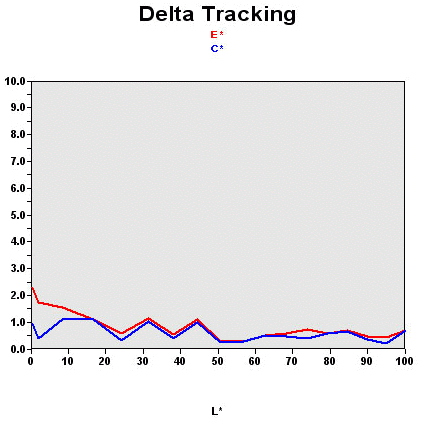
Remember, this graph shows the difference between the desired colors and those actually displayed.
- If DeltaE >3, then the color displayed is noticeably different from that required, this difference will be noticeable to the user.
- If DeltaE <2, LaCie considers the calibration to be successful, a slight difference but one which would be virtually invisible to the owner.
In this case, the PM17T-S comes through the test pretty well. Once calibrated, 98% of colors are rendered true and 82% are perfect. As usual, the darker shades suffer the most.

| Header Cell - Column 0 | Black Spot | White Spot | Contrast |
|---|---|---|---|
| PM17T-S | 0.73 | 274 | 368:1 |
These values were obtained at optimum calibration, in other words with brightness, contrast and color adjustments providing the best calibration curve. Moving away from these optimum calibration settings, contrast and/or brightness, the calibration curve then deteriorates.
The advantage of the PM17T-S is that you can also use it as a sun lamp! With such high brightness, it's not surprising to have a mediocre black level. We would have preferred 0.4 cd/m2 or even 0.2 cd/m2. Well, we'll have to live without it. The black level isn't deep enough but with such brightness perhaps you won't notice, unless of course you're watching a dark movie, in which case the absence of a deep black will be obvious. Clearly, luminosity is too strong for office use.
Then we measured contrast stability while changing the brightness of the panel.
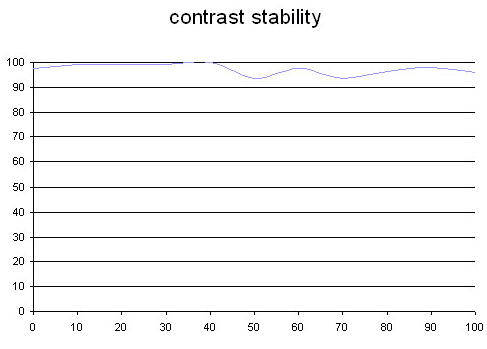
This curve shows the contrast value obtained for each brightness level set using the OSD. In theory, brightness and contrast are two independent parameters and a good contrast level should be achievable regardless of the brightness setting. Unfortunately, this isn't the case in practice: the x-axis represents the brightness setting while the y-axis represents the contrast. Here contrast is expressed as a maximum percentage value measured according to ANSI standards.
The PM17T-S performs well enough, you can (and you'll have to) reduce the brightness to around 40% to benefit from optimal contrast and avoid going blind at the same time! However, color rendering then takes a hit.