The Fourth Dimension
The HQL260WR is extremely fast, there's no doubt about it.
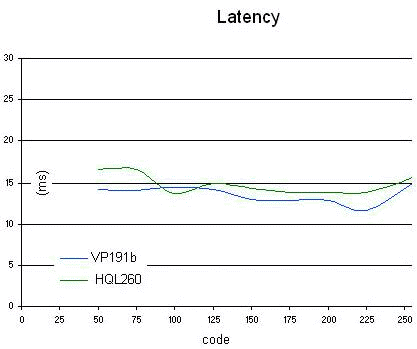
Our tests show that it's just as fast as the VP191b/s, our current reference monitor! And yet Hyundai's specifications claim only 23 ms. Why? We're currently discussing that with Hyundai, and they're usually very open about such topics, so we'll likely be getting back to you very soon with an answer.
Video Quality

Color fidelity was good, but video noise was a problem. The OSD does offer an effective anti-noise filter, but it greatly reduced the sharpness of the picture. The viewing angles, while the specs are a little optimistic, proved sufficient.
Interpolation
Interpolation worked very well on this monitor, both with 4:3 broadcasts and with console video games. Movie viewing was good as far as interpolation went, but the noise levels were high.
PC Mode
This was a big disappointment. The VGA input will handle XGA resolution (1024x768) only. It's really a shame not to have access to the native resolution, since with XGA only, a small form factor PC makes no sense.
Sound Quality
Sound quality was mediocre - the sound was muffled and lacked bass. It'll do for watching the news, but that's about it.
Conclusion
The bottom line is that the Hyundai HQL260WR was unconvincing. Its design is more attractive than the Phocus', but Phocus provides better connectivity and possibilities for convergence. However, the HQL260WR is a good alternative to the Phocus for console-game players thanks to its high-quality interpolation.