









Why you can trust Tom's Hardware Our expert reviewers spend hours testing and comparing products and services so you can choose the best for you. Find out more about how we test.
Test equipment, method, and results
CPU |
|
CPU Cooler |
|
System Fans |
Pre-installed (if needed, Cooler Master Masterfan M120) |
Motherboard |
Gigabyte Z890 Aorus Elite Wifi7 Plus |
GPU |
|
PSU |
Our thermal tests are presented to give you more information about the product’s performance, but aren’t intended as the sole basis for judging the chassis. The style, price, features, and noise levels of a case should also be considered, and we all have different preferences. What I might like in a case, you might not, and that’s OK. Our goal with these reviews is to give everyone, regardless of their preferences, enough information to decide whether a case is right for them.
To get heat into the system, we stress the CPU with Cinebench R26 (multi-threaded test) and the video card with Furmark 2 (1080p). CPU and GPU tests run concurrently for 30 minutes, allowing the air-cooled system to reach saturation and stabilize over that period. We then let the system idle for 15 minutes, adjust the fans to 100%, and test again.
Noise-normalized (42dBA) Maximum thermal Performance
This set of tests is designed to appeal to those who love quiet PCs, with both system fans and the CPU fan noise normalized to 42 dBA. Consider this a measure of the case’s thermal efficiency when noise levels are set to run quietly. It is audible, but just (at least for my old ears).


View Original
View Original
The HAF II 500 and its gigantic wind movers did a good job keeping our Intel Core Ultra 9 270K Plus running below its throttling point with ease, like the others. Temperatures peaked at 90 degrees Celsius, the best result (matched by the Montech TG3) among the five datasets we have on our new Intel-based test system. The HAF churned out the lowest video card temperature by far (5 degrees) in the group, which averaged 69 degrees Celsius, making this chassis great for high-power graphics cards for gaming, AI, rendering, or other GPU-heavy, compute-intensive workloads.
Maximum Noise Levels
We measure the noise levels with a sound meter from one meter away from the computer case, with the pre-installed fans running at their maximum RPM. If a case does not have enough included fans for airflow (intake and exhaust) as configured, we add a Cooler Master M120 ARGB, since we expect most users will add at least one more fan in situations like these.

With the three massive fans cranked and moving copious amounts of air, the new HAF peaked at 49 dBA, placing it in the middle of our current data sets. The Montech was the quietest at 48 dBA, a mere 1 dBA difference. Subjectively, the three Mighty40 fans' tone wasn’t unpleasant when fully cranked, and there was way more wind noise, with little audible mechanical noise. At the lower noise-normalized speed, it also didn’t emit harsh tones.
Get Tom's Hardware's best news and in-depth reviews, straight to your inbox.
Maximum thermal performance - fans at full speed
Our noise-normalized results are designed for folks who prefer silence, but what if you don’t mind additional noise and just care about maximum performance, or maybe you have to run things at high settings to keep high-powered devices cool? This testing is for you. Obviously, when you add fans or an AIO up top, things will change a bit, but this gives you a great idea of ‘out-of-the-box’ performance, noise be damned.


View Original
View Original
Maximum thermal performance – fans at full speed
Our noise-normalized results are designed for folks who prefer silence, but what if you don’t mind additional noise and just care about maximum performance, or maybe you have to run things at high settings to keep high-powered devices cool? This testing is for you. Obviously, when you add fans or an AIO up top, things will change a bit, but this gives you a great idea of ‘out-of-the-box’ performance, noise be damned.
View Original
View Original
As we cranked the fans up, temperatures dropped 6 degrees Celsius from the noise-normalized testing to an average of 84 degrees for the HAF II 500. Video card temperatures only dropped two degrees Celsius to 67 degrees, but the HAF was still leading the pack. Overall, the huge fans did a great job of keeping our internals cool, especially with the graphics card.
Conclusion
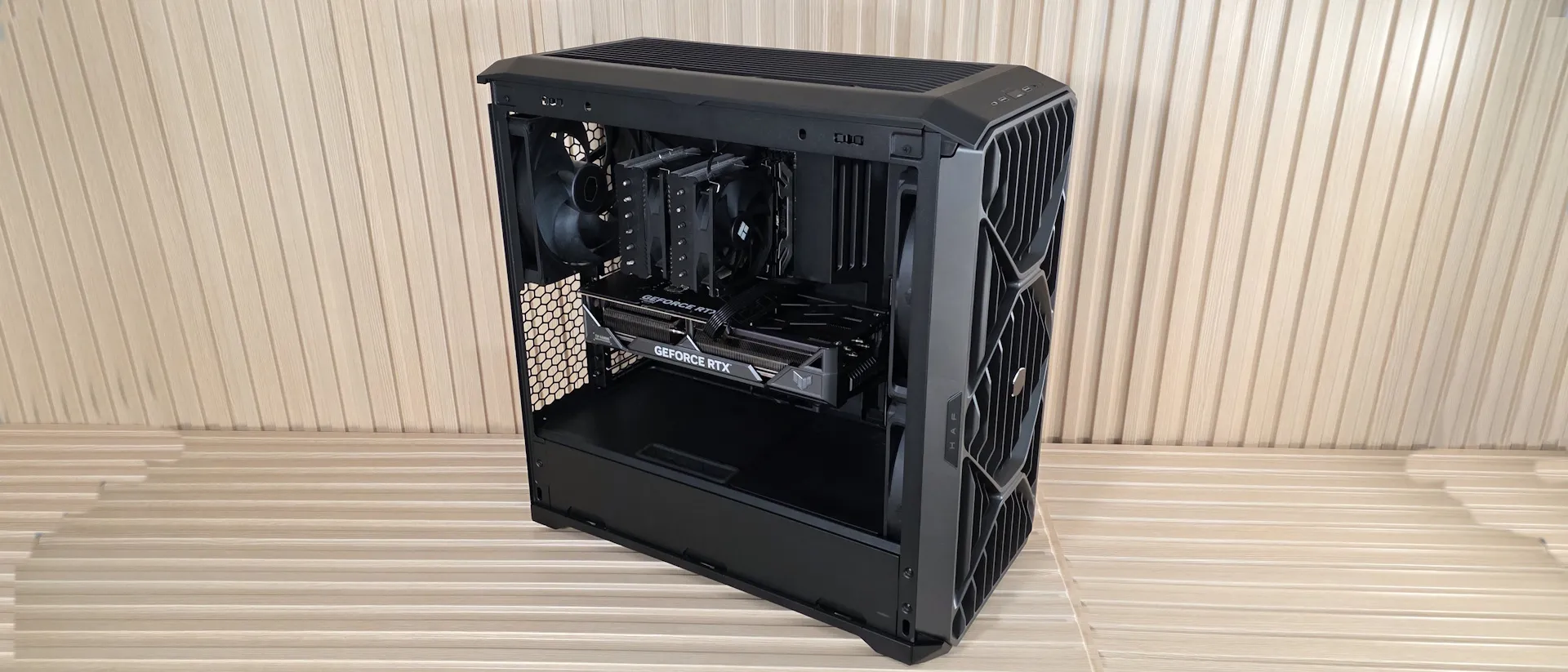
Cooler Master’s new HAF II 500 ($199.99) carries on the HAF legacy, focusing on what made the series popular in the first place: moving a lot of air. The three pre-installed Mighty40 fans delivered excellent thermal performance in our testing, leading the pack on GPU temperatures and tying for the best CPU result on our new platform. The mid-tower not only supports a wide variety of hardware configurations, including up to four dual-slot graphics cards or two colossal 3.5-slot cards, but also cools them better than any of the five cases we’ve tested in this new setup so far. That may change over time, but for now, it’s the king of the hill, especially for video card cooling.
At just under $200, the HAF II 500 isn’t inexpensive, but it's built for enthusiasts who prioritize cooling performance without sacrificing acoustics. With massive fans, excellent airflow, a noise-optimized profile, flexible interior configurations, and a clean, built-for-purpose appearance, Cooler Master has delivered a worthy successor in the HAF lineup. It also made our Best PC Cases list as the best premium airflow chassis. So if you have the budget for a gaming, AI, rendering, or other high-power configuration, the HAF II 500 is a well-rounded sub-$200 chassis that keeps everything inside running optimally, and it does so without being loud.
- 1
- 2
Current page: Thermal and Acoustic Benchmarks, Conclusion
Prev Page HAF II 500 Features and Specifications
Joe Shields is a staff writer at Tom’s Hardware. He reviews motherboards and PC components.
-
helper800 My first real build was with a HAF XM case, and I love it. My friend still uses that case today. This new HAF case is making me rethink my next build. Something about two 220mm front fans and a ludicrous 180mm rear fan all 40mm thick makes me happy, but I digress...Reply -
logainofhades I still have my HAF 932 advanced sitting on the floor, being used as a stand for the CM NRP 200, from my previous build. I had full intentions of keeping the case, to use as a test bench.Reply -
thestryker I'm really glad to see that the real world performance matches how it looked on paper. While it is fairly wide I don't really think that's a huge problem in this current era of dual chamber for all. When I was looking for cases towards the end of 2024 that had the ability to side mount a radiator there were only 3 which were ~10" or less wide. At least this case has a really good reason for being as wide as it is.Reply
This case has enough airflow that I think I'd feel okay ditching the side mounted radiator strategy I've used the last couple of builds. -
Sluggotg I have an original HAF X and a HAF X Nvidia edition. The original was a Sandy Lake build that was still in service till 2 years ago. (I need to install Win 10 on it. It was running Win 7 all those years). Love those cases! I will certainly looking into this new HAF case.Reply -
myeyes I’m still using my 2011 HAF 932 for my 2024 build. My dad thought it was a mini fridge when it showed up on the doorstep. Although my specs and my needs don’t warrant the massive size, I do enjoy how roomy and sturdy it is. I believe its MSRP was around $150 at the time. Very cool to see it sporting 220mm fans now. $200 is a drop in the bucket if you’re building a new computer these days…hopefully you’ll also get 15 years out of it.Reply -
AndrewJacksonZA Replythe cube-shaped, dual-chamber HAF-XB (which I owned)
I still use and love my HAF XB!! <3 <3 <3 :-) -
SkyBill40 I was waiting on this but decided I couldn't any longer and went with a HAVN BF360 Flow. Not even remotely disappointed and these two are pretty close in terms of performance. Good to see CM releasing a serious airflow case and a proper one for the namesake of the line.Reply -
thestryker Just swapped my system into one of these today and while there certainly could be more room at the back I wouldn't really want the case wider to get there. I removed the fan hub and used one of Arctic's new fan controllers in its place. The rear fan isn't as loud as the front so I've got it running a little higher PWM level than the front.Reply
I was debating on what fan configuration I wanted on the AIO radiator and ended up going with push/intake on it after seeing jayztwocents smoke tests. Normally I'd never consider this configuration as I prefer keeping CPU/GPU apart but the airflow is so high that it seemed like a viable choice and so far it's quite good.
edit: I forgot the 2.5" bays do not support 15mm drives which is unfortunate and not noted anywhere.