HP Deskjet 932c
One of the best-selling printers between late 2000 and this summer was the Deskjet 930c. This all-purpose printer was replaced last August not by one, but two models: the Deskjet 932c ($130) and the Deskjet 940c ($149). The only difference between them is that the second has a bit faster motor. They use the same cartridges and, as usual with HP, integrated print-heads. Unlike Canon and Epson which have fixed heads on the printer, the integrated heads are supposed to ensure consistent quality for the entirety device's lifetime, as well as much less clogging. If you have the same ink, the same heads and the same resolution (2400 dpi), you have the same quality. And this is true. You could not tell the 932c and 940c prints apart, and the same applies to the 930c, 960c and 990cxi. They are all very good.
- The quality of text pages ranks just behind the new Canons, whose black smoothing and depth in default mode is slightly better. It ranks higher than Epson and Lexmark, whose prints lack precision in comparison.
- Compound pages prove to have the best quality, with vibrant and true colors that far surpass the other makes.
- Photos are a step below the Epson Stylus Photo 820, but above the C60, C70 and C80, as well as the Canon and Lexmark printers. This favorable impression, albeit subjective, was confirmed in the ink tests. Though, like the others, HP adds cyan to magenta and magenta to yellow, it does not overdo it. The result is that the dots, even in the lightest areas of images, cannot be detected with the naked eye without a magnifying glass. This makes the colors truer than with the general-purpose printers of the other three makes.

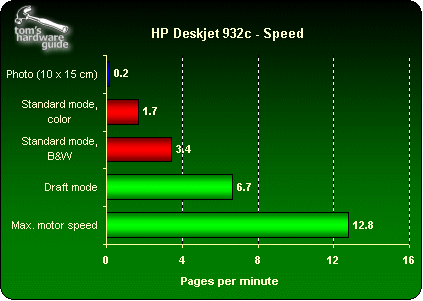
Mechanically speaking, the Deskjet 932c does not move like lightning. Only the Stylus Photo 820, after all a device dedicated to photography, turns out slower. So nothing to get excited about.
It works slowly but surely. Note that only the Deskjets produced monochrome prints worthy of the name, with true shades of gray. Rival models always tend towards a hue, usually green.

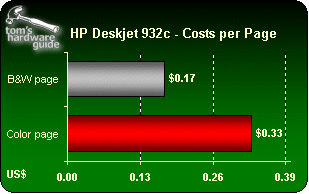
But quality has a price. Deskjet cartridges are some of the costliest. The shop price is about $75 for a full set (black + color) and about $110 for a "double-content" set. However, the higher cost is due to more ink, so it works out cheaper in the long run. The cost per page is lower by 10%.
The costs we give you here are the ones we found for single-content cartridges:
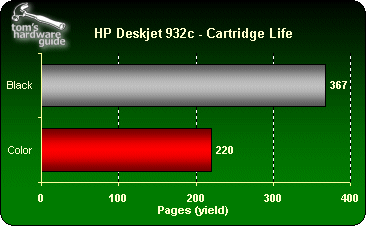
These figures give us a ratio of 3000 pages at $810. This is twice that of an S500. It is also higher than the Lexmark and Epson printers. With double-content cartridges, the cost at 3000 pages drops to $737 and is comparable to Lexmark and Epson, but is still much higher than Canon.
To sum up, the Deskjet 932c prints very well but slowly and its inks are very expensive. Our advice is to use it sparingly.
Note that when connected to a PC running Windows XP, the device is automatically recognized and installed. The user has access to a generic driver which is fully usable and compatible. It is however less practical than the original if you want to refine your print options. So it would still be better to install the driver supplied with the device or download the latest version.