Lexmark Z43, Continued
Now as to color, while the prints in top quality mode are nearly perfect, default mode (which uses the ink more sparingly) shows print defects. This is especially noticeable with graphics on a shaded background, such as the ones we use on our site. Cleaning the cartridges and aligning the heads makes no difference, the color blocks in default mode are not smooth enough.
In photo mode, tests with the standard cartridge are really disappointing. To compensate for the lack of brightness in the inks, the printer adds magenta to yellow and cyan, cyan to magenta and both cyan and magenta to its grays. The dots are quite wide apart, and therefore fairly visible. In addition, the cyan ink is below standard and the palette of dark hues is limited, so you can see that if you want decent prints, you really have to use the "Photo" cartridge.
When you do use the Photo cartridge (in place of the black), you will find a much wider range of hues. This is true for both light and dark shades. Still in this vein, the printer injects much less magenta and cyan to brighten the images. This enhancement relies on the lighter inks in the photo cartridge. The extra droplets are still there but not so obvious and the photos really gain by it. The dots are still visible though. Be that as it may, our color chart results again prove that the magenta and cyan inks lack shading in dark colors, and this means there is a loss of detail.

Still on the subject of photo mode, note that black and white prints give good results. For once, the gray is really gray and gives a true impression of black and white photos.
Like HP, Lexmark has integrated the print-heads into its cartridges. Advantage: the printer suffers less from head clogging and print quality is constant throughout the lifetime of the device. The disadvantage is that the cost of cartridges, and therefore the page, hits the roof.
Incidentally, the costs given here are those of an office context. We decided to estimate them based on standard color and black and white cartridges.
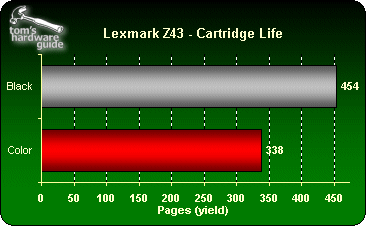
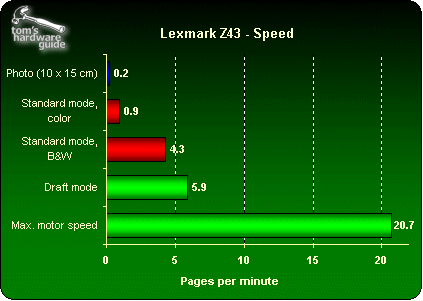
We found that the costs were well over those of Canon. But they are less than the new Epsons (even though these use headless cartridges) and HP Deskjets. The cost at 3000 pages is $689.