Better Safe Than Sorry: Backup With CD/DVD
Finally, we should point out that the software also supports backup with CD/DVD. We highly recommend using CD/DVD for backup in addition to the use of the hidden partition, because a mechanical hard drive defect would result in the loss of the entire disk including the Recover Pro partition. The only thing that will work in that case is recovery from CD/DVD.
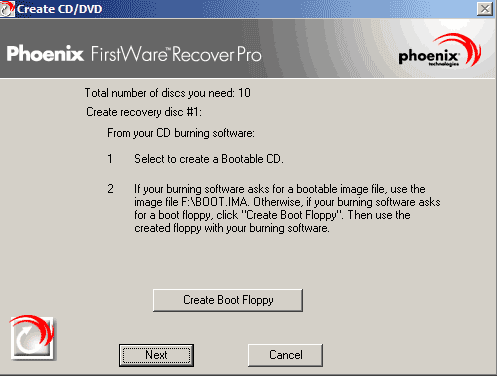
Practical: Recover Pro provides the required bootable image file
To back up a system to CD or DVD, select Create Recovery CD/DVD in the Core Management Environment and follow the Wizard instructions. For this to work, however, you must have a burn program that supports the creation of bootable CDs/DVDs. Interestingly, the cME creates the required boot disk image on a virtual storage medium when you activate the Create Recovery CD/DVD setting.

Product Manager David Huang told us that it's not yet possible to create backups to external USB or FireWire drives with Recover Pro 2004. The manufacturer gave us two reasons why it cannot offer this feature to customers right now. The first is that not all systems support booting from USB, let alone FireWire; the second has to do with current incompatibilities between the boot managers of individual systems and the external drives currently on the market. He added however that this feature was at the top of the to-do list for Recover Pro 2004's successor.