Best offers
|
Core i7 I7-920 Quad Core Processor... | $349.99 Dell Home More info |
|
Phenom II X4 965 Black Edition Quad... | $194.99 Newegg.com More info |
|
P7P55D Motherboard (Intel Socket H... | $149.99 Newegg.com More info |
|
Core i5 750 Qaud Core Processor... | $199.99 Newegg.com More info |
|
M4A785TD-V EVO AMD 785G/SB710 Socket... | $99.99 Newegg.com More info |
- how to fix motherboards
- fixing a motherboard
- motherboard capacitors
- replacing capacitors on motherboard
- motherboard capacitor replacement
- fixing motherboards
- how to fix motherboard errors
- discuss the computer hardware failures
- installed terabyte hard drive problems
- what is the lifetime of a laptop
- motherboards news
- what do capacitors do in motherboards
- processor terabyte
- latest quad core processor
- motherboard capacitor
Partners
The Games selection
adventure :
Scoobydoo: Episode 2
The sequel of Scooby and Sammy's adventures. Same principle as in the previous episode (available on this website). Click on "Instructions" to see...
|
crazy :
Xiao Xiao 7
A great fight scene from the animation movies Xiao Xiao.
|
Sponsored links
How to Fix Your Motherboard for $15
- Email |
- Print |
- Comments (3) |
- Share
Table of contents
- 1 – When a Motherboard Fails
- 2 – Capacitors - Mysterious Creatures
- 3 – When Capacitors Spring Leaks
- 4 – How To Recognize Flawed Capacitors
- 5 – How To Buy Substitute Low-ESR Capacitors
- 6 – Let's Get Started!

Hardware failures can have mysterious faces - computer crashes, display anomalies or read/write errors when accessing a hard drive. Usually, what you do is install new drivers, then you look at adjusting settings within your operating system, you search BIOS for relevant options or go the whole nine yards and exchange components such as the main memory. But your computer just won't run smoothly.
Not only operating systems or device drivers cause system malfunctions. Not even the latest hardware such as quad core processors and terabyte hard drives can prevent hardware failures. Hardware manufacturers typically define a certain lifetime for every component of your computer or laptop. This tends to be five years for hard drives, but other components may have longer life expectancies. Building blocks such as processors, memory, motherboards or graphics card usually keep working for much longer - if always operated and cooled properly. But no crystal ball can tell you precisely how long an electronic product will last.
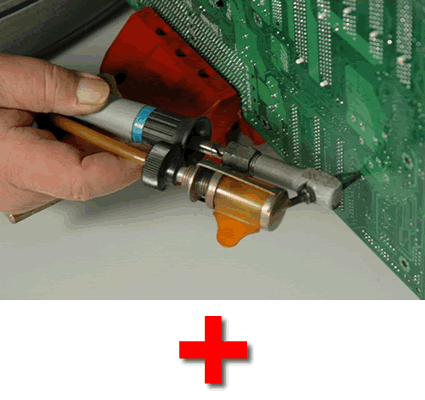
Electrolytic capacitors on numerous semiconductor-based products such as motherboards or graphics cards can often cause computer to behave strangely if they fail. What can you do if malfunctioning motherboard capacitors are the reason for trouble with your computer? If the mobo is under warrantee you can return it for a replacement. If you have to exchange a faulty motherboard for a new and different one, you may also need new memory as well as a new processor. There is a considerably less expensive solution. You can replace faulty electrolytic capacitors yourself. I will show you how to revive a motherboard or graphics card Compare Prices on Video Cards with the right tools and for very little money.

- Intel Bayfield (ATX 865G); reliable? Prescott too hot? [CPU & Components]
- BIOS upgrade [Motherboards & Memory]
- Asus P6T V2 & ZALMAN CNPS10X Extreme Cooler [CPU & Components]
- 8800GTS + C2D @ 3GHz, horrible performance, help! [Graphic & Displays]
- Laptop repair price -- is this fishy? [Laptops & Notebooks]
Questions? Ask Tom's community!
Sponsored links
Related forums topics
- CPU temps and overall computer temps
- THGC Needs You -Team 40051
- Socket LGA775 Repair?
- does anyone know how to dual boot from 2 different Drives
- Audio problem with GA-EP45-DS3P motherboard
- P5Q Pro first overclock problem (PCI speed)
- ASUS is Awesome!
- Water cooling motherboard
- Corrupted my motherboard bios. Any hope of fixing it?
- Is my system fast enough?
- 2-yr PC randomly crash after installing xp64?
- Installation Help GA-P35C-DS3R
- Asus P5K P35 Chipset boot problem!!!
- A8N32-SLI Deluxe and the ACPI Problem.


Recognizing of broken capacitors is not so simple in some cases.
Sometimes (very often in my case) have capacitor its nominal capacity but it has high serial current. When you connect DC voltage of capacitor nominal value and capacitor have some serial current throught it, then it is broken. Only charging current is allowed (short current peak on connect).
Sorry for my english.
Good article. I have personally made this repair sucessfully many times using only a basic hand held solding iron and hand held desolder pump.
Like you say the motherboard sinks away the heat fast. You need an iron with between 70 and 100 watts and a large flat tip. If it spans both solder points of the cap its really easy
Just heat and gently pull the cap out from the other side of the board. Then clear the holes with the heated pin method or use a desolder pump. If you heat the hole on one side and use the pump on the other side it should clear easily.
Only other thing to note is. Be QUICK, practice on some junk board first, you dont want to burn a big hole in your board or lift of the tracks.
Im sure most people don't have a professional solder/desolder station. These cost at least $160 usually more.
Another trick. Assuming the old caps are dead and of no further use. Pull them off thier leads.
If you pull a electrolytic capacitor hard the leads will pull straight out of the body of the cap.
Leaving just the leads sticking up. Its now much easier to remove becuase you can desolder the leads and remove them one at a time.