Best offers
|
My Passport Essential 500GB Portable... | $99.99 Newegg.com More info |
|
Caviar Black 1TB Hard Drive (Serial... | $99.99 Dell Small Business More info |
|
My Book Essential Edition External... | $148.00 ServerSupply.com More info |
|
X25-M Gen2 160GB 2.5" Solid State... | $509.95 PC Connection More info |
|
My Passport Essential Portable 320GB... | $134.00 ServerSupply.com More info |
Partners
The Games selection
crazy :
PC Breakdown
What is worst than a Fatal Error occuring during a game you did not save? Unleash your rage at your PC in this game. Blow it to pieces, it feels so...
|
kids :
Bob
Throw bubbles so as to make the ones that appear in the game disappear. For this, use the Right / Left arrow keys to duck or move about, and the...
|
Sponsored links
- Email |
- Print |
- Comment (1) |
- Share
Xdrive is an AOL service that offers 5 GB of free online storage space without any catches. All you need is an AOL screen name - which if you use AIM, you already have - and you can get 5 GB of online storage goodness, for free.
With Xdrive, AOL has a service that aims to be both a service for online storage sharing as well as a real backup solution. The online interface provides basic individual file upload, as well as a tool for multiple file uploads.
Where Xdrive goes beyond just basic online storage is in how it allows you to deal with your online content. If you've got audio files, you get an online media player that plays the files; for photos, you get a separate set of tools that enable you to group them by album and set up basic slideshows. Moving beyond that, Xdrive also has a feature called Xdrive Shows that lets you take your photos, mix them with music on a timeline, and create a full presentation.

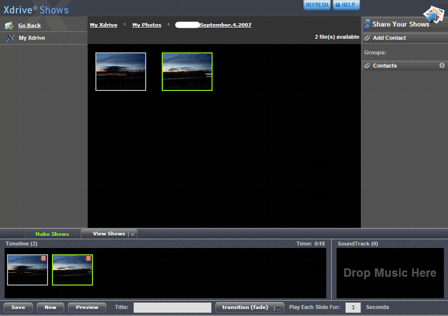
Sharing your online content is relatively straightforward too, though it does have one simple snag: your recipients need to sign up for Xdrive too.
The Xdrive desktop download application is all about backup. It creates a mapped drive to your local PC (the X: drive by default) so you can easily drag and drop files for upload.
There is also a backup routine that lets you choose files for a regularly scheduled backup, where an infinite number of file versions can be stored (until you reach your storage cap, that is).
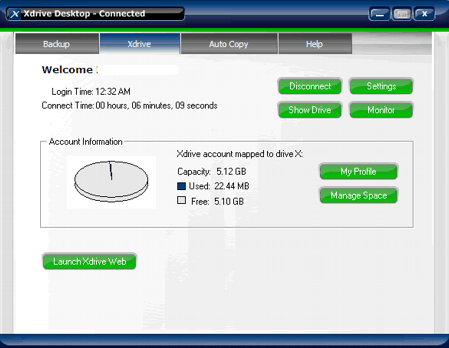
What is clearly lacking here is any kind of bandwidth control. Xdrive desktop does not identify what the backup speed is, either, so there is no easily accessible method to throttle speed. The desktop backup is also a scheduled backup as opposed to an ongoing or continuous backup, which could well leave you at risk if you don't schedule your backup frequency properly.
While the free service offers 5 GB of storage, the paid service only has an option for 50 GB of storage. While that might be okay for some, it's a hard upper limit that may not be enough for all.
- ATI or Intel? [Homebuilt Systems]
- HDD or Online storage. [Homebuilt Systems]
- Online Storage: Box.net [General Networking]
- Windows Live SkyDrive: 25 GB of free online storage [Digital Camera]
- site for online photo storage/sharing that allows others a.. [Digital Camera]
Questions? Ask Tom's community!
Sponsored links
Related forums topics
- Will this plat WoW?
- First Attempt Gaming Rig
- Intel i7 920 vs q9400 and q9550
- How to spend $100?
- E8500 & DDR2-800???
- Water Cooling - What do you think?
- Need Help! on new system build...
- New system!
- Computer out of storage, bios reset
- A 4.1 GHz Dual Core at $130 - Can it be True?
- Please help....
- Not another help me thread... i'm afraid so :(
- Gigabyte GA-8i945P-G upgrade overclock questions
- Yet another i7 Build $2200 Budget


Comparison/Feature chart error: This is intended for the article author editor.
First, part of it is blocked since it's very wide and the ads block some of the info.
I think you have an incorrect entry in the Carbonite Lite column of the Feature Chart (most people probably aren't seeing this info though). It shows "Zoho for Word, Excel files" in the editing row and an X in the Online Recovery option. I think you intended to have these entries under the Box.net column.
Other than that I do want to say the overall article and information is some of the best I've found yet on the topic. Great work! Thanks.