Join Tom’s Hardware today









For most of the past 20 years, black and red have been the iconic colors of Asus’ ROG brand. But to celebrate two decades of the Republic of Gamers, the company has settled on a black-and-gold motif, which we’ve already seen on its RAM and other components in a Computex teaser. This also extends to peripherals, as seen with the Asus ROG 20th anniversary Harpe II Extreme Edition mouse and the Asus ROG Azoth Extreme Edition 20 wireless gaming keyboard that we’re looking at here.
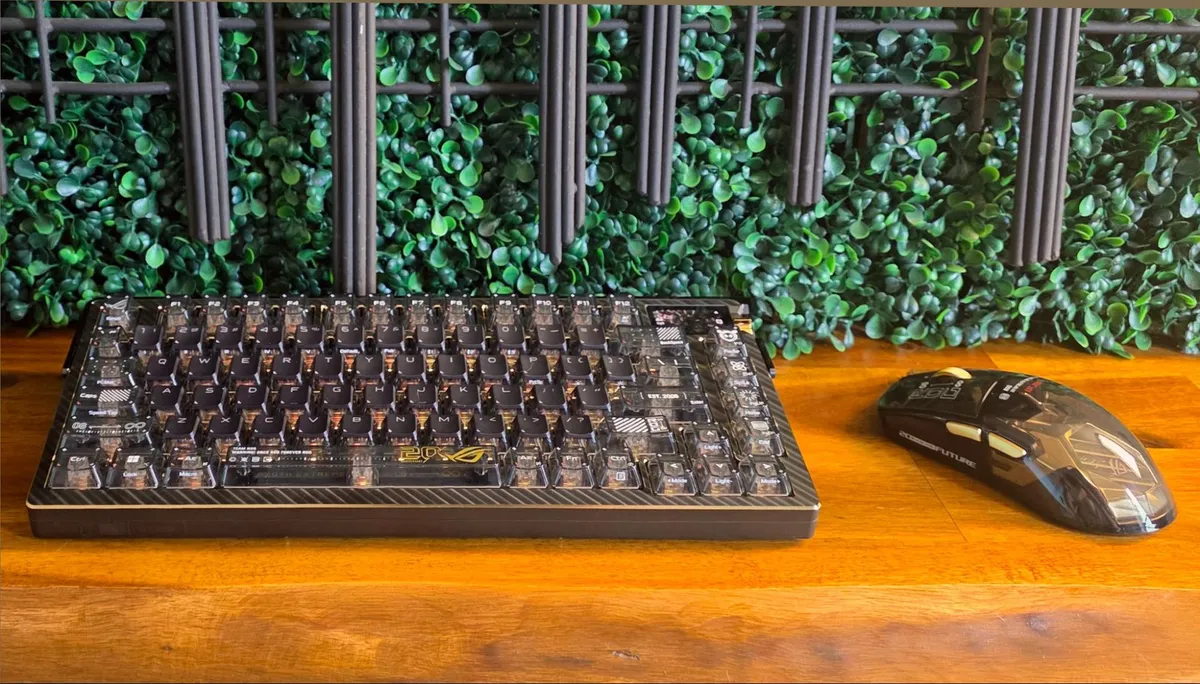
The 75% clacker is a reimagining of the carbon fiber-adorned ROG Azoth Extreme we looked at in 2024, with a mix of transparent and partially transparent keycaps (the primary keys have traditional black crowns with transparent sides, while the rest of the caps are a smoky, glossy plastic. It’s also $100 more expensive than the launch price of the previous Azoth. There’s also a gold metal jog wheel, as well as gold accents along the back, magnetic gold feet (in two sizes), and even gold screws holding the whole thing together. And, naturally, the RGB backlighting under the switches defaults to a gold color out of the box. If nothing else, this is a much bolder design than the original ROG Azoth Extreme.
Asus ROG Azoth Extreme Edition 20 Specs
Connection | RF 2.4 GHz / USB 2.0 / Bluetooth |
Key Switches | ROG NX Mechanical Switches (Snow / Storm) |
Keycap | PC / PBT PC double-shot |
Layout | 75% (81/82 key) |
Backlighting | Per-Key RGB |
Screen | 1.47” AMOLED with touch function |
Chassis | Aluminum alloy |
Wrist Rest | Silicone wrist rest with metal base |
Multi-Function Keys | 3-way control knob and side button |
Anti-Ghosting | N-Key Rollover |
Polling Rate | 1,000 Hz 8,000 Hz with ROG Polling Rate Booster |
Macro Keys | All keys programmable (except for Fn , Caps Lock, Windows, Left-ALT) |
Macro Recording | On-the-Fly Recording Support |
Cable | 2m Braided Fiber, USB-C to USB-A |
OS Support | Windows 11 / Windows 10 / MacOS |
Onboard Memory | 5 customizable profiles & 1 default profile |
Dimensions | Keyboard - 330 x 140 x 39 mm ; Wrist rest - 330 x 97 x 22 mm |
Weight | 1,500 g (without wrist rest) |
Design and features

At nearly 3.5 pounds with an all-metal chassis, the ROG Azoth Extreme Edition 20 feels a bit unnecessarily solid, and overkill definitely feels like part of the design at a fundamental level. The silicone-and-metal wrist rest adds an extra 1.3 pounds on its own, and doesn’t attach to the keyboard. But with silicon feet and so much heft, it’s not likely to move unless you want it to, just like the keyboard itself.


Asus says at least some of the accents are 24 karat gold-plated, as is the removable plate on the back. The chamfered edges on the top plate are also gold colored, as is the rocker knob to the right of the 1.47-inch color touchscreen.

The 2.4 GHz connection (Bluetooth and wired operation are also supported) supports 8K polling, but just like the previous Azoth Extreme, you’ll need to use the included Polling Rate Booster dongle to get the top refresh rate. The screen can play animations, show photos, and show system stats – there’s even a built-in keystrokes per second counter that Asus says is for music and rhythm games. Moving through the various modes is as easy as swiping horizontally on the screen.

The back is where you’ll find a nice chunky switch for the three connectivity modes (wired is in the middle, and the keyboard supports charging while tethered), with the USB-C port on the opposite corner. Presumably, the plastic section in the middle, apart from being a space to write out “Republic of Gamers” is there to allow wireless connectivity through the otherwise heavy metal chassis.

A lot is happening on the bottom of the ROG Azoth Extreme Edition 20, which is where you can attach one of two pairs of gold feet via magnets if you like a little lift in the back. There is also a name plate, which is gold-plated on one side, and a more ROG-traditional black, white, and red on the other.

The plate is also held on by magnets, and removing it reveals a slot for storing the slim 2.4 GHz SpeedNova dongle, as well as the two-way switch for adjusting the rigidity of the keyboard’s gasket mount. But just as I said when I saw the original Azoth Extreme at CES 2024, the difference in feel between the two modes makes less of a difference than moving between switch types. Both options feel pretty rigid. I suspect most owners will play with the gasket switch a few times, then leave it in one position for months or years.

Carbon fiber remains in the keyboard’s positioning plate, and the transparent linear ROG NX Snow switches are factory-lubed, resulting in a smooth feel and a pleasing clack while typing with no discernible ping. There is also a tactile NX Snow switch, but our model came with the linear option. This is one of the nicest-feeling and sounding gaming-specific keyboards I’ve used to date – given the price, that’s not particularly surprising.
Accessories


Aside from the keyboard, wireless dongle, and the backplate, Asus includes three extra switches (which is kinda skimpy, given the price), along with a metal switch puller and a plastic keycap remover. You also get a 2-meter braided cable, as well as the Polling Rate Booster, which you’ll need if you want a faster response time than the 1,000 Hz that’s supported by the keyboard itself. But since the switches here are mechanical rather than magnetic, 1,000 pings per second is probably enough for the majority of gamers.
Web-based adjustability
I’m not the biggest fan of Armory Crate (or any gaming peripheral software suite, to be honest), so I like that Asus makes heavy use of its Gear Link (https://gearlink.asus.com/) web app for keyboard control here. With the mouse plugged into your system, you can dig pretty deep into the settings via the site.

The settings here feel a little limited compared to theoptions with the 20th Anniversary Harpe II mouse. But you can assign keys and key combinations. Macro recording is supported on the fly by pressing the Fn and Left Alt key to start and stop macros, then pressing the key you want it assigned to.
There are also lots of options for adjusting the screen and the RGB lighting. I particularly like the Music Mode preset, which lets you display an animation and artist / track listing of whatever song you’re listening to. There’s also an option for displaying CPU and GPU stats, including frequency, temperature, fan speed, voltage, and use. There are enough options for the screen (and they’re easy to navigate, thanks to touch and the jog button) that I feel like the screen here is something I would use and fiddle with quite a bit if this were my main keyboard.
Gaming (and working) with the Asus ROG Azoth Extreme Edition 20

While I didn’t have as much time with the keyboard as I would have liked before jumping on a plane to Taipei for Computex, I did use it for work and gaming for about a week. While I generally prefer clicky switches for writing, lubed linear switches have either gotten good enough, or I have gotten used to them enough that I don’t mind using them for productivity tasks. And the linear NX Snow switches here, combined with the general overall quality of the rest of the keyboard, meant I was happy to work on this keyboard for hours – the somewhat muted and very solid sound (and feel) of the keyboard certainly helped.
And whether I was slicing through demons in Doom: The Dark Ages, racking up headshots in Borderlands 4, or checking out the new expansion pack in Dome Keeper, the Asus ROG Azoth Extreme Edition 20 kept my gaming fingers happy. I can’t say that the keyboard made me a better gamer, but it certainly didn’t make me worse, or require much in the way of adjustment. Some gamers may miss the extra programmable keys that would come with a larger key layout, but I’ve personally always found 75% the sweet spot for both work and play.
ROG Keycap Mystery Box Edition 20


Asus also sent along a case of blind box 20th Edition keycaps that it will also sell to commemorate two decades of ROG, which are priced at $24.99. They are tiny replicas of other ROG products, like mice, keyboards, and headsets. There’s a mystery cap that I didn’t get in my box, but of the six standard blind box keycaps, my favorite by far is the ROG Chariot gaming chair, because the chair spins, and I spent at least five minutes with it affixed to the Escape switch, snapping it and watching it spin. Either it’s a great momentary escape all on its own, or I really need a break after I get back from Computex. There must be a grass-themed keycap, right?

Follow Tom's Hardware on Google News, or add us as a preferred source, to get our latest news, analysis, & reviews in your feeds.