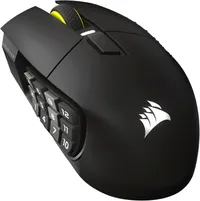
If you're a gamer and are into playing Massively Multiplayer Online Role Playing Games (MMORPG - MMO for short), then you probably already own a mouse with a good amount of programmable buttons on it. But what about a 16-button mouse that's good for MMO play and can also act as a virtual Elgato Stream Deck? Well, good news, the Corsair Scimitar Elite SE wireless can do both, and is also on sale at Amazon for just $79.99, a massive $60 off the $139.99 list price, and only $10 more than its all-time low price.
Corsair's latest Scimitar Elite SE wireless mouse looks identical to its predecessor, the Scimitar Elite Wireless, bar a slight change in color schemes, but the internals of the mouse have been slightly upgraded. A new sensor and better battery life mean the Scimitar Elite SE now sports a 33,000 DPI, a maximum speed of 750 IPS, and can handle up to 50 G's of acceleration, thanks to the Corsair Marksman S 33K optical sensor now included. The upgraded battery now gives you more time playing your favorite games between charges, with up to 150 hours over 2.4GHz wireless and up to 500 hours over Bluetooth.
The Corsair Scimitar Elite SE is a solid mouse that is reasonably heavy compared to the ultralightweight FPS mice that are available for esports. There are 16 programmable buttons on the Scimitar, 12 on the side panel, the left and right primary mouse buttons, a DPI switch button above the scroll wheel, and the scroll wheel's center click. All of these buttons can be mapped to your choosing through Corsair iCUE software. The other key feature of this mouse is that it supports native Elgato Stream Deck integration, and it also works with Elgato's new Virtual Stream Deck software. So you can make use of the large number of buttons on the mouse. This feature is only useful if you're already invested in the Elgato ecosystem, though.
The 12-button side panel on the Scimitar can be moved forward or backward approximately 1/4 of an inch, so you can line up the 12 buttons to your thumb for easier use and less hand fatigue. To slide the panel, you loosen a screw using the included hex key, move the buttons to your desired location, and then tighten the screw back up.
If you would like more information on this mouse, then check out our in-depth review of the Corsair Scimitar Elite SE wireless mouse from our peripherals expert editor, Sarah.
If you're looking for more savings, check out our Best PC Hardware deals for a range of products, or dive deeper into our specialized SSD and Storage Deals, Hard Drive Deals, Gaming Monitor Deals, Graphics Card Deals, Gaming Chair, Best Wi-Fi Routers, Best Motherboard, or CPU Deals pages.