









Tom's Hardware Verdict
This is the ultimate version of a 1982 computer, and it is a beautiful love letter to the era, with plenty of features to bring it into the 21st century.
Pros
- +
So easy to use
- +
Looks great, even in beige
- +
Keyboard is excellent
- +
Case is exactly the same as the original
Cons
- -
Initial cost will deter some
Why you can trust Tom's Hardware Our expert reviewers spend hours testing and comparing products and services so you can choose the best for you. Find out more about how we test.
Update 1/2/2026 08:51 PT
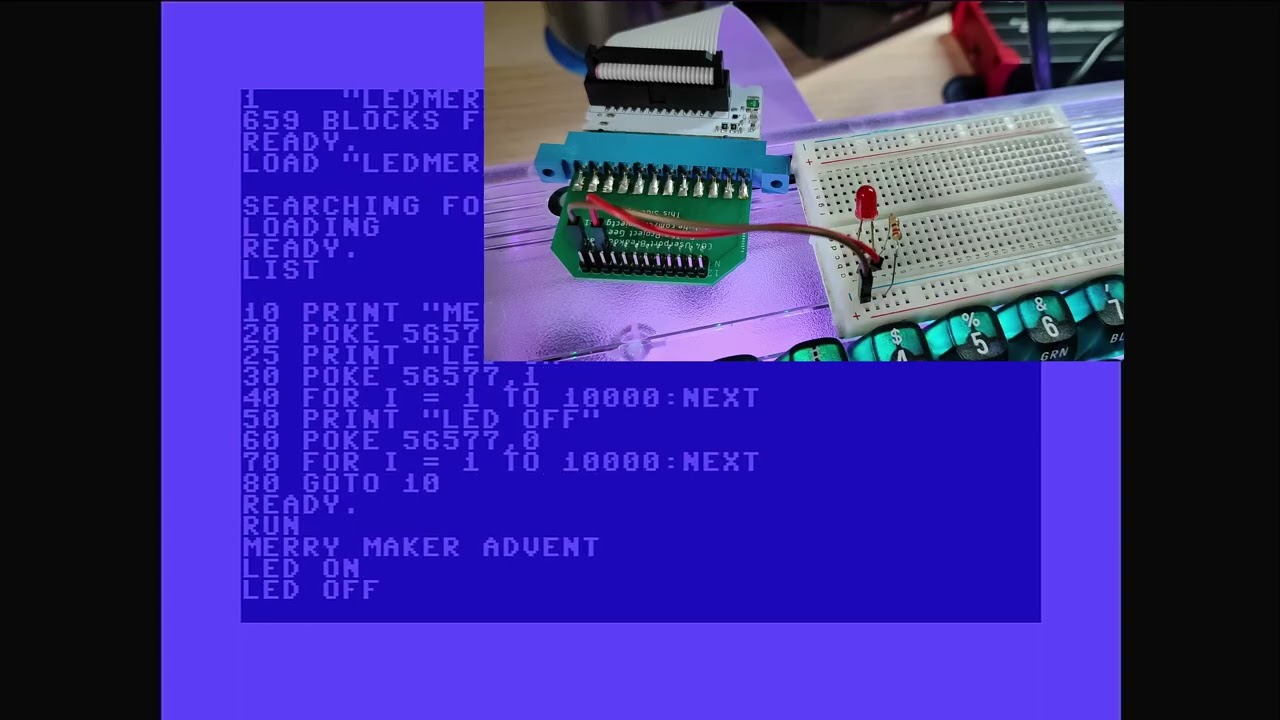
Over the holidays, the User Port breakout arrived and I have added my thoughts to this review. There are no changes to the score.
Updated Review
It's the end of 2025, and here I am, reviewing something that I owned as a child. The Commodore 64 (C64), announced at CES in 1982, is the best-selling desktop computer of all time according to the Guinness Book of Records. From August 1982 to April 1994, 12,500,000 units were sold around the world, and this “beige breadbin” sparked the imagination of many children, including me. The C64 wasn’t my first computer; that honor goes to the Commodore 16, which was released after the C64 as a cost-reduced machine to compete against the likes of the Sinclair (Timex) ZX Spectrum. But the C64 is where I found my feet and learnt some of the foundation on which I built my career.
What is in front of me right now is the closest I have seen to a “real” Commodore 64 in some time. I own a C64, a collection of parts akin to Dr Frankenstein’s monster, but the Commodore 64 Ultimate is real, and on my desk. The $299 price tag is fair, but it will make many think twice. In contrast, the price of a beaten-up C64 on eBay is astronomical right now, and I’ll address that later. The Commodore 64 Ultimate is an FPGA-based recreation of the C64, and provides accurate “emulation” of the original hardware, but with much newer hardware and features that would have cost the earth back in the 1980s, and they’re not cheap in 2025 either.
The Commodore 64 Ultimate comes from a new team that recently purchased the company. Co-founded by Sean Donohue, Leo Nigro, and retro YouTuber Christian “Peri Fractic” Simpson, Commodore International is made up of new faces and many from the early days of Commodore and the retro computing scene. We have the Father of the Commodore 64, Al Charpentier; Jeri Ellsworth, who created the C64 joystick, which was a fully working C64 in a joystick; and Dave Haynie, who was an original Commodore engineer and is closely associated with the Amiga. There is also Bil Herd, one of the engineers from Commodore’s 8-bit era, and RJ Mical, who contributed to Commodore’s Amiga, as well as the Atari Lynx and the 3DO.
In the press materials and website, the Commodore 64 Ultimate promises a lot, and those promises will form the basis of this review. Why? Simply because I can’t benchmark this setup as I would a Raspberry Pi, I can benchmark it against a real C64, though. I’ll be looking at the promises made on the website and seeing if they are fulfilled.
What are the promises?
- Play original games from original cartridges, disk drives, or datasets (cassette storage devices).
- Load games from USB, no SD2IEC or other methods to load games.
- Multiple SID sound chips, compatible with real SID chips.
- Get online with the C64 and download games, demos, and more.
- And yes, I will be comparing this to a real Commodore 64 that I have in my collection (C16, VIC20, C64, and a rogue ZX Spectrum) to show how the Commodore 64 Ultimate compares to the machine that defined my childhood.
Specification Comparison
| Header Cell - Column 0 | Real Commodore 64 |
Commodore 64 Ultimate |
|---|---|---|
CPU |
1.023MHz (NTSC) 0.985MHz (PAL) |
AMD Xilinx Artix-7 FPGA |
RAM |
64KB |
128MB DDR2 RAM |
Video |
VIC-II 320 x 200 at 16 colors DIN or RF output |
HDMI 1080P at 50Hz PAL or 60Hz NTSC Analog via DIN-8: CVBS, S-Video, or RGB |
Audio |
SID 6581 or 8580 |
UltiSID octal core FPGA SID emulation Sockets for dual 6581 or 8580 SIDs |
Keyboard |
66 keys |
66-Key Gateron Pro 3.0 55g switches |
Extra Features |
2 x Game Controller Ports |
Integrated Ultimate-II+ functionality with tape emulation and DMA loader RGB LEDs in Starlight Edition Wi-Fi, Ethernet, USB 2 x Game Controller Ports |


There is no apples-to-apples comparison possible at the bare metal; the AMD Xilinx Artix-7 FPGA blows the original Commodore 64 away. But that isn’t the point of the Commodore 64 Ultimate. The point of it is to provide modern-day reliability while keeping the Commodore experience as pure to the original as possible. If it wasn’t pure, then we could all use a Raspberry Pi and an emulator to get our C64 fix.
The Unboxing Experience


I can vaguely remember unboxing my original C64 back in the 1980s. The box was big, and it had so many parts, but inside was a wedge. Later C64s were “arrowhead/wedge” shaped, and they had Commodore written on them. I was a Commodore kid, so I hastily plugged into the living room TV and started playing games.
The Commodore 64 Ultimate unboxing experience is very much fresh in my mind. The packaging is sublime, and really tugs at my nostalgia for the era. The box is designed to be period-accurate while reflecting the contents within.
Inside the box, you're greeted by the Commodore 64 Ultimate itself, protected in styrofoam and plastic. To the right is a box full of cables, a power supply, and a red “cassette tape” USB drive that contains a plethora of related files, games, and demos. Underneath the C64 Ultimate lies the wire-bound User Guide. I read my original copy cover to cover as a kid, so seeing this version brought back some good memories.
Setting up was a breeze. Plug in the included HDMI lead, then power and press the multi-function power switch up on its rocker to see the blue BASIC screen that C64 fans know all too well. Yes, I did do the “10 PRINT” loop that everyone knows and does. Pressing the power button up for a brief second switches to another mode, C64U mode, and this is where everything changes.
Commodore 64 Ultimate Menu


Here, we have access to a myriad of features, both hardware and software. We can load games from USB, micro SD, over a network connection, etc. If we delve into the menus, we can set up Wi-Fi and wired network connections, tweak the video and audio settings, and even overclock the Commodore 64 from 1 MHz to 64 MHz! There is even the option to enable a RAM Expansion Unit all the way up to 16MB of RAM. That's enough RAM and processing power to run Doom on the Commodore 64!
The menu is expansive, and at times it can be tricky to navigate given the C64’s unique keyboard, which sees arrow keys pulling double duty using a shift modifier. But you will get used to it and will soon be navigating like a pro. A top tip is to enter the Video menu and tweak the settings to match your screen. In my case it was a 1080P Raspberry Pi monitor, so I upped the resolution to match and turned off scanlines. Some people love them, I'm not a fan of scanlines. They make my eyes go blurry and eventually give me a headache. The soft output of my real C64 does the same thing these days,
I do love the Commodore 64 Ultimate menu. It suits the era in which the original C64 existed, while offering all the home comforts and features we need in the 21st century.
Does it really work with old hardware?
Surprisingly, yes. I’ll be honest. I was a little skeptical of its claims to work with the old Commodore 64 hardware. In my possession, I have an International Soccer cartridge, a homemade 9-pin joystick, a datasette emulator, and an SD2IEC, which emulates a 1541 5.25-inch floppy disk drive. All of these worked with the Commodore 64 Ultimate.
The only time I encountered an issue was with the SD2IEC floppy disk emulator. In the Commodore 64 Ultimate menu, there are options for BUILT-IN DRIVE A and B. Disabling DRIVE A, essentially disconnecting a virtual 1541 drive, frees up the connection for my SD2IEC. After running a few commands, I had the Commodore Christmas Demo running for a festive experience. Just remember to re-enable the internal drive A when done. To test that my SD2IEC was working, I had to connect up my original C64 and run the same commands, proving that they worked, and that it was the internal drive of the C64 Ultimate that tripped me up.
My own joystick, made from arcade components and housed in a plastic box, worked extremely well, and I was soon blasting aliens and running across platforms, chasing power pills.

The only real cartridge that I own, International Soccer cartridge worked just as I expected. Fast to load, and the CPU always cheats!
My Tapuino, an Arduino-based datasette emulator, worked flawlessly with the C64 Ultimate. I popped a game on the micro SD, connected, and powered up. I typed in LOAD to start the tape loader, then I pressed play on the virtual tape. Minutes later, I had The Empire Strikes Back ready to play, after listening to a classic SID rendition of the Star Wars theme as the game loaded.
These devices worked, but the Commodore 64 Ultimate doesn't need them. It can load games from USB, internal SD card or even over a network. I tested this with a FAT32 USB drive loaded with a mixture of tape images (.tap files) and 1541 floppy disk image (.d64) and the file browser just prompted me to open and play them. Zero effort. If you want to use Tapuino or SD2IEC, or the real thing, then go right ahead!
Inside the Case


The PCB inside the Commodore 64 Ultimate is faithful to the layout, if not the components, of the original Commodore 64. There are no CIA chips or MOS branded RAM, nor is there a VIC-II for the video, all of that is handled by the FPGA. The common ports for joysticks, cartridges, and power are all where they should be. The cassette port for datasettes and the serial port for floppy disk drives are also in the right places. Where the user port should be, we have connections for HDMI, Ethernet, and USB. So how do we connect User Port accessories?


There is an optional $10 user port breakout which can be used with legacy devices and modern add-ons that. The adapter connects to a user port connector on the mainboard, but this is some distance from the case edge. So, a ribbon cable breaks the connector out into the world, and from there we can connect compatible devices. In my case I have GPIO breakout board, and using some BASIC code I wrote a simple loop to flash an LED.
Back to the main PCB and looking around, my first thoughts are that this is a quality board. The white PCB has a black silkscreen and gold signatures of the team behind it. Dominating the board is the FPGA breakout, on a SODIMM-type package. By adding the board in this manner, it should be possible to upgrade the unit, should there ever be an upgrade path.
The keyboard connects to the mainboard via USB-C, and the included lead is short but perfectly adequate. If I were planning to continually access the insides, I would put in a longer cable.
At the top left of the motherboard is an ESP32-S3, which provides Wi-Fi to the FPGA, and just above it are the USB ports, Ethernet, and HDMI.
In the center of the board is an innocuous pin header labeled P7, and to anyone but a Commodore fan, this is just a row of pins. In reality, this is a keyboard connector for the original C64 keyboard, so, should you desire, you can use a real C64 keyboard. That said, the included keyboard is great, feeling like a faithful update of the original.
Moving to the right, we see two blue ZIF sockets. These are labeled SID CHIP 1 and SID CHIP 2, and your thinking is correct. You can use your own SID chips in the Commodore 64 Ultimate, and I did, more on that later.
Going to the far right-hand side of the board, we see the cartridge port for your games and utilities, a speaker which is used to emulate disk and tape noises, and internal USB ports, which one would assume are for connecting storage. Lastly, on the outer right edge, we have the 12V power input, a multi-function switch, and two 9-pin connectors for joysticks and mice.
The Starlight edition comes with additional RGB LED panels that connect to headers located on the far left of the board.
Who's SID?

The Commodore 64’s SID (Sound Interface Device) chips are highly sought after, with some of the best examples fetching high prices on community forums. Sadly, the SID chip in my Commodore 64, an 8580R5, is not great, producing low audio output and a decidedly unnerving hum. But the virtual SIDs in the Commodore 64 Ultimate are bright and fresh. Producing all of the bells and whistles that one would expect of the era.
Via the Commodore 64 Ultimate menu, you can tweak the SID settings to create your own personal preference. There are also two spaces on the motherboard for real SID chips, and these can be configured in the menu. Am I going to put my SID in there? Yes, and it turns out it's ok, so there is something else wrong with my old C64. I installed the 8580R5 into the ZIF socket, checking the orientation before committing to powering up. Amazingly, Commodore 64 Ultimate’s menu detected that a real SID was installed and then asked me to double-check the Audio settings. Sure enough, it was correct, and now the demoscene tracks I used to test all played perfectly, and the character of a real SID shone through. That said, the virtual, emulated SIDs on the Ultimate are just as good, and we can change the SID to match our preference or to match the SID targeted by the particular game or demoscene track.
The tl;dr is that the virtual SIDs are great, and the ability to use your own elevates the experience for those of us with perfect hearing. You won’t be disappointed.
Loading Games

We really are spoiled for choice! No, seriously, we are! On top of being able to use the original methods (tapes, floppy disks, and cartridges), we also have access to a plethora of games and demos via the included USB. But that’s not all. Both floppy and tape images can be run directly from USB, which means we don’t need access to a Tapuino or SD2IEC in order to run software on the Commodore 64 Ultimate. If, like me, you also have the original hardware, then you will know how important those tools are to get software onto our precious vintage hardware. I tested a few games, just to make sure, and yup, everything is covered, and you can enjoy your real and virtual C64 games to your heart’s content.
Connect your Commodore 64 Ultimate to Wi-Fi or Ethernet, and the Commoserver File Search tool offers the world of Commodore 64 content over a handy network connection. Search for demos, SID tunes, games, and applications, all from the comfort of a pleasant user interface. This is a key feature, and one that everyone needs to get to grips with. You basically have a content library offering a massive amount of software, readily available from the machine. No back-and-forth with a USB drive or micro SD card between your PC and the Commodore 64 Ultimate. It's all there, ready; you just have to search for it.
Getting Online with a Commodore 64


The Commodore 64 Ultimate menu includes Wi-Fi and Ethernet connection options. Both are easy, with Ethernet being a simple plug-and-play option. With Wi-Fi, we have to find our access point and connect. The first time, there was a hiccup, and it didn’t connect. But every time after it connected straight away, so let's chalk that up as user error.
Once connected to the Internet, I wanted to explore a few Bulletin Boards (BBS) just like the ol’ days. On the included USB stick, we have everything we need to get online with our Commodore 64 Ultimate. Follow the instructions, no, really do, and you’ll be online in minutes. Getting a real Commodore 64 online is relatively easy; you just need an ESP8266 connected to the user port and some software, but the Commodore 64 Ultimate makes short work of everything.
The process was frictionless, and I love being able to get online in an 8-bit way.
BASIC Features


The Beginners All-Purpose Symbolic Instruction Code was the Python of the 1970s and 80s. I’ll admit, I love BASIC. I even wrote an article on how to use BASIC in 2025, albeit a modern version.
BASIC is an interpreted language, in that the human-readable syntax is converted into something the computer can understand. I am happy to say that it worked just as I expected. The usual 10 PRINT test was completed without incident, and this led me to write something a little larger. So, I wrote a simple conditional test script that reads the user’s input and the code branches based on the result. The code worked, and so I saved it to a virtual floppy disk. To do that, I needed to enter the Commodore 64 Ultimate menu, press F1, and then enter the Built-In Drive A menu. I created a blank floppy image on the USB drive and then mounted it as a drive. I saved the file, unmounted and then took the USB stick to my Windows PC running Cloanto’s C64 Forever, popped it in, powered up a virtual C64, and the disk worked!
So what does this prove? It proves that we can develop games, apps, demos, etc, on the Commodore 64 Ultimate, and we can develop them on our typical hardware and easily port them to the Commodore 64 Ultimate for testing. That opens up a world of possibilities and homebrew applications.
User Port

The original Commodore 64 had a user port on the rear to connect datasets, modems, and add-on devices. In recent years, this has been used with cassette tape emulators like Tapuino, 1541 floppy disk drive emulators like SD2IEC, and ESP8266-based Wi-Fi modems. Heck, I’ve even connected mine up to an LED and a motor via a motor control board.
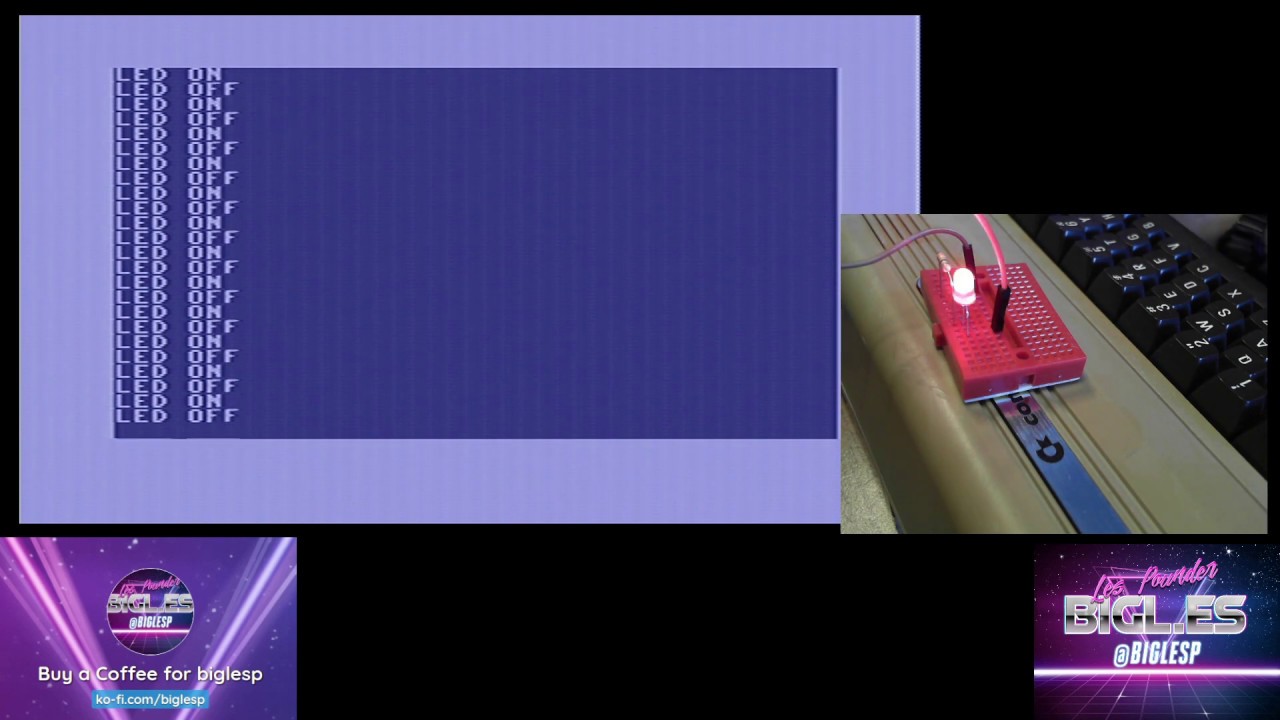
The user port on the Commodore 64 Ultimate is present but requires a breakout to be used. I've got one on the way and will add my findings once I have it.
Starlight, Star Bright?

We were sent two versions for review, both of which have the same specifications, but one has added RGB LEDs and is called the Starlight edition. This version is $349, versus the beige version at $299, and it includes a series of RGB LEDs inside a translucent case. The main keys are translucent, smoky black, and the function keys are translucent red.
Controlling the LEDs is possible via the Commodore 64 Ultimate Menu, which offers options to control the case LEDs and those on the keys. The Starlight edition is a lovely piece of kit, and it looks like a 1990s homage to the C64. Is it worth the extra $50? That is for you to decide. The case looks great, the RGB LEDs are bright, and add extra appeal to the machine. Interestingly, the keyboard PCB is also translucent, enabling the colors to dance around the case and produce interesting patterns.
How Much Would It Cost To Build An Equivalent Commodore 64?

You want all of the features found in the Commodore 64 Ultimate, but you want a real Commodore? Ok, let's break out a spreadsheet and do the math. All of these prices were found on ebay.com in early December 2025.
| Header Cell - Column 0 | Real Commodore 64 |
Commodore 64 Ultimate |
|---|---|---|
Base Machine |
85 |
299.99 |
SD2IEC |
29.99 |
Row 1 - Cell 2 |
Tapuino |
26.62 |
Row 2 - Cell 2 |
Power Supply |
57.99 |
Row 3 - Cell 2 |
Wi-Fi Modem |
41.49 |
Row 4 - Cell 2 |
DIN to RCA Cable |
14.99 |
Row 5 - Cell 2 |
RCA to HDMI |
6.99 |
Row 6 - Cell 2 |
Total |
263.07 |
299.99 |
Why is there a new power supply in the purchase list? Simply because old power supplies, remember we are talking over 30 years old, can suddenly let out the "magic blue smoke" and cause damage or even death to your Commodore.
For just under $40 more, we get a modern Commodore 64, with none of the capacitor issues, dodgy SIDs, dying VIC chips, and MOS-branded RAM, which ultimately dies. Of course, this is an FPGA machine, not the purest example of Commodore. But as the years march on, there aren’t too many examples of pure Commodore machines left. Even mine is a mix of breadbin and arrowhead machines. The motherboard is from a much later machine.
Bottom Line, Who is the Commodore 64 Ultimate For?

If you just want to play Commodore 64 games on a big screen, get one of the emulated consoles, run VICE, or buy Cloanto’s C64 Forever. The Commodore 64 Ultimate is a love letter to a time when 1MHz and 64KB of RAM were enough to power your world. Those of us who love old computers will lap this up, and rightly so. It is a seriously good system that provides a platform for retro gaming, retro homebrew, and video game preservation. Musicians will love the SID options, the chance to use a real SID, and the reliability of the new hardware means there is little or no chance of your audio developing issues.
You’re paying $300, but as we’ve already seen, the cost of retro computing ain’t cheap, and this machine is new hardware, wrapped in the cloak of retro, but there are no bad surprises hiding here. Just a portal to a time when computing was fun.
