









Tom's Hardware Verdict
For those who can never have enough screens, the Asus ZenBook Duo with Intel Core Ultra X9 388H delivers strong battery life and powerful integrated graphics, though you'll spend some setup time uninstalling software.
Reasons to buy
- +
Strong battery life, especially for dual screens
- +
Powerful integrated graphics
- +
Impressive dual OLED screens
Reasons to avoid
- -
Way too much software
- -
Webcam is just OK
- -
Pricey, though what isn't at this point?
Why you can trust Tom's Hardware Our expert reviewers spend hours testing and comparing products and services so you can choose the best for you. Find out more about how we test.
Editor's Note: When we began this review, we were told by Asus that it planned to open pre-orders in mid-February. We were later informed the company is "re-aligning timing" and no longer launching in that time frame, but that the "overall expectation remains within Q1."
Intel's most anticipated CPU launch in quite some time is a laptop CPU — Core Ultra Series 3, formerly known as "Panther Lake." The top-end Core Ultra X9 388H packs a powerful iGPU and is made on Intel's 18A process. Our first look at this chip comes through the Asus ZenBook Duo (UX8407).
This laptop ($2,299.99 as tested) is Asus' latest take on a dual-screen machine, with smaller bezels than before, lovely OLED panels, and surprisingly good battery life. Most of the best ultrabooks are standard clamshell laptops, but Asus is finally starting to refine this dual-screen laptop, even if there are still a few growing pains.
That new processor might not entice you into upgrading based on productivity performance alone (though there are gains), but if you do anything using integrated graphics, you'll likely be impressed.Once you get past the sheer amount of software and bloatware on board, Asus's design and Intel's new processors mostly impress.
Design on the Asus ZenBook Duo (UX8407)
The Asus Zenbook Duo is 5% smaller than previous models, which may not sound like a lot, but is quite noticeable. Once you open the gray "ceraluminum" lid with the Asus Zenbook wordmark, I noticed that the system is thinner, and that there is far less space between the two screens, which are stacked on top of each other.
The lack of bezels between the screens is noticeable. It still looks like two screens, but the new hinge keeps them more flush, and the design feels more purposeful this time around. The bezel on the top of the top screen, however, is very thick compared to other high-end laptops.


View Original

View Original

View Original

View Original

The ceraluminum material is aluminum with a ceramic-like texture. It feels great and I like how it looks. Asus claims that it's "smudge-free" and can withstand light scratches and wear.
There are, however, some quirks unique to this type of design. For one, the keyboard and touchpad are part of a separate piece of hardware that you can use via Bluetooth or place onto the lower screens with magnets and pogo pins for a laptop-style experience (Lenovo's Yoga Book 9i does something similar, but it doesn't use a standard touchpad and requires a mouse, and the smaller keyboard covers less of the screen.)The keyboard fits in between the two screens, but if you choose to travel without it, there will be a small, sandwich-like gap between them, where dust or debris could get in while it’s in your backpack. This is very similar to true foldables we saw a few years ago, like Asus' own ZenBook 17 Fold from 2022.
Get Tom's Hardware's best news and in-depth reviews, straight to your inbox.


View Original

View Original

There is a kickstand built into the bottom of the system, which is kind of awkward and feels very thick when using it as a standard laptop. But it allows you to put the dual screens in portrait or landscape mode without needing a separate stand elsewhere. While the kickstand is very steady with the screens tacked one on top of the other, it can be a bit rocky in side-by-side portrait mode unless angled absolutely perfectly.


View Original

View Original

The Duo is 12.21 x 8.21 x 0.92 inches and weighs 3.64 pounds with the keyboard (it drops to 2.98 pounds without the accessory). The Lenovo Yoga Book 9i is larger but thinner at 12.4 x 8.35 x 0.63 inches, and is 2.69 pounds sans accessories.
Asus ZenBook Duo (UX8407) Specifications
CPU |
Intel Core Ultra X9 388H |
Graphics |
Intel Arc B390 (integrated) |
Memory |
32GB LPDDR5x-9600 |
Storage |
1TB PCIe Gen 4 M.2 SSD |
Display |
Dual 14-inch, 2880 x 1800, Lumina Pro OLED touchscreens, HDR True Black 1000, 48 - 144 Hz |
Networking |
Wi-Fi 7, Bluetooth 5.4 |
Ports |
2x Thunderbolt 4, USB 3.2 Gen 2 Type-A, HDMI 2.1, 3.5 mm headphone jack |
Camera |
FHD webcam, IR for Windows Hello |
Battery |
99 WHr |
Power Adapter |
100W, USB Type-C |
Operating System |
Windows 11 Home |
Dimensions (WxDxH) |
12.21 x 8.21 x 0.92 inches (310.1 x 208.6 x 23.4 mm) |
Weight |
3.64 pounds (1.65 kg) with keyboard |
Price (as configured) |
$2,299.99 |
Productivity Performance on the Asus ZenBook Duo (UX8407)
This review of the Asus ZenBook Duo is serving as our introduction to Intel's Core Ultra Series 3, the artist formerly known as "Panther Lake." Specifically, Intel loaned us a unit with an Intel Core Ultra X9 388H with 16 cores, a 5.1 GHz max turbo frequency, and, crucially, an integrated Arc B390 GPU with 12 Xe cores.
We're using more competitors than usual. Here's a handy table listing them:
Intel Core Ultra 7 255H |
|
Qualcomm Snapdragon X Elite (X1E-80-100) |
|
Apple M5 (10-core) |
|
AMD Ryzen 9 HX 375 |
This list gets us a comparison to last-gen Intel Core H-series, a high-end Snapdragon X processor, the latest from Apple, and a last-gen Ryzen processor. (AMD's Ryzen AI 400 series should arrive in our labs soon, with a launch planned for Q1 2026.)


View Original
View Original
View Original
View Original
On Geekbench, Intel handily beat AMD, Qualcomm, and its last gen CPU, as the ZenBook Duo notched a single-core score of 3,031 and a multi-core score of 17,283. Only Apple did better, with its M5 scoring 4,288 on single-core and 17,926 on multi-core.On our 25GB file transfer test, the ZenBook Duo copied the files at a rate of 1,531.30 MBPs, beating the Yoga Book and XPS but falling behind the OmniBook and the class leader, the MacBook Pro.
The ZenBook Duo transcoded a 4K video to 1080p in 4 minutes and 22 seconds using HandBrake. That's faster than last-gen and the Snapdragon-based XPS, but the MacBook Pro (3:31) and OmniBook Ultra (4:18) beat it.
In our ten-run Cinebench stress test (our first time using the new 2026 edition), the laptop started with a score of 3,871.93, before falling for a run until the thermals settled in. Throughout most of the rest of the test, the system was in the mid 3,800's, with no obvious signs of throttling affecting performance.
During the test, the performance cores ran at an average of 2.86 GHz, while the efficiency cores ran at 2.7 GHz, and the low-power efficient cores reached 2.45 GHz.
Graphics Performance on the Asus ZenBook Duo (UX8407)
Panther Lake also brings with it Intel's newest integrated graphics technology, Arc B390. Different configurations will have different GPUs, including some without the Arc branding. But the Core Ultra X9 388H has the most powerful option. Graphics testing hasn't been a huge part of of our ultraportable testing to date, but that may have to change.
Here are the GPUs the competition are using:
Intel Arc 140T (integrated) |
|
Adreno GPU (X1-85, integrated) |
|
10-core GPU (integrated) |
|
AMD Radeon 890M (integrated) |
Because we don't have a ton of historical game data, we're going with 3DMark tests, but look out for more games in the future. Keep in mind that on the XPS 13 with Adreno, 3DMark was being emulated.
I was surprised to see the Panther Lake system handle Microsoft Flight Simulator 2024, even on the low-end graphics settings at 1920 x 1200p. I took off around a suburban New Jersey airport and flew around the surrounding area with the system running the game between 44 and 52 frames per second.


View Original
View Original
On 3DMark Fire Strike, the ZenBook Duo easily surpassed its rivals with a score of 13,581. The next highest was the AMD-based OmniBook Ultra at 8,557. The Mac wasn't included here, as Fire Strike isn't compatible.3DMark Steel Nomad is a more recent test, and the Arc B390 won comfortably here, too, with a score of 1,483. The MacBook Pro with M5 came in second at 1,122, so there was less of a gap on this test. Both of those had a sizable lead over other Windows-based ultrabooks.
Displays on the Asus ZenBook Duo (UX8407)
The two, count 'em, two screens on the ZenBook Duo are each 14 inches, with 2880 x 1800 Lumina Pro OLED panels. They're not the brightest or most vivid that we've seen, but they're still quite good.
The dual-panel design really shines for productivity, letting you easily organize multiple windows either one on top of the other or side-by-side.
But they also are solid screens, generally. Using the top screen in laptop mode, I watched the trailer for The Odyssey, and was particularly impressed by one scene in which Odysseus (Matt Damon), leads his men on a boat through deep blue water and a dark blue sky. The amount of detail I could make out was impressive, despite how dim the scene was. In another, bright orange flames lit a cave as the men discovered the cyclops.

The top screen covered 123.1% of the sRGB gamut by volume and 87.2% of the DCI-3 gamut. The bottom screen reached 118% and 83.6%, which is close enough that I couldn't tell the difference. That was the same pattern for brightness, where the top screen measured 435.2 nits on average while the bottom reached 455.6 nits.
These weren't as bright or as vivid as Lenovo's screens (the MacBook Pro's Mini LED was the brightest option), but proved superior to the HP OMniBook ultra and the comparatively dull LCD in the XPS 13 (9345).
Keyboard and Touchpad on the Asus ZenBook Duo (UX8407)
The keyboard and touchpad on the ZenBook Duo are on a small slate that is separate from the dual-screened laptop. You can attach it over the bottom screen with pogo pins and magnets for a classic laptop experience, or use it separately with Bluetooth (my preferred way at a desk) to get two screens.

Asus says that the detachable keyboard's keys have 1.7 mm of key travel. The keys, however, feel a bit mushy, and I wish they would pop up a bit faster.
Typing with the keyboard on the laptop, I did great on the monkeytype test, hitting 102 words per minute with 99% accuracy. I've been faster, but that's hard to complain about. But with the keyboard on a desk, my fingers weren't hitting keys, which were far lower than most desktop keyboards, and so I dropped to 79 wpm with 93% accuracy. If I were using this at my desk all the time, I would pick a different Bluetooth keyboard. As a portable machine, though, I want the standard keyboard to work great in every position.
The touchpad is 5 inches wide and more than 3 inches tall. It isn't the most premium-feeling touchpad, but it does the job even with its stiff click. Asus has packed the touchpad with sensors — you can swipe your finger on the left side to adjust the volume or the right side to dial in the brightness. Swiping along the top scans through media. This is fine, but I tended to just use the keyboard function row, because those are labeled and I didn't have to remember them.
While Asus bundles a stylus with the ZenBook Duo in the United States, it didn't come with our review unit.
Audio on the Asus ZenBook Duo (UX8407)
Asus's six-speaker sound system (four woofers and two tweeters) gets quite loud. Listening in a small room in our office, the sounds of the Beaches' cover of "I Ran (So Far Away) easily filled the entire room.
The speakers made that song and others very vocals-forward. I usually prefer that, but it was so much the case that it sometimes drowned other parts of the song out. The thumping drums and even a tiny bit of bass were noticeable, but overwhelmed, while the guitars were lost in the mix.
I was surprised to find that there is no preset equalizer in the Dolby Atmos software. I found that both the "detailed" and "balanced" presets did a better job toning down the vocals to highlight the low end, though balanced made the whole song a bit too soft.
Upgradeability on the Asus ZenBook Duo (UX8407)
Asus has made it extremely simple to replace the single easily repairable part on the ZenBook Duo: the SSD.Beneath the kickstand, there's a plate held in by two Torx T5 screws. Unscrew those, and the plate comes right out, giving you access to the drive if you need to repair or upgrade it. You can also access some of the main cables here. One is definitely for the battery, and the other appears to be a ribbon cable, likely to the displays.

We've seen easy-access SSD doors before, primarily on some of Microsoft's Surface devices, but Asus is using a full-size M.2 2280 SSD, while Microsoft uses smaller drives. But it's a good idea, and I hope Asus puts it on even more of its laptops.
There are eight Torx T5 screws of two different lengths lining the bottom of the laptop. While we got those out, pry tools didn't give us a way into the machine. An Asus representative told Tom's Hardware that "opening and putting the device back together is not an easy task and not something we would recommend the average user to do," but added that inside the laptop, the Wi-Fi card is technically replaceable.
Battery Life on the Asus ZenBook Duo (UX8407)
I thought it was folly that Intel loaned us a dual-screen OLED laptop for the debut Panther Lake review. Surely, that wouldn't be a good show of efficiency.
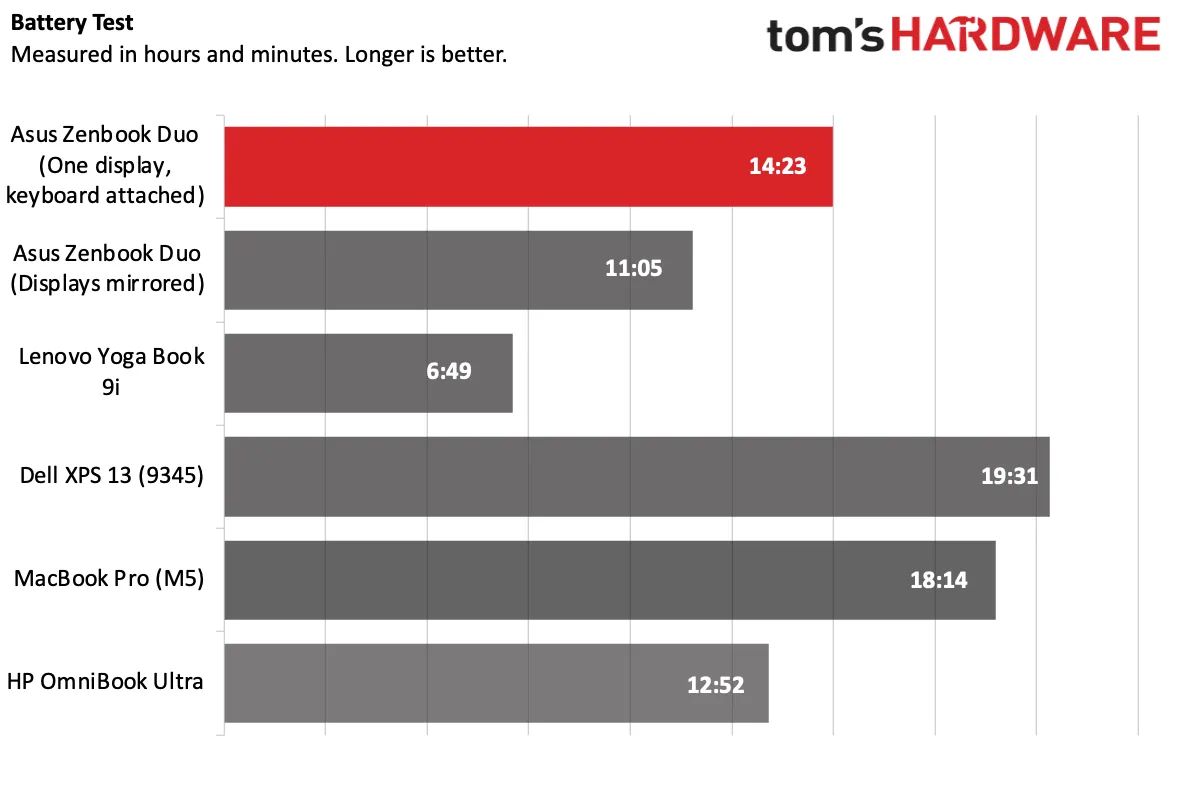
I was wrong. The ZenBook Duo and the Core Ultra X9 388H were impressive on our battery test, especially given the fact that there are two screens. Our battery test runs at 150 nits with the device connected to Wi-Fi, browsing the web, running OpenGL tests, and streaming videos. With one display on and the other covered by the keyboard, the laptop lasted for 14 hours and 23 minutes. With both screens mirrored, the system ran for 11 hours and 5 minutes.
Both of those trials were far longer than the Yoga Book 9i (6:49) and isn't far off the HP OmniBook Ultra X, but the Dell XPS 13 with Snapdragon X Elite lasted the longest at 19:31, though Dell sent that review unit with a dim, comparatively low-resolution 1920 x 1080 display.
The ZenBook's successes here can't be attributed solely to the Core Ultra chip, though. It is also packing a massive 99 WHr battery, which we usually only find in the most powerful gaming laptops. The previous version, the UX8406, had a 75 WHr battery, so the larger power source is definitely helping.
Heat on the Asus ZenBook Duo (UX8407)
We measured skin temperatures on the ZenBook Duo while running an intensive stress test.
The hottest points on the system were on the back of the lower screen — the "bottom" of a normal laptop, where the internals are held. The top screen was cool to the touch, and the keyboard and touchpad are separate from the main unit.The laptop measured 104 degrees Fahrenheit at its hottest point, but that was under the kickstand, meaning if it were in laptop mode, it would be covered. At several points around the kickstand, the laptop hit 100 F, which isn't alarming.
During that same test, we also measured the CPU package, which averaged 74.29 degrees Celsius.
Webcam on the Asus ZenBook Duo (UX8407)
Asus is using a 1080p webcam on the ZenBook Duo. I'd love to see Asus start upping the resolution on its top-tier laptops, but this will do for most people.
Still, in some test photos, the images were a bit soft or blurry, with my beard and hair looking especially lifeless. On a video call, things fared better, but I won't tell you the image stood out from the competition in any way. The IR camera supports Windows Hello, and I logged in quickly and easily with my face.
You won't want to use the webcam with the screens in portrait mode, as the camera will be on the left side, and, I found, doesn't automatically rotate. You'll want to switch to landscape for any and all chatting, unless you use an external camera.
Software and Warranty on the Asus ZenBook Duo (UX8407)
Like many other Asus laptops in recent memory, no matter how premium, the ZenBook Duo comes with quite a bit of preinstalled software.
Some of it, like ScreenXpert, is necessary. That app does all of the background work to make a dual-screen experience on Windows 11 smooth, including providing a shortcut to bring up the virtual keyboard, adjust brightness across different screens, and add gestures to make windows span both screens and flick windows between the screens.
But Asus has a ton of its own software. There's MyAsus, which lets you check your warranty service, battery condition, and contact customer support, which can be useful. But then GlideX is there to share the screens between your phone and your laptop (do you need more screen with this device?)m and includes in-app purchases, though this laptop comes with a "Device Edition" that supports two devices. Another app, Asus Dial & Control panel, was designed for a previous version of the ZenBook Duo (and features that design in the app).
There's also a bunch of promotional apps, including Adobe Offers to find "discounts" from the company, and 500GB of Dropbox storage for free for six months. Asus also links to McAfee LiveSafe in the Edge browser's bookmarks. This is a lot of ads for a machine that is over $2,000.
Asus sells the ZenBook Duo (UX8407) with a one-year warranty.
Asus ZenBook Duo (UX8407) Configurations
Our ZenBook Duo review unit came packed with an Intel Core Ultra X9 388H, Intel Arc B390 integrated graphics, 32GB of RAM, and a 1TB PCIe Gen 4 SSD. When pre-orders open on Amazon, that will cost $2,299.99
A second model with a Core Ultra 9 386H and standard Intel graphics will cost $2,099.99.
Pre-orders were originally supposed to go live in mid-February, but Asus has changed that to a more vague Q1 plan, so it's possible that prices may change after this review has been published.
Bottom Line
The Asus ZenBook Duo impresses with a premium design, a nice set of dual screens, solid battery life, and powerful integrated graphics. This targets a very specific person: someone who works a lot on the go, has a lot of open windows, and possibly plays some games or does light video editing.

The battery life is impressive, and hopefully is a sign of other efficient Core Ultra Series 3-based laptops. The fact that it pulled double-digit hours with two screens was surprising, until we noticed the very large 99 WHr battery..The GPU gains are more interesting than the CPU gains here. That's the real reason to upgrade to a system like this. If you're happy with a last-gen Duo and it meets your performance needs, this won't add a significant jump.But if you're looking for a premium workhorse that will be reliable, if sometimes a bit awkward on the go, you can carry two screens around and get decent performance and battery life. It finally seems viable.

Andrew E. Freedman is a senior editor at Tom's Hardware focusing on laptops, desktops and gaming. He also keeps up with the latest news. A lover of all things gaming and tech, his previous work has shown up in Tom's Guide, Laptop Mag, Kotaku, PCMag and Complex, among others. Follow him on Threads @FreedmanAE and BlueSky @andrewfreedman.net. You can send him tips on Signal: andrewfreedman.01
-
Notton Okay, I'm impressed.Reply
It fixed all, or most, of the issues with the previous version (UX8406). -
DS426 Dual screens don't do battery life any favors -- I see why ASUS went with a 99 WHr battery. Looking forward to seeing more traditional comparisons.Reply
I was just expecting better, but of course, this is the high-perf incarnation of P-Lake; the mid-range options should do better.
Graphics perf is surprisingly good, which indeed that fast RAM really helps there.
Overall and in most areas, a good improvement from Intel. Nice to see the competition heating up again. -
Gururu PCgamer right away complaining that PL doesn't have the PCIe lanes to support a dGPU. Maybe some gamers would want one, not sure, but seems like a huge limitation.Reply -
Gururu Reply
Not sure about this, since Hardware Canucks has the battery life 24++ hours. Comes down to efficiency though during operations. More real life studies needed.DS426 said:~14.5 hours of battery life isn't that great IMO considering the 99 WHr battery. Go back to the 75 WHr battery for a straighter comparison and then battery life comes to ~11 hours.
I was just expecting better, but of course, this is the high-perf incarnation of P-Lake; the mid-range options should do better.
Graphics perf is surprisingly good, which indeed that fast RAM really helps there.
Overall and in most areas, a good improvement from Intel. Nice to see the competition heating up again. -
DS426 Reply
That's more like what I was expecting.. and they did their testing on a traditional single-monitor laptop, yeah? Displays consume a huge share of battery energy.Gururu said:Not sure about this, since Hardware Canucks has the battery life 24++ hours. Comes down to efficiency though during operations. More real life studies needed. -
DS426 Reply
True, a compromise that isn't optimal for high-end gaming laptops. It'll be interesting to see how much this hobbles performance in comparisons.Gururu said:PCgamer right away complaining that PL doesn't have the PCIe lanes to support a dGPU. Maybe some gamers would want one, not sure, but seems like a huge limitation.
Hopefully Nova Lake will juice up PCIe connectivity. -
Notton Reply
🤦♂️Gururu said:PCgamer right away complaining that PL doesn't have the PCIe lanes to support a dGPU. Maybe some gamers would want one, not sure, but seems like a huge limitation.
The specs are listed.
The non-X versions get an extra PCIe 5.0 x8 lanes for a dGPU.
https://www.tomshardware.com/pc-components/cpus/intel-doubles-down-on-gaming-with-panther-lake-claims-76-percent-faster-gaming-performance-new-x-series-chips-deliver-up-to-12-xe3-cores
Maybe, just maybe, the Panther lake GPU tile runs off of the PCIe lanes... There's just so much 🤦♂️ :rolleyes: -
TheSecondPower Reply
The PCIe lanes are provided by the I/O tile. In the Panther Lake details Intel released last year, Intel specified 2 possible CPU tiles (4+8+4 or 4+0+4), 2 possible I/O tiles (12 or 4 PCIe 5.0 lanes), and 2 possible iGPU tiles (12 Xe3 N3E or 4 Xe3 Intel 3). Intel specified 3 possible configurations from these tiles, with every big iGPU model getting the smaller I/O tiles with fewer PCIe lanes. Which makes perfect sense; either you get a big dGPU and need the lanes, or you get a big iGPU. The smaller iGPU models still have all the media decoders and encoders and can easily handle light 3D workloads, so it'd be kind of pointless to pair with a big dGPU.Notton said:🤦♂️
The specs are listed.
The non-X versions get an extra PCIe 5.0 x8 lanes for a dGPU.
https://www.tomshardware.com/pc-components/cpus/intel-doubles-down-on-gaming-with-panther-lake-claims-76-percent-faster-gaming-performance-new-x-series-chips-deliver-up-to-12-xe3-cores
Maybe, just maybe, the Panther lake GPU tile runs off of the PCIe lanes... There's just so much 🤦♂️ :rolleyes: -
redgarl This thing cost 2300$... 2300$...Reply
You can get a 395+ for 2000$ and it is not even comparable.
Why the praise when the price is making this product a joke?!!!