Intel has finally pulled back the curtain on Panther Lake, and in addition to a major process milestone with 18A, Intel is packing in the largest integrated GPU it has ever shipped in a handful of new X-series SKUs. These SKUs, including the Core Ultra X9 388H that Tom’s Hardware was able to test ahead of release at CES 2026, include 12 cores on Intel’s latest Xe3 graphics architecture and boast performance that can rival a discrete RTX 4050, at least according to Intel’s claims.
Testing the graphics performance in-person, Panther Lake is undoubtedly impressive, not only because of its raw capabilities, but also its clear efficiency. We aren’t able to publish power numbers today, but subjectively, Panther Lake delivered easily the coolest gaming experience I’ve seen out of a laptop, barely even getting warm during an hour and a half of heavy-duty benchmarks in a Lenovo reference design.
Article continues belowWe’ll have full test results for Panther Lake once systems arrive on January 27 globally, including firm power and temperature numbers, along with productivity results. For now, we’re looking at some quick and dirty tests in games, along with the experience of using Panther Lake in the flesh.
Meet our Panther Lake test system

Intel set us up with a reference system made by Lenovo. You can see the system information above. This is an IdeaPad Pro 5 running the top-end Core Ultra X9 388H chip from Panther Lake, along with 32GB of memory. For testing, the system was perched on a stand for better airflow, and the games were running off of an external PCIe Gen 4 NVMe SSD connected via USB-C.
The native resolution for the display is 2880 x 1800, but I ran tests at either 1920 x 1080 or 1920 x 1200 depending on support in-game, along with XeSS upscaling (settings for each will be noted in the benchmarks below). This is in-line with the benchmark data Intel itself has shared on Panther Lake. Keep in mind, however, that upscaling works better with higher output resolutions. You’ll see a performance drop climbing up to native resolution, but with upscaling, the drop isn’t as severe as you’d expect.
Although we can’t publish power results, Intel confirmed that the Core Ultra X9 388H has a maximum turbo power of 65W (PL1) with a short-term limit of 85W (PL2). That’s power for the entire SoC, not just the integrated graphics. The performance results here for the SKUs sporting 12 Xe3 cores; the vast majority of the Panther Lake lineup only includes 4 Xe3 cores, with only the X-series SKUs getting the full 12.
As we dig into the benchmarks, keep in mind the limited time we had available for testing these systems. Most games only got a single benchmark pass as we tried to test as many titles as possible within an hour and a half. You should take the numbers as rough approximations of the performance you can expect ahead of launch, not the final word on the gaming prowess of Panther Lake.
Testing Panther Lake’s gaming performance
Now what you came for — the benchmarks. Broadly, you can expect frame rates nearing 60 fps in recent titles with Panther Lake at 1080p, with some assistance from XeSS upscaling. Multi-frame generation is available in titles that support XeSS 2 or newer through an override in Intel’s driver software. We didn’t look at frame generation when gathering performance results. However, in Spider-Man 2, we quickly looked at FSR frame generation and saw positive results. Given the limited availability of XeSS frame generation, FSR 3 (or newer) seems like the more practical route for frame generation on Panther Lake outside of tools like Lossless Scaling.
| Header Cell - Column 0 | Average frame rate | 1% low frame rate | Settings |
|---|---|---|---|
Baldur’s Gate 3 | 68.4 fps | 39.7 fps | 1200p, High, XeSS Quality |
Cyberpunk 2077 (Built-in benchmark) | 81.4 fps | 59.1 fps | 1080p, High, XeSS Balanced |
Doom: The Dark Ages | 51.1 fps | 38.1 fps | 1080p, High, XeSS Balanced |
F1 2025 (Built-in benchmark, Australia Day Clear) | 109.5 fps | 81.8 fps | 1080p, High, XeSS Balanced |
Monster Hunter Wilds | 35.5 fps | 28.1 fps | 1200p, Medium, XeSS Balanced |
Marvel’s Spider-Man 2 | 57.4 fps | 30 fps | 1080p, High, XeSS Quality |
We tested two more titles, Clair Obscur: Expedition 33 and Battlefield 6, but we weren’t able to capture performance data; more on that in the next section.
Overall, the average frame rates are solid considering the settings. With upscaling assistance, 60 fps is achievable even in relatively demanding titles like Baldur’s Gate 3, while heavily titles like Marvel’s Spider-Man 2 and Doom: The Dark Ages fall slightly short of that mark while still providing a smooth experience for an efficient mobile platform. Actually playing a game like Doom: The Dark Ages brought out the experience Intel has been talking about. When you’re playing, the fluctuations below 60 fps aren’t apparent, and the complete lack of heat leads to a mobile gaming experience that’s refreshingly clean. Fan noise wasn't bad, either. In a room with about two dozen people with only a minor murmur, you couldn't hear the fans spinning.
Although the performance holds up, the software backing it has some issues. XeSS works and is available in a broad range of titles, but the quality of the implementation varies wildly. In F1 2025, it can go toe-to-toe with FSR 2 or 3 upscaling; in Cyberpunk 2077, the visual artifacts are immediately apparent. Intel still has a lot of work to do on XeSS, particularly when it comes to unifying the quality you can expect across titles.
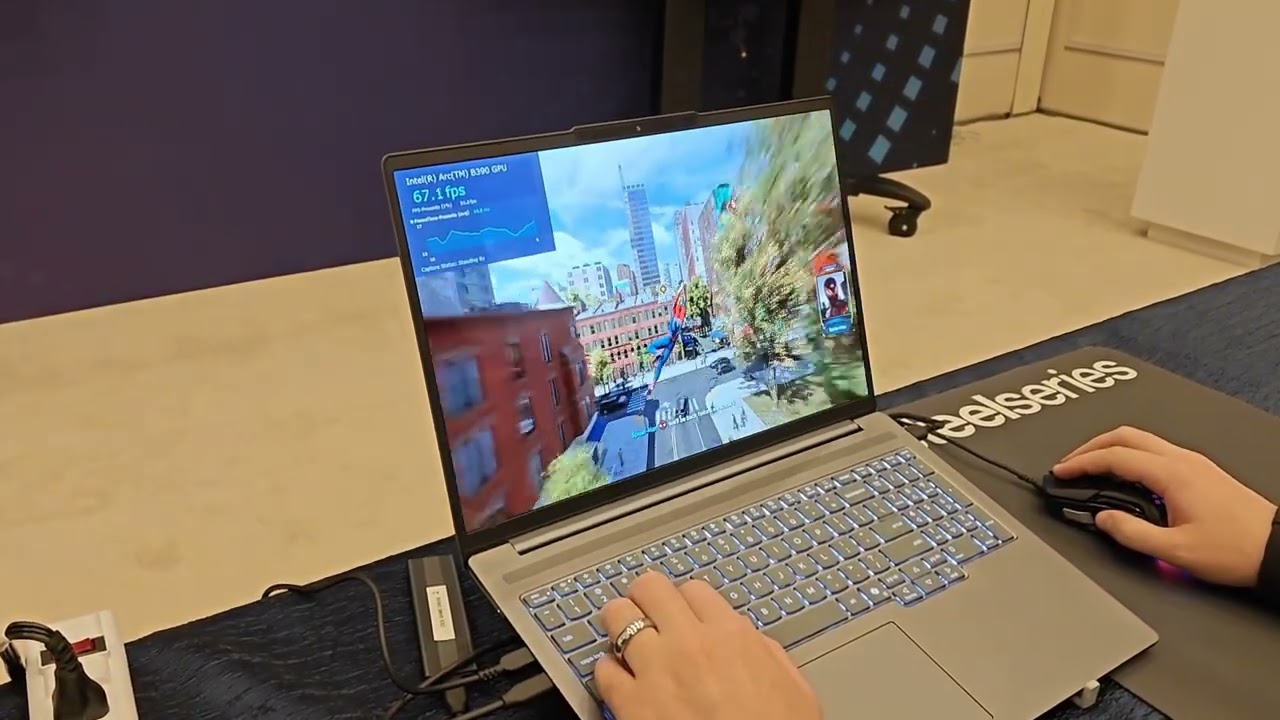
We tested Spider-Man 2 with FSR frame generation, XeSS Quality, and 1080p resolution, which you can see the performance of in real-time in the video above. This provided a much better experience and clearly showed off the capabilities of Panther Lake without the drawbacks of Intel’s software ecosystem. Some of those drawbacks are too big to ignore. However, in many titles, moving over to FSR or Lossless Scaling can bring Panther Lake to life in a way that the limited support for XeSS 3 can’t.
The average frame rates are solid, but consistency is a bit different. There were titles where the consistency was great, such as Cyberpunk 2077, while others, like Baldur’s Gate 3, struggle. And there are still games that will prove too demanding for Panther Lake without heavy assistance from both upscaling and frame generation as evidenced by Monster Hunter Wilds.
Questions linger about Intel’s software stack
Intel has done a lot of work stabilising its Arc driver releases, and today, they’re much more robust than what we saw just a few years ago with the initial release of Alchemist GPUs. Still, I have some concerns about the software when it comes to using Panther Lake in a wider swath of games.
In addition to the titles above, we tried to test Clair Obscur: Expedition 33 and Battlefield 6, both of which we weren’t able to gather data for because Intel’s PresentMon — the monitoring tool available to us for testing — wasn’t able to hook into the game. Clair Obscur: Expedition 33 also reduced the resolution to just 900p each time we toggled to fullscreen mode; a well-known bug in this game that shows up across GPU vendors.
In areas Intel can more directly influence, there were still issues. Monster Hunter Wilds had an unplayable level of stuttering on the first benchmark pass, while the quality of XeSS in Clair Obscur devolved into a shimmering mess while falling short of a 60 fps average. These, thankfully, aren’t issues in the driver, but it takes the claims about Intel’s all-in-one graphics ecosystem down a peg when looking at the real-world experience.
Although we didn’t focus on frame generation, others in the room did; just behind our station, another journalist spent the better part of 45 minutes troubleshooting Intel’s multi-frame generation overrides in the driver without success. The performance of Panther Lake is solid, and I’m confident in it when combined with tools like FSR and Lossless Scaling. You can expect some bumps in the road if you stay fully within Intel’s ecosystem, however.
That shouldn’t overshadow the impressive performance of Panther Lake. The performance is stunning considering the hardware, and even moreso when factoring in power and temperatures. We’re looking forward to sharing those results with you when we can, but broadly, Intel’s claims about Panther Lake hold up. It’s a relentlessly powerful and efficient SoC that hits a sweet spot few other chips can touch. Hopefully our initial testing results hold up once we can dedicated dozens of hours to putting Panther Lake through the full gauntlet.