Communication Features
Networking And Sharing Center

The networking interface has been revamped completely in Vista. Instead of right-clicking onto My Network Places in order to find configuration options, you can access the Networking and Sharing Center. It offers an overview on current network connections and related settings such as network discovery, file sharing status, printer and media sharing. (Yes, you can share multimedia data across various Vista PCs in a network...)
As long as all network drivers have been installed, Windows can automatically connect to wired and wireless networks. Unlike Windows XP, Vista is perfectly capable of detecting up-to-date protocols such as WPA2 and both TKIP and AES encryption. Under Windows XP the system sometimes isn't capable of detecting the correct settings, so you would need third party software to manually set up your wireless connection.
The Networking and Sharing Center offers a plethora of direct links on the left hand side to view computers and devices, to connect to networks - dial-up, PPPoE or Wireless, with wired networks working automatically - and manage existing connections. The latter is the item that you need to get the classic view of all network devices.

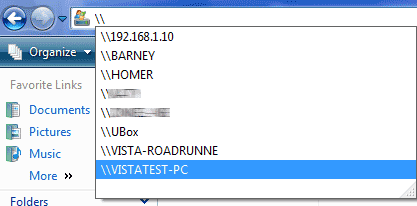
To access other systems, Windows Vista offers a more user friendly network discovery function. Simply type the double backslash into the address field of any Explorer window, and Vista will show you all the systems it can find.
