All about Build Your Own
 Latest Build Your Own articles
All Build Your Own articles

Newsletters


  • Ask your question about IT issues
  • Post

Partners

The Games selection

violent : Interactive Buddy Unwind on your interactive buddy: Do anything you want to him, it will earn you money, and you can buy other stuff to torture him with.
kids : Bob Throw bubbles so as to make the ones that appear in the game disappear. For this, use the Right / Left arrow keys to duck or move about, and the...
Ads

Sponsored links

Benchmark Results

Previous Next
1:06 PM - 09/06/2001 by Patrick Schmid

Data Transfer Diagrams

Single Drive


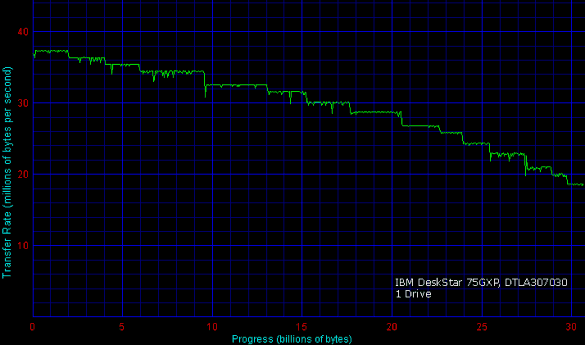
Most of you should be familiar with the transfer diagram of a hard drive like the DTLA.

Two Drives, One Channel


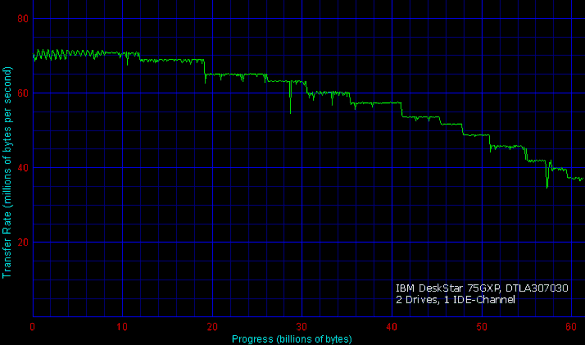
This diagram looks pretty much the same, using two instead of only one drive. Only the scale is different: While the single drive provides a maximum of 36 MB/s, the two-drive configuration starts at approximately 70 MB/s - that is double the transfer performance.

Two Drives, Two Channels


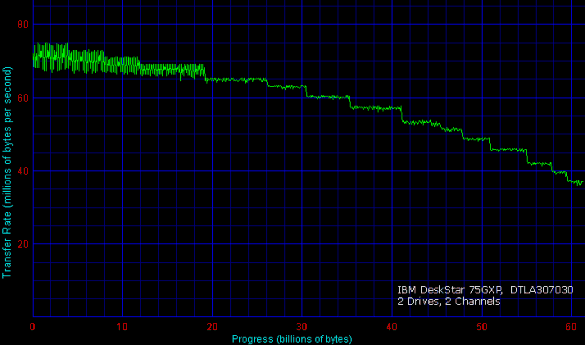
Using two instead of only one IDE channel hardly has any impact on the data transfer performance.

Three Drives, Two Channels


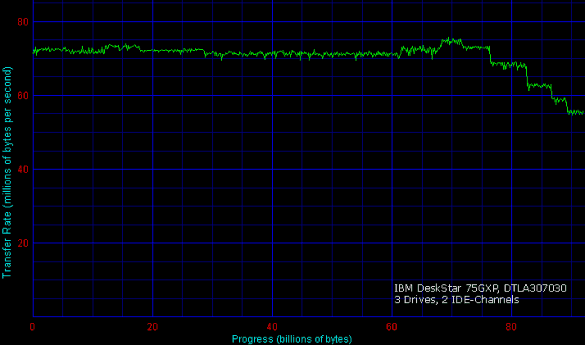
Attaching a third drive to the setup above won't exceed ~75 MB/s, but it makes sure that the transfer rate stays constant at > 55 MB/s. The two-drive setup drops to 38 MB/s, which is quite a difference for demanding applications.

Talkback
Comments are closed on this page.

Sponsored links