Awesome $11 power button gadget lets you start your PC from your desk — make your life easier by not having to bend down to reach the power button, super-durable external power switch
Now and again, you come across a product so excellent within such a narrow category that it makes you marvel at the effort put into its creation. While browsing for Cyber Weekend deals, we spotted exactly such a product. The "SinLoon External Power Button for Desktop, PC Power Switch, Push Button, Manual Operation, Black" is precisely what it says on the tin: a 2-meter cable that connects to your PC's front-panel headers and ends in a pair of mechanical keyboard switches. The innovative PC power switch is now just $11 for Cyber Monday.
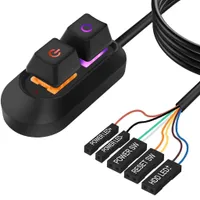
We don't want to understate how hard the manufacturer went on this thing. The two key switches that serve as your PC's power and reset buttons are made to look like Cherry MX-compatible mechanical keyboard switches, and SinLoon claims they're good for over 5 million keystrokes. Hopefully, you don't need to press either of these buttons five million times. Besides the buttons, there are also connectors for the PC's power LED and disk access LEDs.
This slick external power button features a 2-meter (~78 inches) cable and a splitter that lets you connect both to your case's front panel buttons. It also includes adhesive pads and zip-ties.
The keys rest in a smooth black plastic case with a wire that extends to the PC itself, and that's where we find this product's next trick: an included "1 to 2 splitter" that allows you to connect both the external power and reset buttons as well as the standard case front connectors. It's just a basic physical adapter, so even if your pinout doesn't match the documentation's, you can move the headers around until they're all in the right place.
As much as we want to call this a novelty product for how overbuilt it is, it could honestly be quite valuable for some folks. There are many situations where it could help: folks with back issues or mobility problems who can't easily press a floor-bound PC's power button, or scenarios where the PC ends up in a secured position that makes it inconvenient to push the front panel buttons.
Ideally, you shouldn't have to do that too often, but a product like this makes it completely trivial when you inevitably do. There are also cases like our hardware test labs, where the open-air testbed chassis don't include front panel connectors; a product like this steps in nicely for budget boards that don't have on-board power and reset connectors.
Frankly, we can think of many less-fruitful ways to spend eight-and-a-half bucks. For overclockers, for folks who are extremely sensitive to aesthetics (and want to hide an ugly desktop PC), or simply for enthusiasts who enjoy the feeling of a big, clicky key to power on their PC, SinLoon's external power button could make an excellent stocking stuffer or gag gift.
If you're looking for more Cyber Monday savings, check out our Best PC Hardware deals for a range of products, or dive deeper into our specialized SSD and Storage Deals, Hard Drive Deals, Gaming Monitor Deals, Graphics Card Deals, Gaming Chair, Best Wi-Fi Routers, Best Motherboard or CPU Deals pages.

Get Tom's Hardware's best news and in-depth reviews, straight to your inbox.

Zak is a freelance contributor to Tom's Hardware with decades of PC benchmarking experience who has also written for HotHardware and The Tech Report. A modern-day Renaissance man, he may not be an expert on anything, but he knows just a little about nearly everything.
-
JeffreyP55 Reply
Useless.. At least for me. A bluetooth remote control thingie would work. Actually, make it WiFi. I could add it to the universal remote. :)Admin said:You could do a lot worse for $8.49 than this gloriously overbuilt external power switch.
Awesome $8.49 power button gadget lets you start your PC from your desk — make your life easier by not having to bend down to reach the power butto... : Read more -
bit_user I've started doing new builds on an open "bench" setup, until I've got the cooler mounted and know everything works properly. Then, I move it into a case. For a while, I was using a paper clip as a substitute for a power button. I got one of these and it was such a luxury!Reply
https://www.amazon.com/dp/B0D2HSRDHQ
It does feel a little cheap, but would otherwise be fine for daily use. I never use the "reset" switch, so its absence is a non-issue for me. -
DingusDog Or you could get your PC off the dusty floor and put it on the desk within arms reach. I might be interested if it were wireless the last thing I need is another cable running across my desk.Reply -
bit_user Reply
The one I use most is on the floor, sitting at the far side of my desk. It's inaudible at that distance. I used all Noctua fans and set custom curves, but I can still hear them at idle, if it's on my desk.osirhc17 said:Y'all keep your PCs on the ground?
Also, the air near the floor is coolest.
I have more PCs (and networking gear) than desk space!tiredcrow said:My desktop is in fact on top of my desk
: D
I also have what was originally a hi fi rack next to my desk (at 90 degrees, so it's facing me and in easy reach), which holds some audio gear and my KVM switches. -
TerryLaze Reply
Just search for 'Wifi PC Power Button Reset Switch' on amazon or ali or wherever you prefer, plenty of different options, some on pci cards so your front buttons still work, others that plug straight into the mobo.JeffreyP55 said:Useless.. At least for me. A bluetooth remote control thingie would work. Actually, make it WiFi. I could add it to the universal remote. :)
You can also get front panel splitter cables for those that plug into the mobo. -
abufrejoval Reply
Same here: I assemble my systems typically on a mainboard box until I'm convinced everything works.bit_user said:I've started doing new builds on an open "bench" setup, until I've got the cooler mounted and know everything works properly.
And during that time, which may involve more reboots than ever after, it's tyically a screw driver to power, shutdown or reset, often in the midst of a blank screen and a drive I'd rather not corrupt.
I used to have external toggles and buttons on long cables for things like Turbo or changing SCSI IDs for flexible boot orders, but they may be hiding in some deeper drawers now.
CMOS-clear was another one I yearned to have a switch for, when doing DDR5 RAM overclock and dual-DIMM-per-channel tests.
But I guess cleanging out those drawers would actually be better than buying something new that's so easy to get lost within them. -
abufrejoval Reply
Last PC on the desk was an IBM PC-AT clone in 1986. While it looked very much like the original, it had a top opening hinge cover, which only required heaving the EGA monitor off its back to access its entrails.osirhc17 said:Y'all keep your PCs on the ground?
And in those times everything was configured via DIP switches or jumpers, so going inside was far more frequent than it is today beyond initial building.
It also still had floppies, or at least one 1.2MB drive, that was needed to move data and software via the sneaker-net and for backups, the main reason to have it in arms reach.
Everything 80386 and beyond was proper tower cases and floor standing as if it was a Micro-VAX., quite the look (and functionality) I was aiming for, backups moved to QIC tapes or Syquest removable disks but reaching drives didn't mean bending low on a full height tower.
Once the Internet replaced the sneaker-net and backups went to secondary PCs, there was no longer any need to look at computers or physically interact with them for operations (vs. configuration).
I never understood the urge for bling bling, my focus was always on the screen and any desktop void filled by them not the boxes behind/below.
Only NUCs and NUCalikes (eight, currently) became horizontal again, but would then go into a metal mesh shoe-stand to form clusters with some ventilation in a space somewhat crowded by tower PCs (seven at this moment).
The giant desk is a wall of screen with cascaded KVMs below and network switches behind (also plenty of cables, good things screens got to be flat!), a top shelf holds Raspis or other tiny computers, WIFI AP, a firewall and until last week a corporate laptop finally returned after a 45 year career in IT.
That's not counting other rooms or family...
I eliminated books, folders, filing cabinets, CDs, DVDs or pretty near everything that could be made digital-only, so net-net I might have saved some space, but I guess the next challenge is still reducing footprints, all of them. -
JeffreyP55 Reply
MAG X870 Tomahawk WiFi, No PCI slot. I was just playing around, I'm too lazy to get off of my rear end. :)TerryLaze said:Just search for 'Wifi PC Power Button Reset Switch' on amazon or ali or wherever you prefer, plenty of different options, some on pci cards so your front buttons still work, others that plug straight into the mobo.
You can also get front panel splitter cables for those that plug into the mobo.
