









Why you can trust Tom's Hardware Our expert reviewers spend hours testing and comparing products and services so you can choose the best for you. Find out more about how we test.
Nvidia GeForce RTX 5060 Ti 16GB Ray Tracing Gaming Performance
Ray tracing can be extremely demanding, and it often requires high-end hardware. Is the RTX 5060 Ti 16GB a "high-end" GPU? Not in our opinion, which means that performance at higher resolutions will quickly drop into the unplayable range. Upscaling and framegen are generally required to get a good experience from the 5060 Ti and similar GPUs with ray tracing enabled, but we'll stick with native for our baseline performance tests.
The more demanding RT games are usually better optimized for Nvidia GPUs, and often Nvidia promoted. That's no surprise as Nvidia has been pushing the tech far more than AMD or Intel. We've got four RT games for our testing — we dropped Control Ultimate due to a recent patch, and are currently retesting it. We also ditched Minecraft, for a variety of reasons.
It's also worth pointing out that both Avatar and F1 24 are relatively lightweight games as far as RT goes. The latter doesn't seem to use RT too much, unless you use the "unobtanium" settings, while F1 24 shows very little difference in visuals with RT on or off — and even at 4K it's hitting pretty reasonable framerates. Our intent is to add another DXR game or two in future reviews, preferably more demanding games.


View Original

View Original

View Original

View Original

Because ray tracing is so much more demanding, we've ordered the charts from 1080p medium through 4K ultra — with the understanding that 4K ultra at native rendering will be far too much for budget and mainstream GPUs. But the results are there if you want to look at them.
With ray tracing, the RTX 5060 Ti 16GB comes in ahead of AMD's previous generation RX 7800 XT, but it's still behind the RTX 4070. The 5070, 9070, and 4070 Super are all pretty close to tied in overall RT performance.
Gen-on-gen, the 5060 Ti 16GB outperforms the RTX 4060 Ti 16GB by 13–19 percent, with the bigger margins coming at higher resolutions and settings. The PNY card still squeaks past the Asus card, though not by a meaningful amount, and the thermals and noise levels are also something to consider. Three of the four DXR games in our suite had serious performance issues with 8GB cards (like the 4060 Ti).
You can certainly use the 5060 Ti 16GB to play ray tracing games, and even full RT is within reach if you enable upscaling and framegen/MFG. 1080p Ultra ran sufficiently fast in three of the four games, but Cyberpunk 2077 still needs a bit of help to get above 60 FPS (never mind the full RT-overdrive settings).


View Original

View Original

View Original

View Original

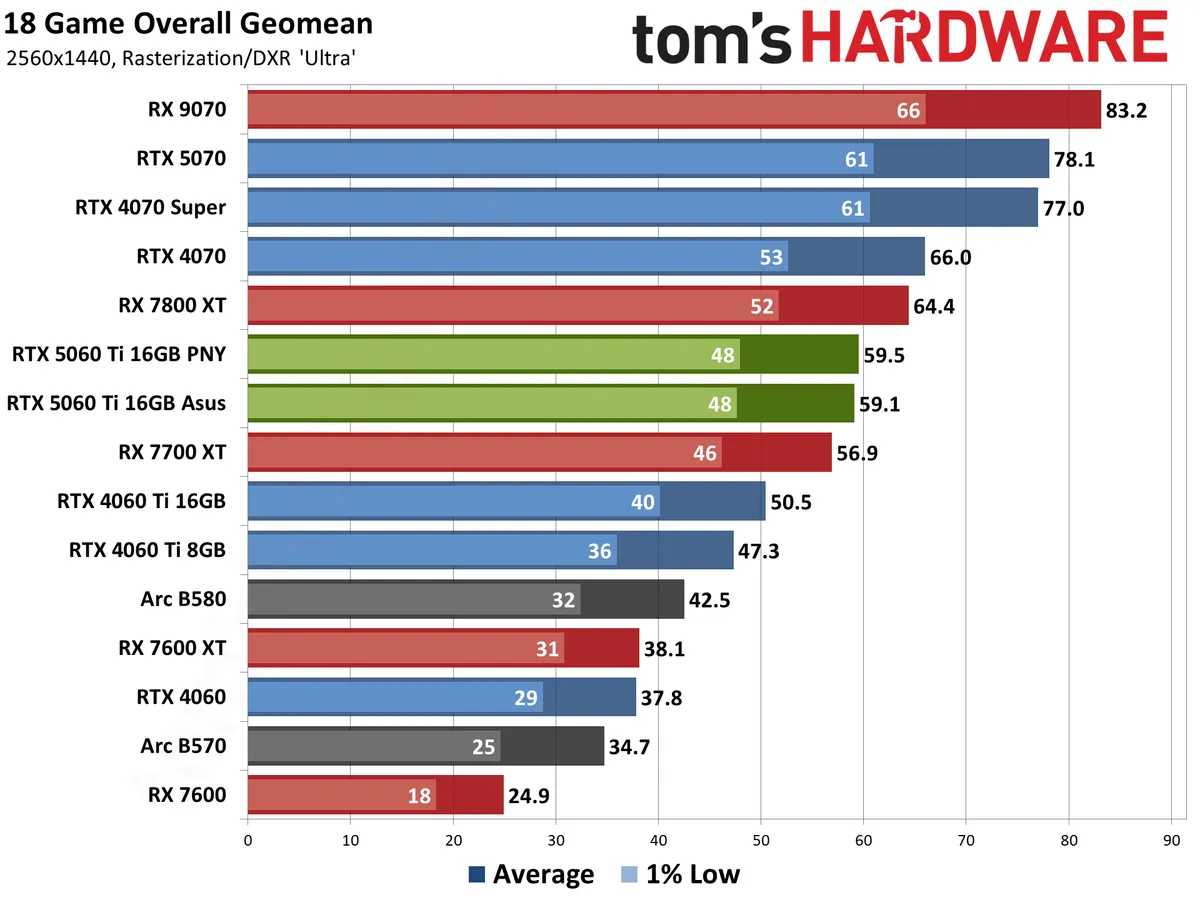
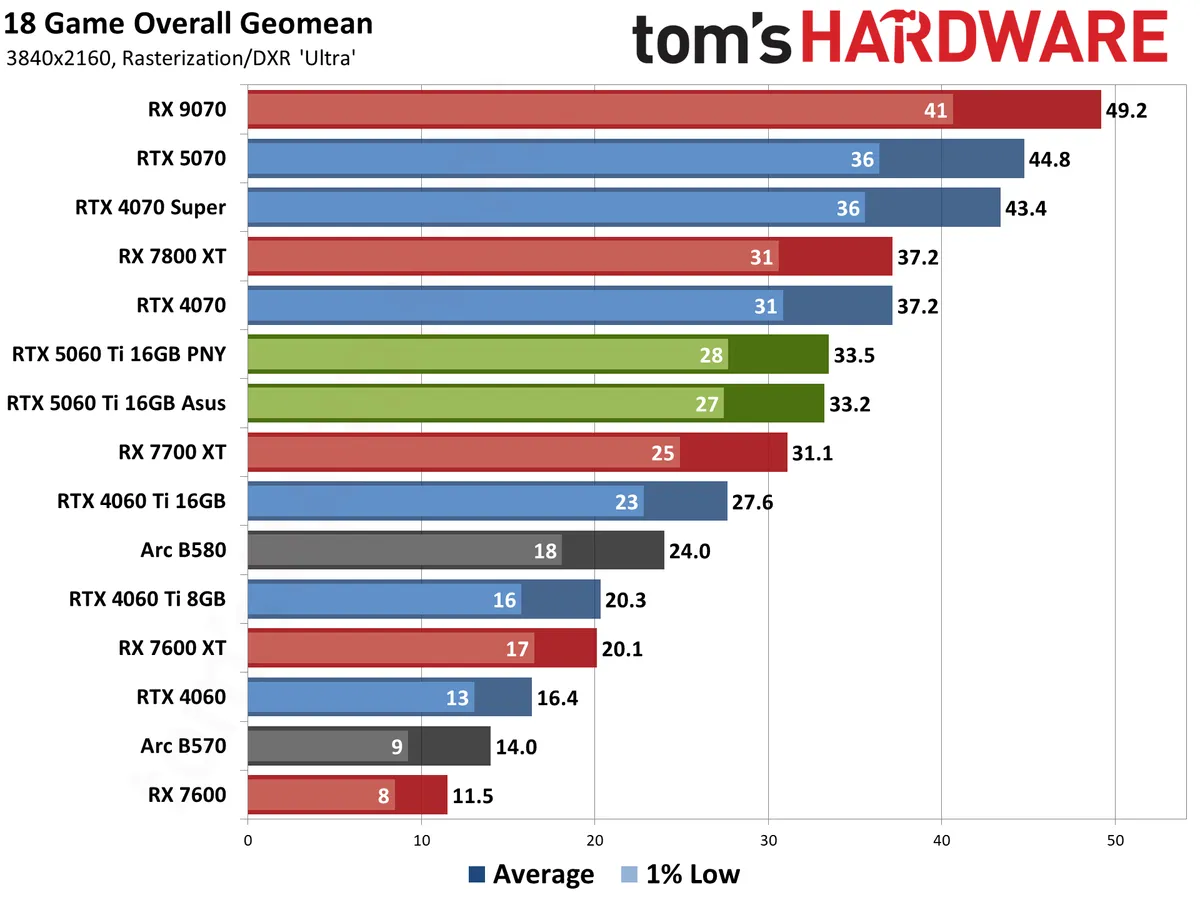
Combining all 18 game results into a single chart doesn't radically change the view. The RTX 5060 Ti outperforms its RTX 4060 Ti (8GB) predecessor by 15 percent at 1080p, 25% at 1440p, and 65% at 4K. 8GB definitely doesn't work well at 4K, but the 4060 Ti 16GB fares much better — the 5060 Ti is only 16–21 percent faster. That's a decent uplift, for a lower price (ostensibly), but it's also not a worthwhile upgrade. If you're running a GPU from four years back, the 5060 Ti should be a lot more compelling.
There's still a big gap between the 5060 Ti 16GB and the 5070, and an even larger gap between the 5060 Ti and the 9070. The pricing gap is equally large. The new 5060 Ti does consistently surpass AMD's RX 7700 XT, however, which isn't something the 4060 Ti could manage — not that the 7700 XT can be found at decent prices these days (in the U.S.)
In retrospect, I feel like I was perhaps too harsh about the 4060 Ti 16GB. It's still primarily a 1440p or 1080p card, and most of the biggest differences in performance between the 8GB and 16GB cards only show up at 4K. But even where performance is generally okay on the 8GB model, there are plenty of occasions where the 16GB just doesn't feel as temperamental. The big issue with the 4060 Ti was that the doubled VRAM was originally a $100 upsell. It's a far more palatable $50 difference with the 5060 Ti, which makes the 8GB card mostly superfluous.
The individual RT gaming charts follow, again with limited commentary on each.


View Original

View Original

View Original

View Original

Avatar: Frontiers of Pandora uses ray tracing, but it's not particularly forthcoming on when and where it's used. Reflections, in general, don't appear to use RT, which is one of the most noticeable upgrades RT can provide. Instead, it's used for shadows and possibly global illumination and some other effects. What I can say for sure is that nothing in the menus (other than "BVH Quality") directly mentions ray tracing, and the performance hit doesn't seem to be as severe as in some games. Still, since there's RT of some form, this one gets lumped into our DXR suite. Our test sequence runs around the outside of the Resistance HQ.


View Original

View Original

View Original

View Original

Possibly the most hyped-up use of RT in a game, Cyberpunk 2077 launched with more RT effects than other games of its era, and later, the 2.0 version added full path tracing and DLSS 3.5 ray reconstruction. Ray reconstruction ends up looking the best but only works on Nvidia GPUs, so, as with upscaling, it can be a case of trying to compare apples and oranges.
We're using medium settings with RT lighting at medium and RT reflections enabled, and then the step up uses the RT-Ultra preset. In all cases, any form of upscaling or frame generation gets turned off. Our test sequence is a manual walk around Night City in the vicinity of Tom's Diner, during the day.


View Original

View Original

View Original

View Original

F1 24 enables several RT effects on the ultra preset but leaves them off on medium. But then 1080p medium runs at hundreds of frames per second, so we went ahead and turned all the RT effects on for our testing. We use the Great Britain track for testing.


View Original

View Original

View Original

View Original

Last on our list of RT-enabled games, Spider-Man: Miles Morales doesn't look as nice with RT turned on as the previous Spider-Man: Remastered. The reflections are less obvious, and perhaps performance is better as a result. But beyond the RT effects, maxing out the settings in Miles Morales definitely needs more than 8GB of VRAM, and even 12GB cards can struggle at times. Our test sequence has us swinging around New York, above a street that has some cars and pedestrians.
Get Tom's Hardware's best news and in-depth reviews, straight to your inbox.

One final ray tracing benchmark we have is the 3DMark DXR Feature Test, where we report the average FPS rather than the calculated score. This is similar to full RT in a game, only done via a standalone benchmark and perhaps in a more vendor-agnostic fashion. Nvidia has also fixed a bug here that was causing Blackwell 50-series GPUs to underperform.
If this truly represents the RT hardware capabilities of the various GPUs, it looks like AMD still has plenty of catching up to do. The 5060 Ti 16GB beats the RX 9070 — not by a lot, but considering the 9070 normally takes on the 5070, it shows how good Nvidia's RT cores are. Alternatively, it shows that Nvidia has done more work to optimize drivers for 3DMark, so take these results for what they are but look to gaming RT results as a better overall indication of performance.
- MORE: Best Graphics Cards
- MORE: GPU Benchmarks and Hierarchy
- MORE: All Graphics Content
Current page: Nvidia GeForce RTX 5060 Ti 16GB Ray Tracing Gaming Performance
Prev Page Nvidia GeForce RTX 5060 Ti 16GB Rasterization Gaming Performance Next Page Nvidia GeForce RTX 5060 Ti 16GB Full RT and DLSS Testing
Jarred Walton is a senior editor at Tom's Hardware focusing on everything GPU. He has been working as a tech journalist since 2004, writing for AnandTech, Maximum PC, and PC Gamer. From the first S3 Virge '3D decelerators' to today's GPUs, Jarred keeps up with all the latest graphics trends and is the one to ask about game performance.
-
Amdlova I want to say that is a nice card... But with 180w TBP for those numbers it's a waste of sand.Reply
nvidia is afraid to bench the 8GB cards... Just buy an AMD card and be happy -
palladin9479 Once the 8GB model comes out would be nice to see a quick article focusing just on 4060 and 5060 8 / 16 finding the settings where 8GB stops being capable. The 1080p medium graph shows that the 8GB cards work fine at that level, but then the next step is "ultra" which usually has ridiculous texture sizes. Would be nice to see 1080, 1440, 2160 "high" or "very high", one step down from ultra and see how well those cards do. Someone buying a xx60 class card isn't going to have a good experience playing at 4K "ultra".Reply
Amdlova said:nvidia is afraid to bench the 8GB cards... Just buy an AMD card and be happy
It's right in the article just compare both versions of the 4060. Each test has a graph at the very end using 1080p medium and you can see the 8GB model does very well there. They didn't have time to do additional testing with "high" or "very high" intermediate levels and ultra has ridiculously large texture sizes that start to hurt 8GB cards. I see them as doing well on 1080/1440 with "high" settings, basically a budget gamer using whatever they can get their hands on. We laugh but I know a ton of guys like that at work, have wives and kids are upgrade a piece at a time. -
JarredWaltonGPU Reply
In our test suite, 1080p ultra is still playable in all 18 games on an 8GB card, or at least an 8GB Nvidia card. (The RX 7600 may have some issues in one or two games.) There are however games like Indiana Jones where 8GB represent a real limit to the settings you can use. The TLDR is that it varies by game, but 1080p/1440p "high" should be fine on an 8GB card. I'd still pay the extra $50 if I were in the market for this sort of GPU (assuming it's only a $50 difference, naturally).palladin9479 said:Once the 8GB model comes out would be nice to see a quick article focusing just on 4060 and 5060 8 / 16 finding the settings where 8GB stops being capable. The 1080p medium graph shows that the 8GB cards work fine at that level, but then the next step is "ultra" which usually has ridiculous texture sizes. Would be nice to see 1080, 1440, 2160 "high" or "very high", one step down from ultra and see how well those cards do. Someone buying a xx60 class card isn't going to have a good experience playing at 4K "ultra". -
cknobman So the new gen 60 TI class card cant even come close to matching the last gen vanilla 70 class card?Reply
Seems like a really bad "upgrade" to me.
Definitely a 3 star, not 4, kind of score.
Also if you have been keeping up with the news Nvidia is purposely not letting 8gb cards get reviewed.
They told partners they are not allowed to sample those cards out for review.
The only way you will get 8gb card reviews is AFTER release and when they are purchased at retail by reviewers.
The only reason this is happening is because Nvidia knows the 8gb cards are crap. Making reviews wait until after retail availability ensures that at least the first batch will fly off shelves regardless.
Nvidia is a terrible company. -
palladin9479 ReplyJarredWaltonGPU said:In our test suite, 1080p ultra is still playable in all 18 games on an 8GB card, or at least an 8GB Nvidia card. (The RX 7600 may have some issues in one or two games.) There are however games like Indiana Jones where 8GB represent a real limit to the settings you can use. The TLDR is that it varies by game, but 1080p/1440p "high" should be fine on an 8GB card. I'd still pay the extra $50 if I were in the market for this sort of GPU (assuming it's only a $50 difference, naturally).
Yeah it's all price dependent $50 USD to go from 8 to 16 is a no brainer, but there is a large market for older stuff including used cards (see your other article). Steam survey has 1080p being 56.40% of the market with 1440p being 19.06%, that's 3/4ths of the gaming market between those two resolutions. 8GB VRAM was 35.52% with 12GB at 18.42 and 6GB at 11.93%. Over 60% of the market was 8GB or less and only ~7.2% had 16GB or more. We've obviously got a center mass of sorts around 1080/1440 with 8GB, kind of the definition of "mainstream" and why I'm interested in that bracket despite youtubers claiming that a 8GB card can't run solitaire in 2025.
It's not sexy but it's the vast majority of the consumer gaming market and with economies being what they are are prices going up, that market segment wants to squeeze as much out of it's limited disposable income as possible.
I mean RX 7600 8GB at $290 USD. Dirt cheap by todays standards. The poster child of "1080p medium/high".
https://www.amazon.com/PowerColor-Hellhound-Radeon-Gaming-Graphics/dp/B0C48LM7NN/ -
Alvar "Miles" Udell I'd say this is a 3 star card.Reply
Should have knocked a star off just because the 8gb model exists to up charge for the 16gb model.
The 19% rasterization performance improvement deserves another deduction because it is a terrible Gen over Gen increase, same across the 5000 series stack. Yes it's just a refinement generation, but even for MSRP you're talking over $400 for 1080p75/1440p60 in 2025 and not even matching last gens 4070, which will be made all the worse once custom editions tack on their upwards of $100 premiums.
Granted this is an upper entry level gaming card, a PC built around it is still very much more expensive than a console, and needs to have performance that justifies it. -
DRagor I have checked my local market. All 8Gb cards were sold out while 16Gb were still in stock, some even at MSRP (although many had price close to 5070 lol). For me it is clearly foul play by NVIDIA: let the ppl watch 16Gb version reviews and then go buy cheaper 8Gb models coe they're cheapo and ppl don't understand difference.Reply -
Gururu B580s are still in stock... So many similar cards tested from the big two, why not toss in the ARC B580 for buyer options? We know it sits in the 7600/4060 class or higher.Reply -
Roland Of Gilead Reply
Totally agree with you. I was kinda hoping the 5060ti would have a similar bump like the 3060ti did, being faster than a 2080 Super. I kinda figured from the reviews of the new gen 50xx models that it wouldn't really hit the point. But to do so, so unspectacularly is not good.cknobman said:So the new gen 60 TI class card cant even come close to matching the last gen vanilla 70 class card?
As pointed out, the 5060ti 16gb is the only choice for only $50 more. It's a no brainer.
I'm quite happy now with my 4070 Super, and have no FOMO. Well, maybe apart from the 9070XT, which I think is hands down the award winner in the last roll out of GPU's. Defo the stand out card right now, if they are available. -
ThereAndBackAgain Reply
Honestly, if people don't understand the difference between 8 GB VRAM and 16 GB VRAM, they shouldn't be spending $400+ on a GPU in the first place. But it's kind of hard to imagine someone knowledgeable enough to build their own PC not comprehending VRAM. The people who bought those cards most likely knew exactly what they were getting.DRagor said:I have checked my local market. All 8Gb cards were sold out while 16Gb were still in stock, some even at MSRP (although many had price close to 5070 lol). For me it is clearly foul play by NVIDIA: let the ppl watch 16Gb version reviews and then go buy cheaper 8Gb models coe they're cheapo and ppl don't understand difference.