Tom's Hardware Verdict
The Corsair HX1500i delivers exceptional electrical performance and premium build quality with comprehensive digital monitoring capabilities. While the $390 price and oversized chassis present barriers, its outstanding efficiency, zero-RPM operation, and robust feature set make it an excellent choice for high-performance systems requiring substantial, reliable power delivery.
Pros
- +
ATX 3.1 and PCIe 5.1 compliance
- +
Dual 12v-2x6 connectors
- +
Premium component selection
- +
10-year manufacturer’s warranty
- +
Platinum-level efficiency
- +
High-quality individually sleeved cables
- +
Virtually silent operation
- +
Digital interface with iCUE integration
Cons
- -
Expensive
- -
Extremely long chassis (200 mm)
- -
Basic bundle
Why you can trust Tom's Hardware Our expert reviewers spend hours testing and comparing products and services so you can choose the best for you. Find out more about how we test.
Within Corsair's extensive power supply portfolio, the HX series occupies a strategic position between mainstream offerings and flagship AX models, delivering near-premium performance at more accessible price points. The 2025 version of the HX1500i represents the latest evolution of this philosophy, incorporating ATX 3.1 compliance while maintaining the series' reputation for reliability and performance.
This 1500-watt unit targets enthusiasts building systems with multiple high-end graphics cards, flagship processors, and extensive storage arrays. How does it stack against our best power supplies list? Beyond raw power capacity, the HX1500i integrates digital monitoring capabilities through Corsair's iCUE ecosystem, providing real-time telemetry and customization options that distinguish it from purely analog alternatives. The critical question becomes whether this combination of features, performance, and brand heritage justifies the premium positioning in an increasingly competitive market segment.
Specifications and Design
RAIL | +3.3V | +5V | +12V | +5Vsb | -12V |
MAX OUTPUT | 20A | 20A | 125A | 3.5A | 0.3A |
| Row 2 - Cell 0 | 100W | 100W | 1500W | 17.5W | 3.6W |
TOTAL | 1500W | Row 3 - Cell 2 | Row 3 - Cell 3 | Row 3 - Cell 4 | Row 3 - Cell 5 |
AC INPUT | 100 - 240 VAC, 50 - 60 Hz | Row 4 - Cell 2 | Row 4 - Cell 3 | Row 4 - Cell 4 | Row 4 - Cell 5 |
MSRP | $390 | Row 5 - Cell 2 | Row 5 - Cell 3 | Row 5 - Cell 4 | Row 5 - Cell 5 |
In the Box
Corsair's packaging approach for the HX1500i reflects both brand consistency and environmental consciousness. The substantial cardboard enclosure features the company's signature yellow and black color scheme while minimizing plastic components in favor of paper-based cushioning materials.

However, the unboxing experience reveals a notably sparse accessory collection that feels inadequate given the unit's premium positioning. The included items - basic mounting hardware, standard AC cable, and minimal cable management accessories - pale in comparison to competitors who provide comprehensive installation kits.

The cabling system compensates somewhat for the bundle’s shortcoming, featuring uniformly black, individually sleeved conductors with factory-installed cable combs on primary connections. Two 12v-2x6 connectors accommodate next-generation graphics cards, though each requires dual 8-pin PCIe connections at the PSU end, which is an arguably better design choice that distributes current load while maintaining flexibility. An internal USB header connection enables motherboard integration for iCUE monitoring, distinguishing this model from conventional power supplies. The number of connectors is identical to the connector count found on the HX1200i despite the increased power capacity.

Connector type | Hardwired | Modular |
|---|---|---|
ATX 24 Pin | - | 1 |
EPS 4+4 Pin | - | 2 |
EPS 8 Pin | - | - |
PCI-E 5.0 | - | 2 |
PCI-E 8 Pin | - | 5 |
SATA | - | 8 |
Molex | - | 6 |
Floppy | - | - |
External Appearance
The visual design is very well-balanced, making the HX1500i visually appealing but not extravagant and/or kitschy. Satin black coating provides an attractive foundation, enhanced by strategically placed decorative elements and subtle edge chamfering that adds visual depth without appearing ostentatious.

Measuring 200mm in length, the HX1500i significantly exceeds standard ATX specifications, demanding careful case selection and internal clearance verification. This dimensional consideration becomes particularly crucial in compact or mid-tower configurations where space constraints could preclude installation. The integrated fan guard incorporates a distinctive triangular mesh pattern that continues across the rear ventilation area, creating design cohesion while serving functional purposes.


Modular connectors occupy the majority of the front panel. Nine 8-pin connectors accommodate both PCIe and EPS requirements, meaning that not all of the EPS/PCIe cables can be installed simultaneously. The top side is partially covered by a sticker displaying electrical certifications and specifications. The rear panel hold the standard AC receptacle and power switch.


Internal Design
Thermal management relies on a Corsair-branded NR140P fan featuring fluid-dynamic bearings that prioritize longevity and acoustic performance. The 1800 RPM maximum speed appears conservative given the unit's 1500-watt capacity, reflecting confidence in the underlying thermal architecture and component efficiency.

Channel-Well Technology (CWT) serves as the manufacturing partner, though Corsair maintains significant design influence throughout the development process. The HX1500i is utilizing the same platform as the HX1200i, enhanced in order to handle the extra power output.


The architecture begins with comprehensive EMI filtering incorporating six Y capacitors, three X capacitors, and dual filtering inductors. Two rectifying bridges can be found on the primary heatsink assembly, handling initial AC-to-DC conversion duties efficiently.


Active PFC implementation utilizes two Infineon 60R099P6 MOSFETs working alongside companion diodes, all sharing the same heatsink with the rectification bridges. The array is digitally controlled – hence the semi-digital design – to improve efficiency. The active components operate in conjunction with dual encased inductors and three high-quality Nippon Chemi-Con capacitors, two 680 μF plus one 470 μF, representing an upgrade from the HX1200i's capacitor configuration.

Primary inversion employs four Alpha & Omega 29S50 MOSFETs arranged in a full-bridge LLC topology, mounted on dedicated heatsinking adjacent to the main transformers. Secondary rectification utilizes twelve Vishay R626 MOSFETs positioned on a vertical daughterboard - four more than the HX1200i's eight-MOSFET configuration. The 50% increase should give the HX1500i a slight performance advantage as each MOSFET is slightly less stressed.
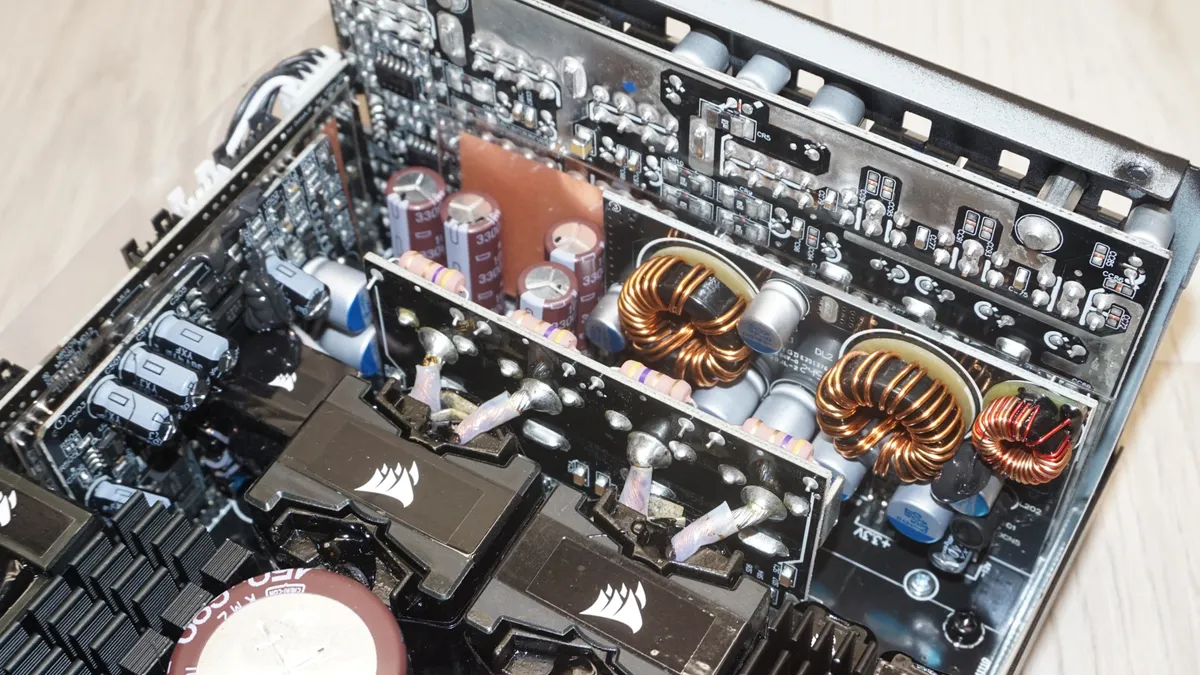
The secondary side capacitors, both polymer and electrolytic, come exclusively from premium Japanese manufacturers (Nippon Chemi-Con, Nichicon, and Rubycon). This no-compromise approach to parts selection directly impacts longevity and performance stability, though such quality is more of a demand than a request at this price tier.

Cold Test Results
Cold Test Results (25°C Ambient)
For the testing of PSUs, we are using high precision electronic loads with a maximum power draw of 2700 Watts, a Rigol DS5042M 40 MHz oscilloscope, an Extech 380803 power analyzer, two high precision UNI-T UT-325 digital thermometers, an Extech HD600 SPL meter, a self-designed hotbox and various other bits and parts.


Under normal ambient conditions, the HX1500i demonstrated excellent efficiency characteristics, achieving Cybenetics Platinum certification across both 115 VAC and 230 VAC inputs. Average nominal load efficiency measured 91.7% at 115 VAC and 92.8% at 230 VAC, figures more than high enough to earn this unit its Platinum certification. The efficiency curve peaks around 40% load while maintaining impressive performance throughout the operational range. Low-load efficiency is just as excellent as the HX1200i’s, showcasing the platform's versatility across varying power demands. Fan operation remains completely silent until load exceeds 600 watts, matching the HX1200i's threshold. The fan maintains conservative speeds even under maximum stress.
Thermal performance during standard testing proves outstanding, with internal temperatures remaining remarkably controlled despite the substantial power output. The iCUE software integration allows custom fan curve adjustments, providing users with personalized acoustic and cooling balance preferences.
Hot Test Results
Hot Test Results (~45°C Ambient)
High ambient temperature testing reveals the unit's behavior under challenging thermal conditions. Efficiency measurements showed 91.1% at 115 VAC and 92.1% at 230 VAC, a minimal degradation compared to cold testing and superior retention compared to many high-wattage competitors. There is virtually no additional degradation under heavy loads, indicating absence of thermal stress even under extreme conditions. This thermal resilience distinguishes the HX1500i from units that exhibit significant performance deterioration as temperatures rise.


Fan activation occurs earlier under elevated temperatures, engaging a little over 400 watts. That was still a good 100 watts higher than what we observed in the HX1200i under similar conditions though. Despite the earlier activation, speed increases remain conservative, reaching maximum RPM only at full load and maintaining very low noise figures for a 1500-watt unit. Internal temperatures also stay remarkably controlled for a 1500-watt unit, demonstrating superior thermal engineering and component selection.
PSU Quality and Bottom Line
Power Supply Quality
The HX1500i delivers exceptional electrical characteristics across all measured parameters. Voltage regulation measures 0.9% on the 12V rail, 0.7% on the 5V rail, and 0.5% on the 3.3V rail - impressively tight tolerances for such a power output. Ripple suppression is equally outstanding with maximum levels of 40 mV on the 12V rail, 24 mV on the 5V rail, and 22 mV on the 3.3V rail.
During our thorough assessment, we evaluate the essential protection features of every power supply unit we review, including Over Current Protection (OCP), Over Voltage Protection (OVP), Over Power Protection (OPP), and Short Circuit Protection (SCP). Protection circuits operate precisely within expected parameters. Over Current Protection engages at 112% on the 12V rail, an extremely sharp figure for an ATX 3.1 unit, with higher thresholds of 136% on both minor rails.
Load (Watts) | 302.92 W | Header Cell - Column 2 | 755.24 W | Header Cell - Column 4 | 1128.35 W | Header Cell - Column 6 | 1500.94 W | Header Cell - Column 8 |
|---|---|---|---|---|---|---|---|---|
Load (Percent) | 20.19% | Row 0 - Cell 2 | 50.35% | Row 0 - Cell 4 | 75.22% | Row 0 - Cell 6 | 100.06% | Row 0 - Cell 8 |
| Row 1 - Cell 0 | Amperes | Volts | Amperes | Volts | Amperes | Volts | Amperes | Volts |
3.3 V | 1.9 | 3.35 | 4.74 | 3.34 | 7.11 | 3.33 | 9.48 | 3.33 |
5 V | 1.9 | 5.09 | 4.74 | 5.07 | 7.11 | 5.07 | 9.48 | 5.06 |
12 V | 23.69 | 12.11 | 59.22 | 12.08 | 88.83 | 12.03 | 118.45 | 12 |
Line | Regulation (20% to 100% load) | Voltage Ripple (mV) | Header Cell - Column 3 | Header Cell - Column 4 | Header Cell - Column 5 | Header Cell - Column 6 | Header Cell - Column 7 |
|---|---|---|---|---|---|---|---|
| Row 0 - Cell 0 | Row 0 - Cell 1 | 20% Load | 50% Load | 75% Load | 100% Load | CL1 12V | CL2 3.3V + 5V |
3.3V | 0.5% | 14 | 12 | 16 | 22 | 16 | 18 |
5V | 0.7% | 16 | 14 | 14 | 24 | 14 | 20 |
12V | 0.9% | 20 | 18 | 26 | 40 | 38 | 24 |
Bottom Line
The Corsair HX1500i represents a compelling option for system builders requiring substantial power capacity combined with premium electrical performance and advanced monitoring capabilities. While the $390 retail price firmly positions it in the premium segment, the combination of exceptional build quality, comprehensive feature set, and reliable performance provides genuine value for demanding applications. Compared to the HX1200i, the HX1500i offers 25% additional power capacity while maintaining similar efficiency, thermal performance, and connector configurations. On the other hand, the HX1200i lacks no features and/or performance compared to the HX1500i, making the HX1500i a reasonable choice only for multi-GPU systems or future-proofing considerations where the HX1200i might approach its limits.

The digital interface integration sets the HX1500i apart from purely analog competitors, enabling comprehensive system monitoring and customization through Corsair's mature iCUE ecosystem. Combined with premium component selection, excellent build quality, and 10-year warranty coverage, this creates a persuasive package for users prioritizing system reliability and performance insights.
The Corsair HX1500i is built with premium components, including Japanese capacitors from Nippon Chemi-Con, Nichicon, and Rubycon, ensuring exceptional reliability and longevity. Its advanced thermal management system maintains optimal operating temperatures, while CWT’s manufacturing expertise and Corsair’s engineering refinements create a PSU designed for long-term stability and performance. However, its substantial 200 mm length exceeds standard ATX dimensions, requiring careful case compatibility checks—particularly for compact or mid-tower cases where clearance may be an issue.

In performance, the HX1500i delivers flagship-level power delivery, maintaining low noise through zero-RPM fan operation under moderate loads and a conservative fan curve at high demand. Thermal efficiency testing shows it remains well within design parameters, supporting long-term reliability. This PSU is ideal for high-end gaming systems, professional workstations, and multi-GPU rendering setups where clean, stable power is critical for stability and component safety. While budget-conscious builders can find similar wattage in less expensive units without its premium build or monitoring features, the HX1500i’s value shines when system demands exceed 1000 W, making it a solid long-term investment for discerning enthusiasts.
MORE: Best Power Supplies
MORE: How We Test Power Supplies
MORE: All Power Supply Content