









God of War (2018) PC Performance: DLSS vs. FSR Tested
Only three years late

God of War — the PS4 2018 release, at least — is finally making its way to PC. Along with visual enhancements, it also has DLSS and FSR support. We've grabbed some of the best graphics cards and tested performance to see how it runs. We've also put together a video showcasing the image quality of the various DLSS and FSR settings using Nvidia's ICAT utility.
For newcomers to the series (like me!), there's a long history that I'm missing. I've certainly seen images and videos of Kratos over the years, but other than the fact that he battles big monsters, I couldn't tell you much. So far, that hasn't really detracted me from enjoying the game. Reviews of the original PS4 version were extremely favorable (94 average at Metacritic), and the PC release has been equally well-received (93 average). I've heard the PS4 release could struggle at times with performance, but the PC release doesn't seem to have any such problems — with the appropriate settings and hardware, at least.
Intel Core i9-9900K
MSI MEG Z390 Ace
Corsair 2x16GB DDR4-3600 CL16
XPG SX8200 Pro 2TB
Seasonic Focus 850 Platinum
Thermaltake Toughpower GF1 1000W
Corsair Hydro H150i Pro RGB
Phanteks Enthoo Pro M
Windows 10 Pro 2H21
Nvidia GPUs: 497.29 drivers
AMD GPUs: 22.1.1 drivers
For our look at the launch performance of the Windows release of God of War, I grabbed a selection of the latest GPUs from AMD and Nvidia, plus a couple of previous-gen cards, and ran some benchmarks at 4K with ultra settings. That's definitely going to be too taxing for some of the slower GPUs, but the game also supports DLSS and FidelityFX Super Resolution (FSR), and I tested all the available settings for those on each of the cards as well. I'll get into image quality below, but just be warned that using the DLSS ultra performance or FSR performance modes can result in a visible loss in fidelity, though with a decent boost to performance.
Running at lower resolutions would also help quite a bit, though the Windows release at present only supports windowed and borderless windowed modes. There's no fullscreen mode, which is unfortunate and makes running at other resolutions more time consuming for testing purposes. Because of that, I skipped changing the desktop resolution and just focused on the 4K results. The scaling shown in the following charts should also apply to 1440p and 1080p resolutions, though CPU limits might become more of a factor.
One final note is that Nvidia provided early access to God of War and said the current 497.29 drivers would suffice, which was a bit strange as they're not specifically listed as being Game Ready. AMD's 22.1.1 drivers do list God of War. The game also uses DLSS version 2.3.4.0, which incorporates the latest updates.
God of War PC Performance

If we're willing to round up, four of the GPUs managed an average performance of 60 fps while running God of War at 4K native with ultra settings. Minimums do dip below that mark, and the major battles can drop things even further, but this is as taxing as God of War gets. Basically, you'll need an RTX 3070 Ti or RX 6800 XT to hit 60 fps without any help from FSR or DLSS.
We can also see indications of the Nvidia-centric optimizations, or perhaps it's just that the game uses a DX11 rendering engine and Nvidia tends to be better about driver optimizations for DX11. Either way, where the RX 6800 XT typically ends up just a few percent slower than the RTX 3080 Ti (it's 14% slower at 4K ultra in our GPU benchmarks hierarchy), here it trails by 25%, barely edging past the RTX 3070 Ti. Note that testing at 4K does put more strain on AMD's Infinity Cache, which is part of the reason for the worse showing by AMD's RDNA2 GPUs here.
The AMD deficit extends to previous generation cards as well. The RTX 2060 nominally competes with the RX 5600 XT, and in our GPU hierarchy was 2% slower overall at 4K ultra. However, in God of War, the RTX 2060 was 8% faster than the RX 5600 XT. The same goes for the RTX 3060 and RX 6600 XT. They're tied in our GPU benchmarks using a test suite of nine games, but the RTX 3060 was 15% faster in God of War.


View Original

View Original

View Original

View Original

Enabling the various FSR modes doesn't radically alter the standings. In fact, the only change in rankings is that the RX 6800 XT eventually falls behind the RTX 3070 Ti in the charts due to a significant drop in minimum fps. Of course, that may simply be an anomaly, and we'll try to retest the card and also look at the RX 6900 XT and RX 6800 if time permits, but at least FSR doesn't appear to favor AMD's GPUs in any noticeable way.
Looking at the relative gains versus native rendering, FSR ultra quality improved performance by 26% on average, quality mode provided a 41% boost, balanced was good for a 53% increase in framerates, and performance mode yielded a 67% improvement.
Looking at image quality, there's almost no perceptible loss from the ultra quality and quality FSR modes, at least in this game. In contrast, balanced and particularly performance mode do show a more noticeable degradation. Note that this is only if you're targeting a 4K output result, as we've seen in the past that FSR and DLSS both tend to do better with 4K than 1080p.


View Original

View Original

View Original

View Original

In God of War, performance scaling from the DLSS modes was relatively close to what we saw from FSR. DLSS quality mode improved framerates by 28% on average, balanced mode gave a 38% increase, performance mode boosted fps by 48%, and ultra performance mode provided a 63% increase. However, the 9x upscaling factor used in ultra performance mode definitely results in visible image quality degradation, so we would avoid using that mode whenever possible.
It's also worth pointing out that DLSS tends to benefit the slower GPUs like the RTX 2060, RTX 3060, and RTX 3060 Ti more than it does the RTX 3070 Ti, RTX 3080 Ti and 3090. Memory bandwidth and (to a lesser extent) capacity are contributing factors, and the 3070 Ti, 3080 Ti, and 3090 all have more than enough bandwidth to spare. For example, DLSS quality mode provides an average improvement of 33% on the three slower RTX cards we tested, but only 25% on the three faster cards. The same can be said for FSR: slower GPUs often benefit more from the reduced workload.
God of War PC Image Quality and Settings
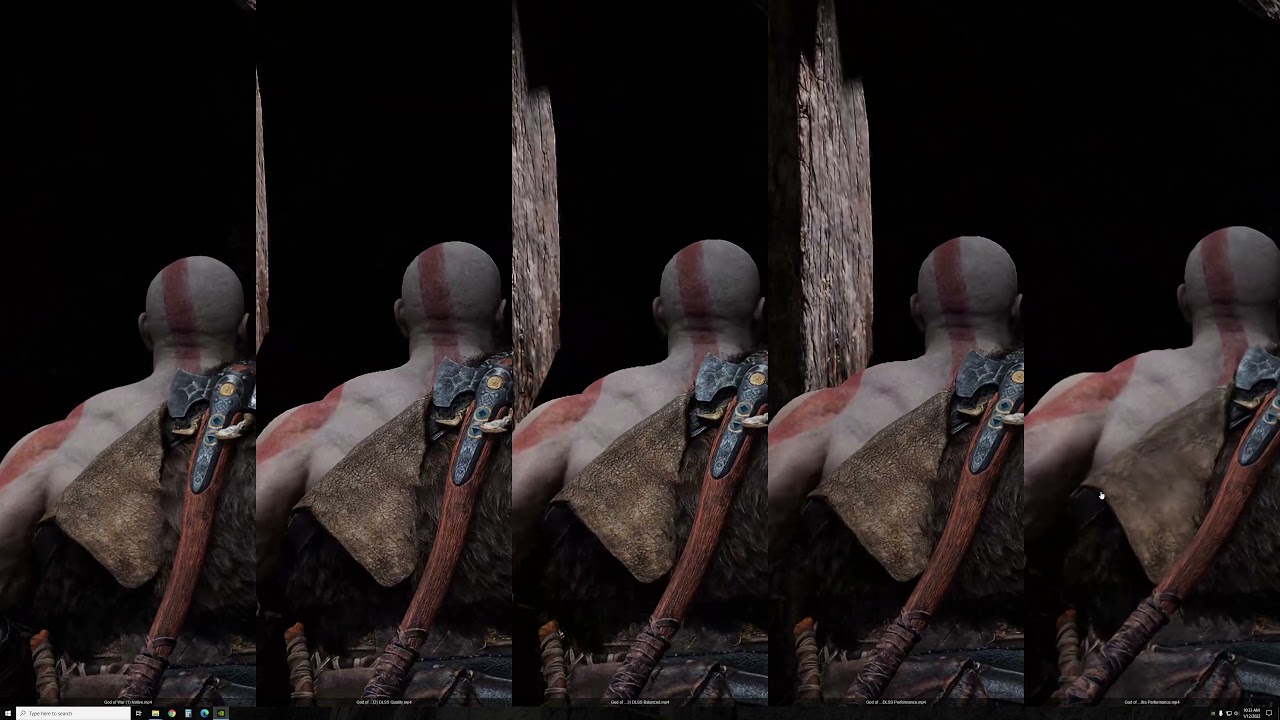
Trying to provide real-world comparisons of image quality can be difficult. Screenshots don't always convey the user experience, and videos don't always match up. More importantly, video compression algorithms (especially those on YouTube) can munge the quality and obscure differences. Still, we've provided both just to show how DLSS and FSR affect the final rendered output.
The above video uses Nvidia's ICAT utility with video results captured via GeForce Experience on the RTX 3090 — the card shouldn't matter other than affecting the fps counter. While the original captures were all at 50Mbps, the YouTube video downgrades that to just 16Mbps, so keep that in mind. As we've hinted at already, there's not a massive difference between native rendering and the higher quality DLSS and FSR modes, at least when targeting 4K. We could play God of War quite happily using just about any of the modes, with DLSS ultra performance being the only real exception. There's certainly a loss in fidelity with the DLSS performance, FSR performance, and FSR balanced modes, but it's not terrible — at least in this particular game.
Get Tom's Hardware's best news and in-depth reviews, straight to your inbox.

Native

DLSS Quality

DLSS Balanced

DLSS Performance

DLSS Ultra Performance

FSR Ultra Quality

FSR Quality

FSR Balanced

FSR Performance
View Original

View Original

View Original

View Original

View Original

View Original

View Original

View Original

View Original

Looking at the still screenshots more or less confirms the above impressions. Most of the DLSS and FSR modes look practically identical, and you have to look carefully to spot the differences. For example, you might notice a slight loss of detail in the twigs overlapping the tree in the middle-top area of the screen, but you likely wouldn't notice it in motion.
The one exception to this is DLSS ultra performance mode, where curiously, the heavy depth of field blurring effect on the mountainside and trees in the distance basically disappears. It's due to the way DoF filters work with resolution; starting at 720p, the filter just doesn't end up blurring things as much — the reduction in blur is also visible on the DLSS performance screenshot.
But again, the key is to see these things in motion and then decide how much the loss of detail impacts the gaming experience. DLSS ultra performance is playable, but you see some shimmering and other artifacts on grass quite a bit, even at 4K, and it becomes much more noticeable at 1080p — not that you should need ultra performance mode if you're running at 1080p.
Ultra quality

High quality

Original quality

Low quality


View Original
View Original

View Original

View Original

View Original

View Original

View Original

Of course, using DLSS or FSR isn't the only way to boost performance. God of War includes four presets, along with a "custom" option that allows you to tweak the seven individual graphics settings. We tested with ultra for the above results, but dropping to the high preset boosted performance about 20%, the "original" preset was about 50% faster than ultra, and dropping to the low preset improved performance by around 60%. A reduction in shadow quality is the most visible change between the various presets, and not coincidentally, that single setting affects performance the most.
You can, of course, mix using the presets with DLSS and FSR. In our performance charts, the RX 5600 XT could only hit 47 fps using FSR performance mode. It could also reach 44 fps at 4K using the low preset, but more importantly, using the original quality preset with FSR quality mode got it to 64 fps, and the low preset combined with FSR quality mode got it to 74 fps. That's a 175% improvement in framerates if you're willing to drop the settings and enable FSR.
It's not particularly surprising that the RX 5600 XT and similar GPUs can easily break 60 fps under such constraints, of course. God of War first came out as a PS4 game, and even the more recent PS4 Pro only has a GPU that's roughly equivalent to the Radeon RX 580 — the original PS4 has a GPU that's more akin to an RX 560, which sits at rank 54 out of all the graphics cards we've tested in our GPU hierarchy. So if all you want is 1080p using the original quality preset, just about any GPU made in the past five years should suffice.


God of War for PC, Finally Where it Belongs
It's been interesting watching the change of heart from both Microsoft and Sony over the past few years. When the original Xbox came out, Microsoft started buying up gaming studios and then made the resulting games console exclusives. Sony had basically been doing the same thing. Of course, there are plenty of cross-platform games, but the assumption was that getting gamers to buy into a specific console platform would ultimately generate more money.
With Windows 10, Microsoft had a change of heart and started releasing nearly all of its first-party games on the Microsoft Store as well as the Xbox One. Actually, it took things a step further with the Play Anywhere initiative and let you buy a game once for both the Xbox One and the Microsoft Store. Clearly, that experiment worked out well, even though the Microsoft Store is one of the worst digital distribution platforms, because Microsoft has started releasing more games on other services like Steam.
It took a few years more before Sony was willing to chance doing the same thing, with Death Stranding and Horizon Zero Dawn being a couple of examples of formerly PlayStation exclusives coming to PC. And guess what? People are still more than happy to buy the consoles, and some people prefer to play games there, but there's clearly an untapped market of PC gamers. God of War is another major PlayStation franchise that's now on PC, and it looks and plays great, even more than three years after its initial release.
Now all we need is a remastering of the rest of the series for PC, similar to what Microsoft did with the Halo Master Chief Collection. We can only hope such a project will see the light of day and get the necessary attention to detail. Because, despite GPU and component shortages, the PC as a major gaming platform clearly isn't going anywhere.

Jarred Walton is a senior editor at Tom's Hardware focusing on everything GPU. He has been working as a tech journalist since 2004, writing for AnandTech, Maximum PC, and PC Gamer. From the first S3 Virge '3D decelerators' to today's GPUs, Jarred keeps up with all the latest graphics trends and is the one to ask about game performance.
-
Makaveli ReplyAdmin said:We tested the God of War PC release on a collection of the latest graphics cards to see how it runs, as well as what settings you'll need for a smooth gaming experience.
God of War (2018) PC Performance: DLSS vs. FSR Tested : Read more
What driver was used for AMD?
AMD Radeon Software Adrenalin 22.1.1
God of War
Up to 7% increase in performance in God of War @ 4K Ultra Settings, using Radeon Software Adrenalin 22.1.1 on the 16 GB Radeon RX 6900 XT graphics card, versus the previous software driver version 21.12.1.
Up to 7% increase in performance in God of War @ 4K Ultra Settings, using Radeon Software Adrenalin 22.1.1 on the 16 GB Radeon RX 6800 XT graphics card, versus the previous software driver version 21.12.1.
Up to 7% increase in performance in God of War @ 4K Ultra Settings, using Radeon Software Adrenalin 22.1.1 on the 12 GB Radeon RX 6700 XT graphics card, versus the previous software driver version 21.12.1. -
SkyNetRising And all the benchmarks are in 4k.Reply
Very useful info. It's like everybody had RTX 3080 class graphics in their system. LOL.
How about more realistic 1440p and 1080p benchmarks? -
JarredWaltonGPU Reply
DLSS and FSR testing basically overlaps with testing at 1080p and 1440p. No, it's not the exact same, but at some point I just have to draw the line and get the testing and the article done. God of War, as noted, doesn't support fullscreen resolutions. That means to change from running at 4K in borderless window mode to testing 1440p, I have to quit the game, change the desktop resolution, and relaunch the game. Then do that again for 1080p. That would require triple the amount of time to test. Alternatively, I could drop a bunch of the DLSS and FSR testing and just do the resolution stuff. Either way, something was going to get missed, and I decided to focus on DLSS and FSR.SkyNetRising said:And all the benchmarks are in 4k.
Very useful info. It's like everybody had RTX 3080 class graphics in their system. LOL.
How about more realistic 1440p and 1080p benchmarks?
As pointed out in the text, an RX 5600 XT at 4K original quality with FSR quality mode achieved 64 fps average performance. Which means anything faster would be playable at 4K as well — that includes the entire RTX 20-series. Drop to 1440p and original quality and performance would be even higher, because FSR doesn't match native resolution performance exactly. Anyway, quality mode upscales 1440p to 4K, so 1440p is easily in reach of previous generation midrange GPUs, and 1080p would drop the requirements even further. -
JarredWaltonGPU Reply
The article lists the drivers: 22.1.1 and 497.29.Makaveli said:What driver was used for AMD?
AMD Radeon Software Adrenalin 22.1.1
God of War
Up to 7% increase in performance in God of War @ 4K Ultra Settings, using Radeon Software Adrenalin 22.1.1 on the 16 GB Radeon RX 6900 XT graphics card, versus the previous software driver version 21.12.1.
Up to 7% increase in performance in God of War @ 4K Ultra Settings, using Radeon Software Adrenalin 22.1.1 on the 16 GB Radeon RX 6800 XT graphics card, versus the previous software driver version 21.12.1.
Up to 7% increase in performance in God of War @ 4K Ultra Settings, using Radeon Software Adrenalin 22.1.1 on the 12 GB Radeon RX 6700 XT graphics card, versus the previous software driver version 21.12.1. -
Makaveli ReplyJarredWaltonGPU said:The article lists the drivers: 22.1.1 and 497.29.
Ah I missed that thank you.
So it looks like more optimizations are in order for amd. I'm going to be playing it at 3440x1440 with a 6800XT shouldn't have an issue with performance. -
JarredWaltonGPU Reply
Yeah, RX 6800 should be fine. I suspect AMD performance is low simply because this is a DX11 game and AMD really doesn't do a ton of DX11 optimizations these days. AMD could probably improve performance another 10-20% with sufficient effort.Makaveli said:Ah I missed that thank you.
So it looks like more optimizations are in order for amd. I'm going to be playing it at 3440x1440 with a 6800XT shouldn't have an issue with performance. -
Makaveli ReplyJarredWaltonGPU said:Yeah, RX 6800 should be fine. I suspect AMD performance is low simply because this is a DX11 game and AMD really doesn't do a ton of DX11 optimizations these days. AMD could probably improve performance another 10-20% with sufficient effort.
I think you are right you generally don't see those big differences on DX12 or Vulkan titles. -
wifiburger It's amazing how crap AMD is at their drivers, 20-30fps difference just because it's a DX11 game.Reply
It's really roll the dice when it comes to FPS if it's not Vulkan, DX12 game. -
hotaru.hino Regarding AMD's performance with DirectX 11 (from this Reddit post):Reply
Let's say you have a bunch of command lists on each CPU core in DX11. You have no idea when each of these command lists will be submitted to the GPU (residency not yet known). But you need to patch each of these lists with GPU addresses before submitting them to the graphics card. So the one single CPU core in DX11 that's performing all of your immediate work with the GPU must stop what it's doing and spend time crawling through the DCLs on the other cores. It's a huge hit to performance after more than a few minutes of runtime, though DCLs are very lovely at arbitrarily boosting benchmark scores on tests that run for ~30 seconds.
The tl;dr - AMD recommends you use one thread to channel API calls. Granted RDNA may be able to do things better, but AMD likely didn't change their "best practices", or maybe the best practices for RDNA are the same as GCN.
The best way to do DX11 is from our GCN Performance tip #31: A dedicated thread solely responsible for making D3D calls is usually the best way to drive the API.Notes: The best way to drive a high number of draw calls in DirectX11 is to dedicate a thread to graphics API calls. This thread’s sole responsibility should be to make DirectX calls; any other types of work should be moved onto other threads (including processing memory buffer contents). This graphics “producer thread” approach allows the feeding of the driver’s “consumer thread” as fast as possible, enabling a high number of API calls to be processed.
In any case, NVIDIA's solution to this problem of things being shoved in a single core was to add multithreading support for DirectX 11 at the driver level. From this other Reddit post:
Since the NVIDIA Scheduler was software based and was running in the OS (and not in the GPU) they could intercept draw calls that weren't sent for Command list preperation and manually in the intercepting server batch the work and distribute it among the other Cores. The monitoring and interception would happen in the main thread (Core1) so it added some overhead but it would guarantee that even if the game wasn't optimized to use DX11 Command lists they still wouldn't be CPU bottlenecked since the software scheduler could redistribute the draw call processing across multiple threads/cores. This gives NVIDIA a huge advantage in DX11 titles that isn't properly optimized to distribute game logic across multiple threads/cores.
3DMark used to have a draw call test, but they've gotten rid of it. It would've been nice to see the DirectX 11 multithreaded data for NVIDIA and AMD GPUs. -
SSGBryan ReplySkyNetRising said:And all the benchmarks are in 4k.
Very useful info. It's like everybody had RTX 3080 class graphics in their system. LOL.
How about more realistic 1440p and 1080p benchmarks?
Tom's Hardware is no different than any tech tuber (LTT, Jayztwocents, Hardware Unboxed, or Gamer's Nexus).
The information is accurate, but it doesn't actually provide anything useful for making buying decisions. They show a theoretical best case scenario.
If they provide 1080p & 1440p benchmarks (and on High settings), you won't feel a need to upgrade your card. At the end of the day, these types of articles are just a sales pitch that the card companies can't be bothered to make.