QDI LM-510

Despite its unpromising specs, barely worthy of monitors of the previous generation, and its disconcerting design, QDI's LM-510 is a pleasant surprise at the very low price of 460 Euros. It's worth considering if you are looking for an LCD display that won't spell financial ruin.
For anyone not in the know, QDI, better known for its motherboards, recently went into monitor manufacturing. This first model seems to have come from the pre-production run. At the moment, it is only on sale in Europe, but in the past it was available in some Asian countries in certain complete configurations. The company no longer sells PCs, but QDI Europe has taken the initiative to manufacture and market standalone screens on its territory. The screens were launched in early 2002 at a price of 582 Euros inc. VAT, but the price has just dropped by 21% for the fall, making these the least expensive screens on the market.
| Color | Darkest color displayed | Lightest color displayed |
|---|---|---|
| Grey pattern | 2 | 255 |
| Red pattern | 2 | 254 |
| Green pattern | 2 | 255 |
| Blue pattern | 3 | 254 |
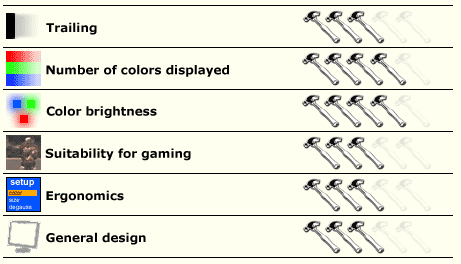
In compliance with the current trend, the QDI screen is slimline. The casing is also very narrow, almost the whole surface being left for the screen itself. The colors tend to veer slightly toward blue, but the rendering is similar to that offered by the LG L1510S, even though the panel is manufactured by Hannstar.

Where it is exceptional, however, is in its very good default screen settings. The OSD menu, available in English and Chinese, offers two color temperatures (9300 and 7500 K) that are not very satisfactory. It's best to use your own settings for color intensity. After umpteen attempts, we settled on the best being a red, green and blue at almost maximum, brighting at 0 (on a scale of -50 through + 50), and contrast at 35.
There's a trailing effect on the screen when playing games that have strongly contrasting colors, and this trail effect is stronger than that of its rivals. As in LG's L1510S, it is particularly noticeable when a light shines against a dark background. Fortunately, the trail disappears as soon as the colors are similar. After a few days, you probably won't even notice this effect. The trail is therefore acceptable, even though on certain screens, especially those made by Chungwa or Samsung's 152T, there is less of it. But at that price... This little defect is soon forgotten however, because the colors and images are very nice and clean, comparable to those of many CRT screens. This good impression also applies to its use for the Internet and office applications.