Scanning And Copying Performance
Scanning/Digitizing An A4 Document
For scanning, we ran three successive tests: previewing, scanning at 300 dpi, and scanning at 600 dpi, all using the same A4 color document.
Prices in the scanner market have been collapsing for several years now, which has been all to the benefit of multifunction devices. Since scanner manufacturers are offering models with better and better performance at more and more attractive prices, building a fast scanner into a multifunction doesn't add inordinately to its cost. Manufacturers like Epson and Canon, and HP to a lesser degree, have realized that and are taking advantage of it.
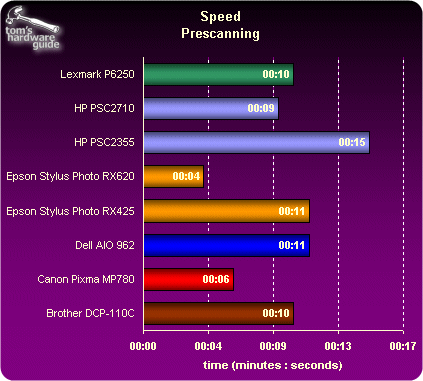
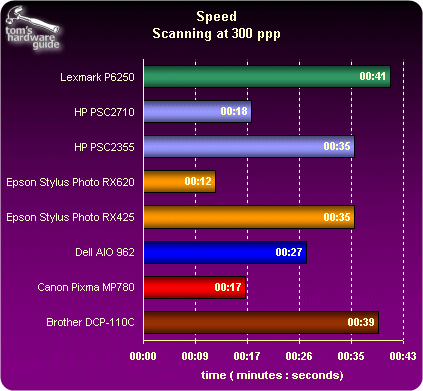
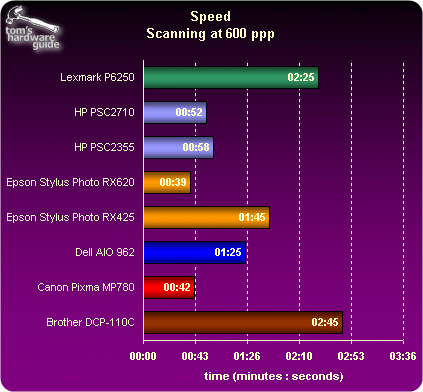
As far as previewing goes, the Stylus Photo RX620 was very impressive. We'd barely had time to click the "Preview" button in the pilot and the image of the document had already come up. The Pixma MP780 was two seconds slower, followed by the rest of the pack, all somewhere in the neighborhood of 10 seconds. Only the HP PSC 2355 lagged behind, with 15 seconds for a preview. That's longer than it took for the Stylus Photo RX620 to scan the same A4 document at 300 dpi! At that resolution, the differences begin to become more noticeable. The Pixma MP780 and Photosmart 2710 were able to keep up with the pace set by the Epson, but the others were left in the dust. This was even more obvious when we moved to 600 dpi. At that resolution, two models stood out for their poor results: the Lexmark P6250 and the Brother DCP-110C, which took more than two minutes. The Photosmart 2710 also showed its limitations at that resolution, whereas the Canon Pixma MP780 and obviously the Epson Stylus Photo RX620 held their own.

Also note that not all multifunctions offer the same scanning possibilities. Only three models - the Pixma MP780, Stylus Photo RX620, and Photosmart 2710 - offer an optical resolution of 2400 dpi. Except for these three, 1200 dpi is the limit. The Stylus also ships with an adapter for film and slides, unlike the other models.