Minisforum launches its first ARM-based Mini PC with a full x16 PCIe slot for discrete GPUs — The MS-R1 packs a 12-core Cixin P1 SoC with up to 64 GB of RAM and generous IO, starting at $500

Minisforum MS-R1
(Image credit: Minisforum)

China-based Mini PC manufacturer Minisforum has just globally launched the MS-R1, the company's first foray into the ARM market, with a compact yet powerful device. Building on the interest in Nvidia's DGX Spark, the ongoing AI boom has made desktop-class ARM systems a hot topic, and Minisforum's MS-R1 differentiates itself by including support for dedicated GPUs and a UEFI.

The MS-R1 is based on Cixin's P1 SoC, using a rebranded variant of it called the CD8180. It's a 12-core SoC, packing 8x Cortex-A720 and 4x Cortex‑A520 cores, alongside an Immortalis-G720 MC10 integrated GPU. It features up to 64 GB of error-correcting LPPDR5 RAM, running at 5500 MT/s. Minisforum is quoting up to 45 TOPS of AI compute, with 28.8 coming from the NPU.

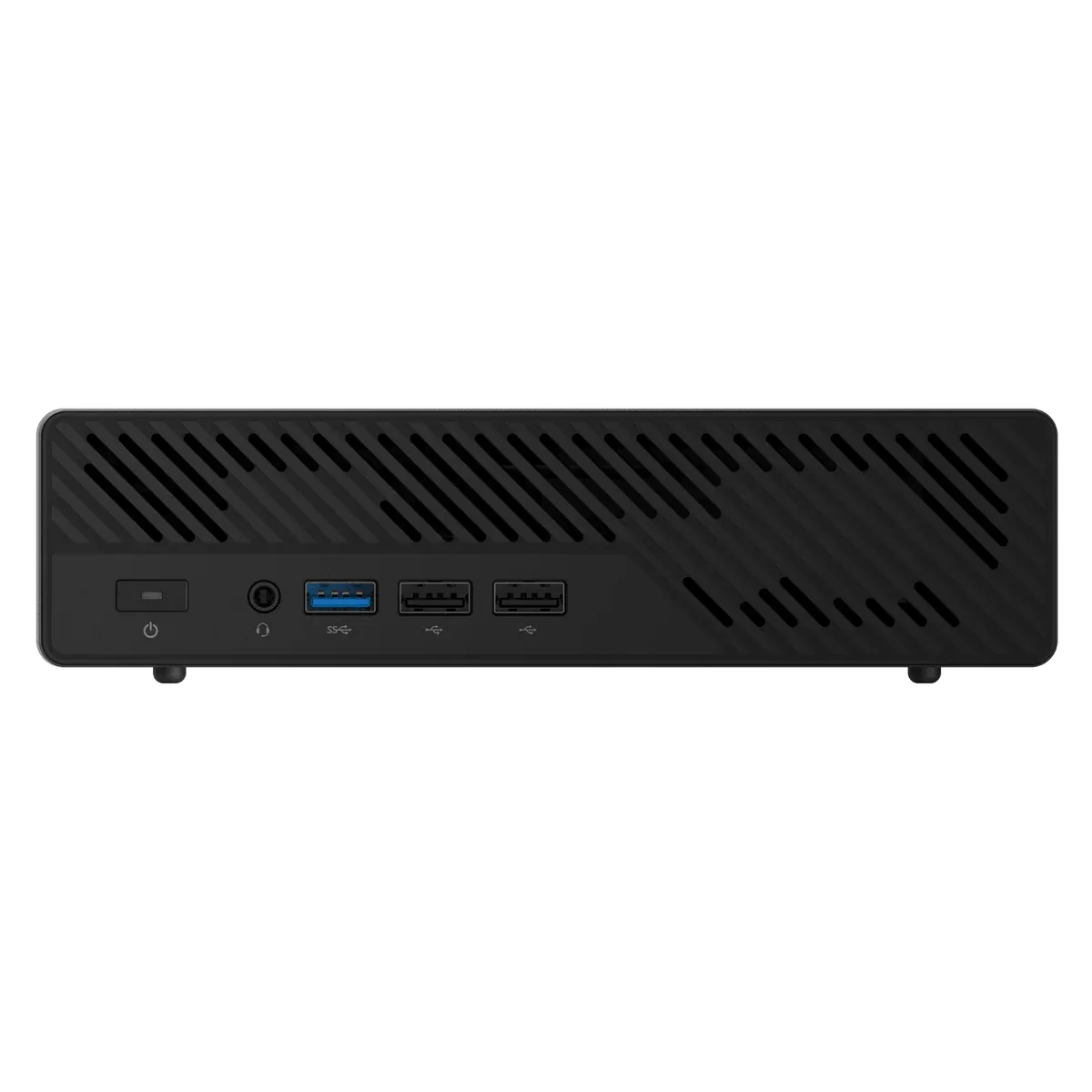
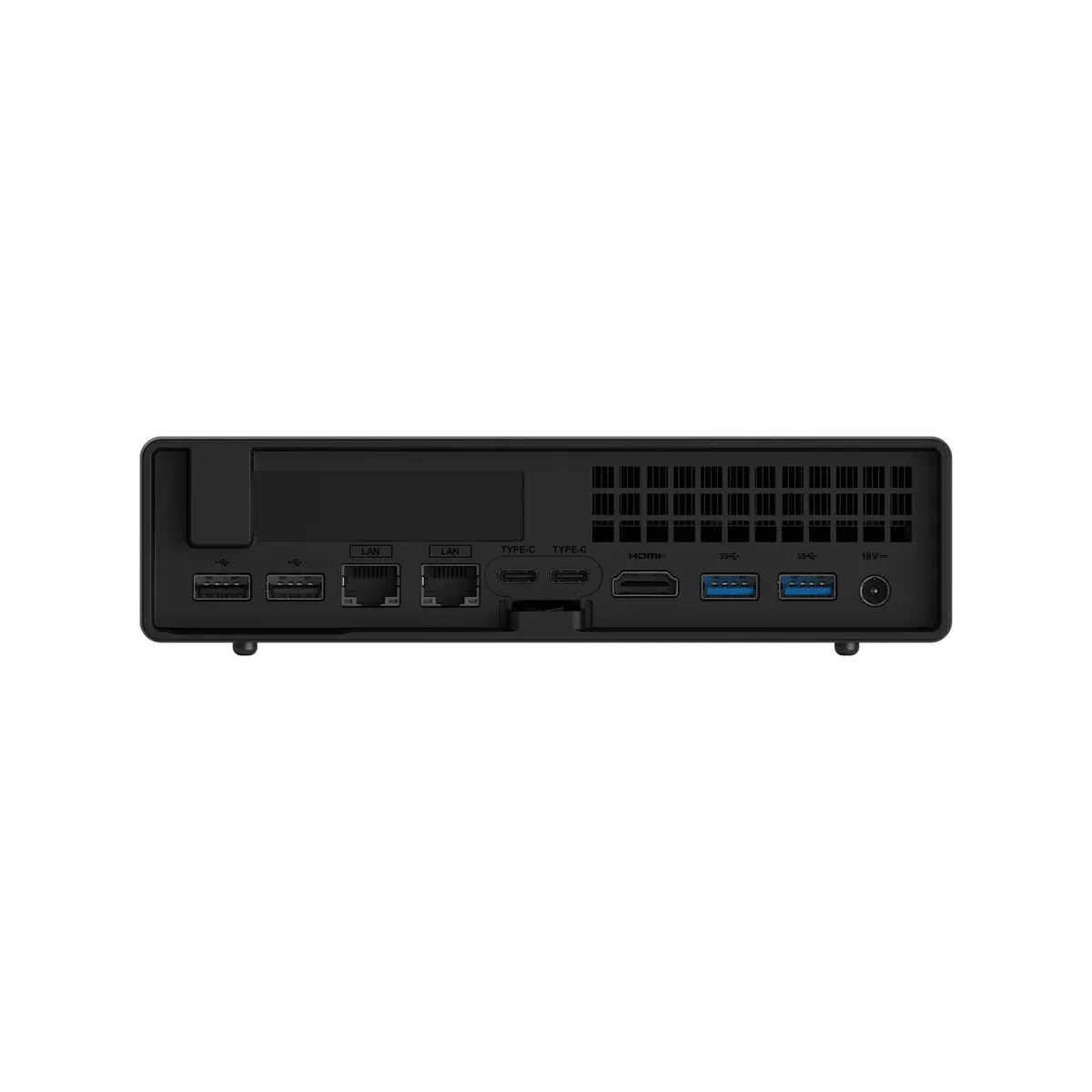
All that power doesn't require a lot of space, as the MS-R1 is only 1.7-liters in size and should run quietly thanks to its 28W max TDP. The 12-core SoC can boost up to 2.6 GHz, but looks to be fairlyweak, even compared to a last-gen Snapdragon X Elite. For connectivity, you get Bluetooth 5.3 and Wi-Fi 6E, plus the IO is packed, with a bunch of fast USB ports, dual 10Gbps Ethernet, and HDMI out.

Minisforum MS-R1
Image credit: Minisforum
Minisforum MS-R1
Image credit: Minisforum

Despite touting UEFI boot support — which should enable even beginners to run mainstream operating systems like Linux easily — Minisforum does not mention Windows on ARM, so we assume it's not supported. The company says this is a "major breakthrough" for ARM computing, allowing both complex setups and everyday environments to be booted into with just a USB drive.

Again, the MS-R1 has a dedicated PCIe x16 slot for discrete GPUs, making it one of the first and only compact ARM-based solutions to have that capability. Discrete GPUs can massively accelerate AI inference and training, and pair nicely with the ARM cores to offer an efficient yet powerful computer for AI, for much less than a DGX Spark.

Minisforum MS-R1

(Image credit: Minisforum MS-R1)

Speaking of, Minisforum is asking $503 for the base unit with 32 GB RAM, which does not include any storage. The top-end model with 64 GB RAM and a 1 TB SSD is $695.90, and you do get an expandable (up to 8 TB) M.2 slot. It looks like the NAND and DRAM shortage has already hit Minisforum as well. These are early-bird discounted prices that will go up after the initial batch sells out (which it already has) showing just how much in demand desktop-class ARM is at the moment.

Swipe to scroll horizontally
Minisforum MS-R1 Full Specs

CPU

CP8180, 12 Cores / 12 Threads, 2.6GHz, 28W TDP

GPU

Arm Immortalis-G720 MC10

Memory

LPDDR5 (LinkECC & Inline ECC), 5500MHz, up to 64GB

Storage

1× M.2 2280/22110 NVMe SSD (PCIe 4.0 x4)
1× M.2 2280 NVMe SSD (from M.2 E-Key transfer card)

Wireless

Wi-Fi 6E, Bluetooth 5.3 (M.2 2230 E-Key)

Video Output

HDMI 2.0 ×1 (up to 4K@60Hz)
USB-C (Alt DP 1.4) ×2 (up to 4K@120Hz)

Audio Output

HDMI ×1
3.5mm Combo Jack (4-in-1) ×1

Audio Input

3.5mm Combo Jack (4-in-1) ×1

I/O Ports

3.5mm Combo Audio (4-in-1) ×1
USB-A (USB 3.2 Gen2) ×1
USB-A (USB 2.0) ×2
USB-C (Alt DP1.4, USB 3.2 Gen2, 100W PD-IN, 15W PD-OUT) ×2
HDMI 2.0 ×1
10G LAN (RJ45, RTL8127) ×2
USB-A (USB 3.2 Gen2) ×2

Internal

PCIe x16 (PCIe 4.0 x8) ×1
40-pin GPIO ×1
Power Loss Switch ×1
BIOS Flash Pin & UART1 Pin ×1
UART2 Pin ×1
eDP ×1

Button

Power Button ×1

Power Adapter

DC 19V 180W / USB-C 20V 100W

OS Support

Debian 12 (default, can be switched)

Google Preferred Source

Follow Tom's Hardware on Google News, or add us as a preferred source, to get our latest news, analysis, & reviews in your feeds.

TOPICS
Hassam Nasir
Contributing Writer

Hassam Nasir is a die-hard hardware enthusiast with years of experience as a tech editor and writer, focusing on detailed CPU comparisons and general hardware news. When he’s not working, you’ll find him bending tubes for his ever-evolving custom water-loop gaming rig or benchmarking the latest CPUs and GPUs just for fun.

  • enb141
    GPU slot?

    As far as I know there's no way to make an nvidia or amd card to work with ARM.
    Reply
  • Findecanor
    Jeff Geerling on YouTube has already tested it. It has some weird performance/efficiency issues.

    He got a SFF nVidia card working under Ubuntu but not under the supplied OS.
    Reply
  • ezst036
    enb141 said:
    GPU slot?

    As far as I know there's no way to make an nvidia or amd card to work with ARM.
    System76's Thelio Astra has Ampere ARM CPUs in them and Nvidia Blackwells. They aren't selling non-functional computers.

    https://system76.com/desktops/thelio-astra-a1.1-n1/configure
    AMD GPUs do work with ARM, at least on RP5, for about a year.

    https://www.jeffgeerling.com/blog/2024/amd-radeon-pro-w7700-running-on-raspberry-pi
    https://www.tomshardware.com/raspberry-pi/raspberry-pi-5-teams-up-with-radeon-gpu-to-run-doom-eternal-with-rtx-on-at-4k-the-combo-also-tackles-crysis-remastered-red-dead-redemption-2-and-forza-horizon-4
    https://videocardz.com/newz/it-can-run-crysis-raspberry-pi-5-combined-with-radeon-rx-6700-xt-runs-crysis-remastered-at-4k-low-with-20-30fps
    Reply
  • JamesJones44
    enb141 said:
    GPU slot?

    As far as I know there's no way to make an nvidia or amd card to work with ARM.
    Nvidia and AMD both have server side GPUs that work with ARM. It's not inconceivable that their consumer GPUs could be made to work with ARM. There is nothing in the Nvidia and AMD GPU instructions that are tied to x86/x64 as far as I'm aware.

    The Switch and Switch 2 both use Nvidia based GPUs with ARM based processors. There is even an open sourced reverse engineered instruction set for Nvidia called Nouveau that is ARM compatible. I've not dug into AMD's GPU instructions, but documents exist for them. Given AMD GPUs work with ARM on the server side I have no reason to think their consumer GPUs are tied to CPU platforms, but I can't say for sure.
    Reply
  • LordVile
    Admin said:
    Popular Mini PC manufacturer Minisforum has just stepped into the ARM market with the MS-R1. It's a 1.7-liter compact system with the CIX CD8180 SoC, consisting of 12-cores clocked at up 2.6 GHz, with a 28W TDP. There's a full-size dedicated GPU slot and support for UEFI built-in, allowing you to easily boot into mainstream operating systems.

    Minisforum launches its first ARM-based Mini PC with a full x16 PCIe slot for discrete GPUs — The MS-R1 packs a 12-core Cixin P1 SoC with up to 64... : Read more
    Yeah hit you can’t run windows on it because of Qualcomm
    Reply
  • jlake3
    enb141 said:
    GPU slot?

    As far as I know there's no way to make an nvidia or amd card to work with ARM.
    AMD and Nvidia GPUs work under Linux, but there's no driver for Windows-on-Arm (and I'm not sure any of the current WoA devices support eGPU even if they did).

    Intel I'd think would be the same, but according to the Jeff Geerling video that seems to be doing the heavy lifting here, the A310 had some sort of signaling issue with both this and the Raspberry Pi where the card wasn't initializing enough to attempt installing drivers.

    Admin said:
    There's a full-size dedicated GPU slot
    It's an x16 slot, but the chassis limits it to single slot, half height half length. The newest and most powerful cards from official board partners that fit this form factor are the RTX A1000 (downclocked RTX 3050) and Radeon RX6400/Pro W6400, although from unofficial sources there are Ada-based laptop GPUs that have been converted into PCIe.
    Admin said:
    allowing you to easily boot into mainstream operating systems.
    Per Jeff Geerling's testing and comments left on the video by Serve The Home, the iGPU drivers have not been upstreamed, so unless a dGPU is installed you need to use their custom OS image to get a display out... but also their custom OS image has some issue with Nvidia's ARM drivers, so if you do install a dGPU the stock OS can't use it.
    Reply
  • Amdlova
    They ask too much for these system.

    I want a cheap arm devices. Got my nuc for 230$ and have two thunderbolt 4.0 ports.
    Reply
  • Jame5
    Honestly, absolutely no one should cover Minisforums without also constantly calling out their lack of software/firmware support for their hardware.

    They make amazing hardware, and it's almost always broken due to a bad UEFI/BIOS. I have had 2 of their systems, most recently the UM790 from last year. The shipping BIOS was the most stable, and even that was buggy as all get out. If you allocated more than 2GB of RAM to the GPU, it would crash.

    They never did ship a truly stable firmware for that system. And my previous system was the same. Every firmware update would just change which bugs were present, never actually stabilizing the system.

    This seems to be endemic to Minisforums systems (from my limited experience), and both Jeff Geerling and Patrick at Serve the Home point out this one isn't any better. Covering this launch without pointing out it's a broken system from a firmware perspective seems to be doing your readers a disservice.
    Reply