









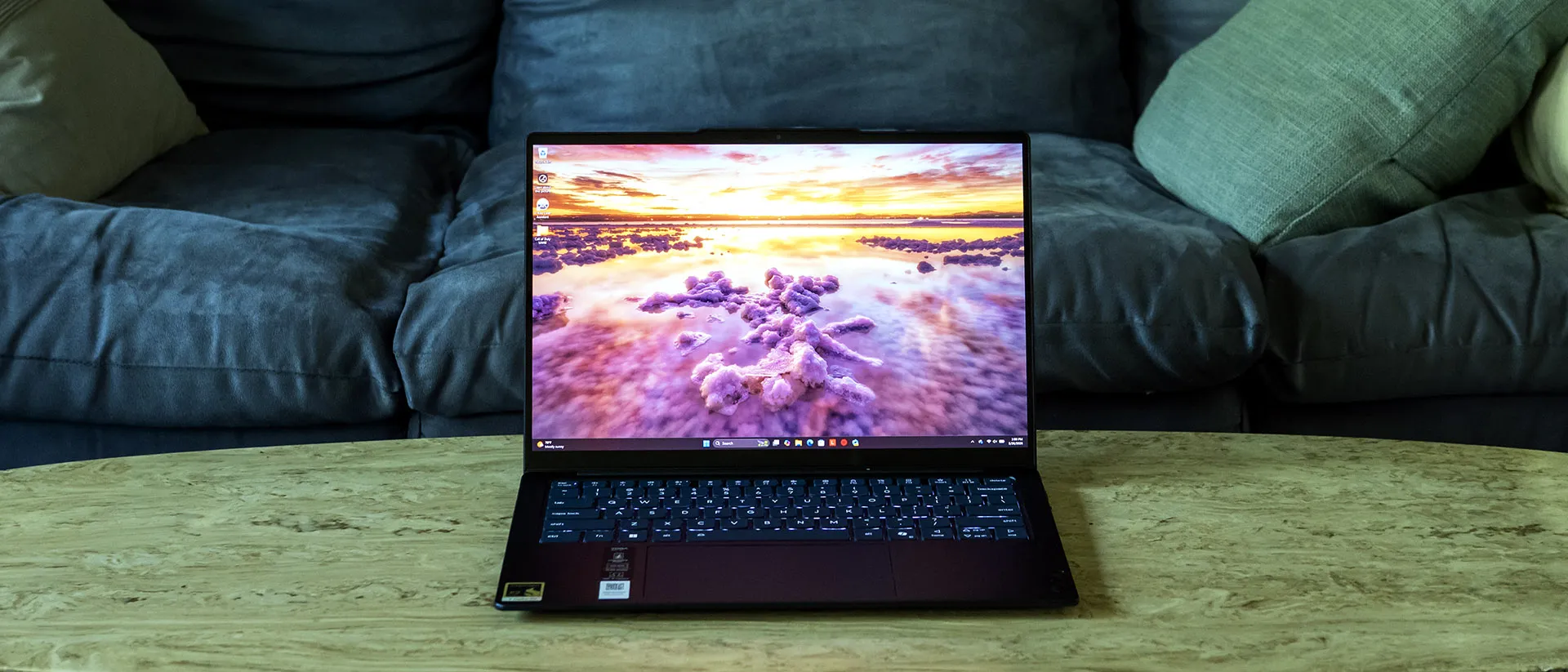
Tom's Hardware Verdict
Lenovo’s Yoga Slim 7x makes a strong case for Qualcomm’s Snapdragon X2 Elite. It’s fast, lasts forever on a charge, and doesn’t feel overpriced for what it delivers. The standard OLED screen is solid, but the 2880 x 1800 option is tempting. If your apps run well on ARM and you’re okay with a dongle or two, the Slim 7x is an easy ultraportable to recommend.
Reasons to buy
- +
Exceptional performance and battery life
- +
Strong build quality
- +
Sharp webcam
- +
Comfortable keyboard and touchpad
Reasons to avoid
- -
1920 x 1200 screen could be brighter
- -
Only USB-C ports, and no headphone jack
Why you can trust Tom's Hardware Our expert reviewers spend hours testing and comparing products and services so you can choose the best for you. Find out more about how we test.
The Yoga Slim 7x (starts at $1,049; $1,579 as tested) is Lenovo’s latest take on a premium ARM ultraportable, aiming to deliver standout performance and battery life with Qualcomm’s Snapdragon X2 Elite under the hood. Paired with a comfy keyboard, an OLED touch panel, and a sharp webcam, and this is a slick overall package provided you’re not reliant on x86 apps. Also prepare to pack a few adapters, as USB-C is the only port in town.
Design of the Lenovo Yoga Slim 7x
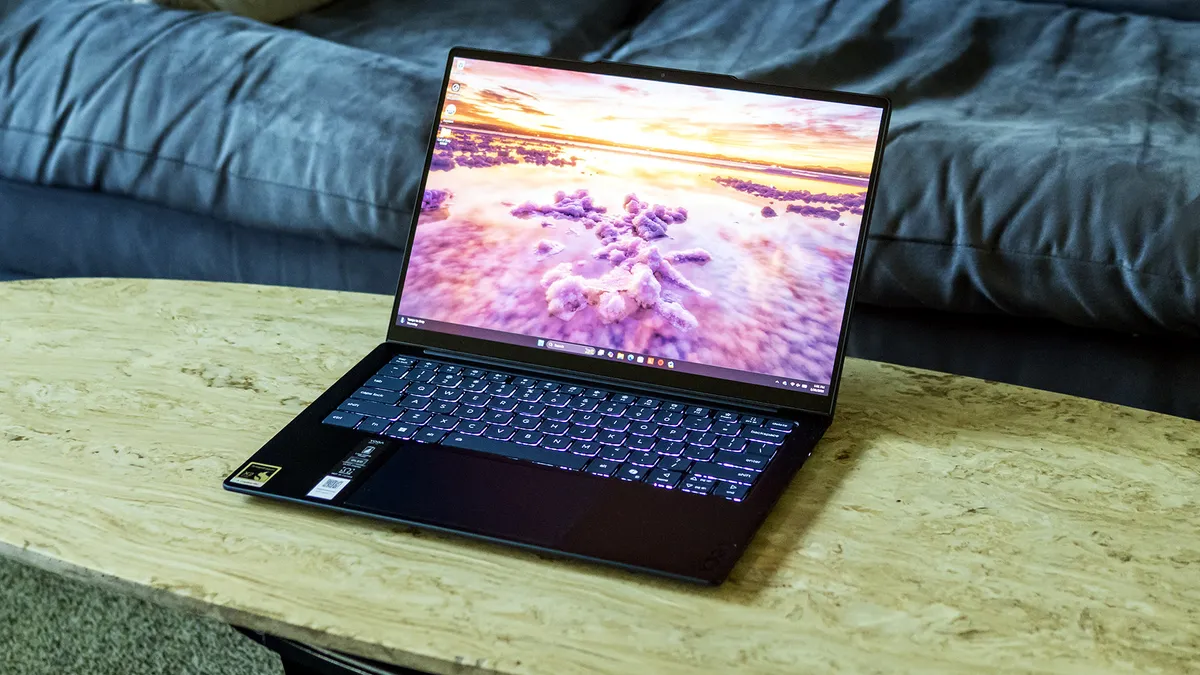
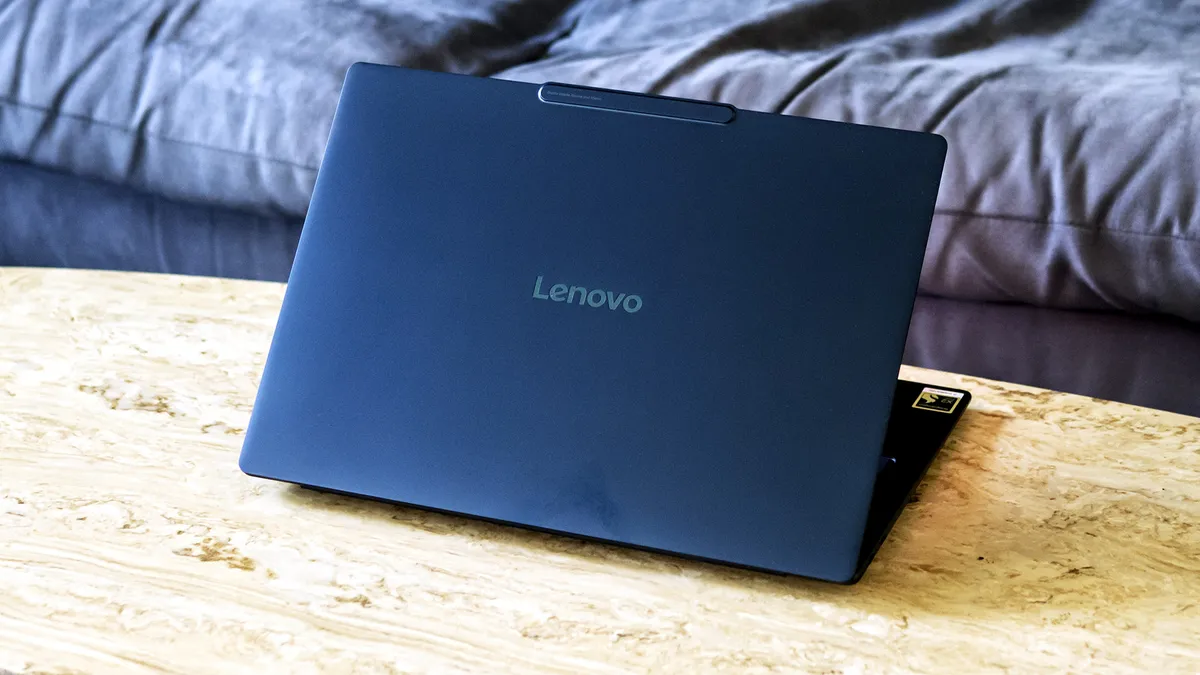
Lenovo’s dark blue aluminum chassis feels premium and impressively rigid. The Slimi 7x didn’t creak or bend when I picked it up by a corner or the lid. (It’s not wise to pick up a laptop like that, but it happens.) Aesthetically, it offers an upscale, modern look though it doesn’t stand apart from the crowd outside its uncommon color.
View Original

View Original

At 12.28 x 8.7 x 0.55 inches (WDH) and 2.58 pounds, the Slim 7x has a slightly larger footprint but ducks under the weight of the 13-inch MacBook Air (11.97 x 8.46 x 0.44 inches, 2.7 pounds). Dell’s XPS 14 is heavier but slightly trimmer (12.19 x 8.26 x 0.58 inches, 3 pounds). Lenovo’s own Yoga Slim 7i (13.54 x 9.27 x 0.55 inches, 2.15 pounds) is slightly larger but noticeably lighter.
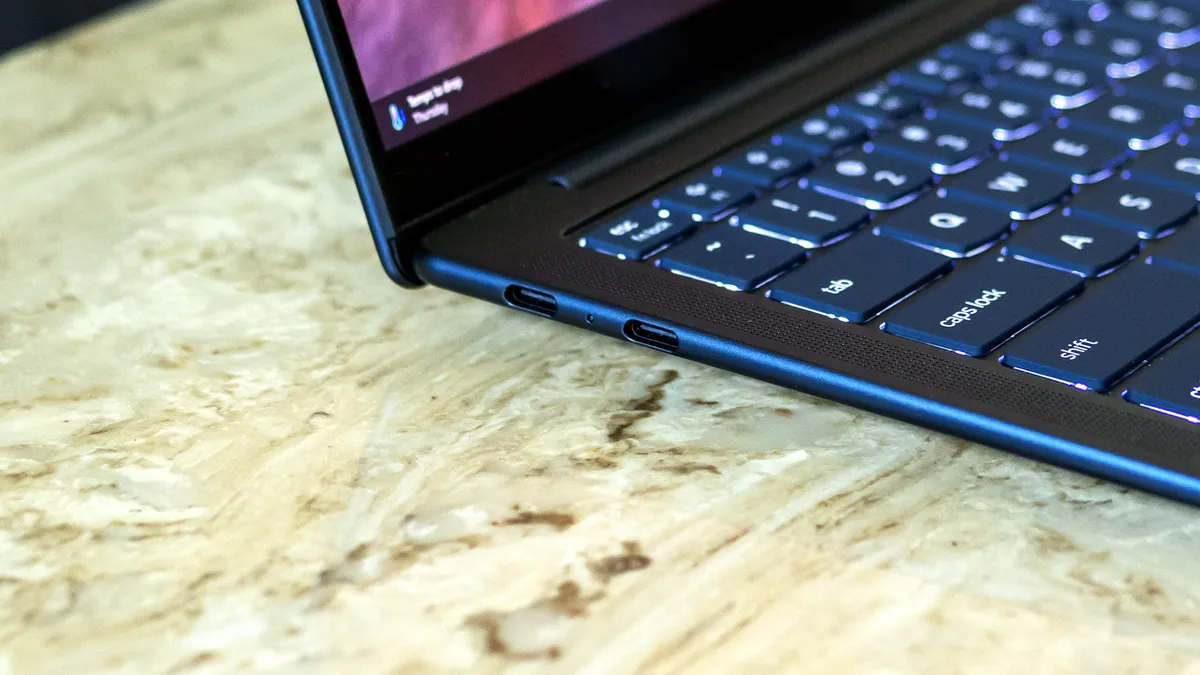
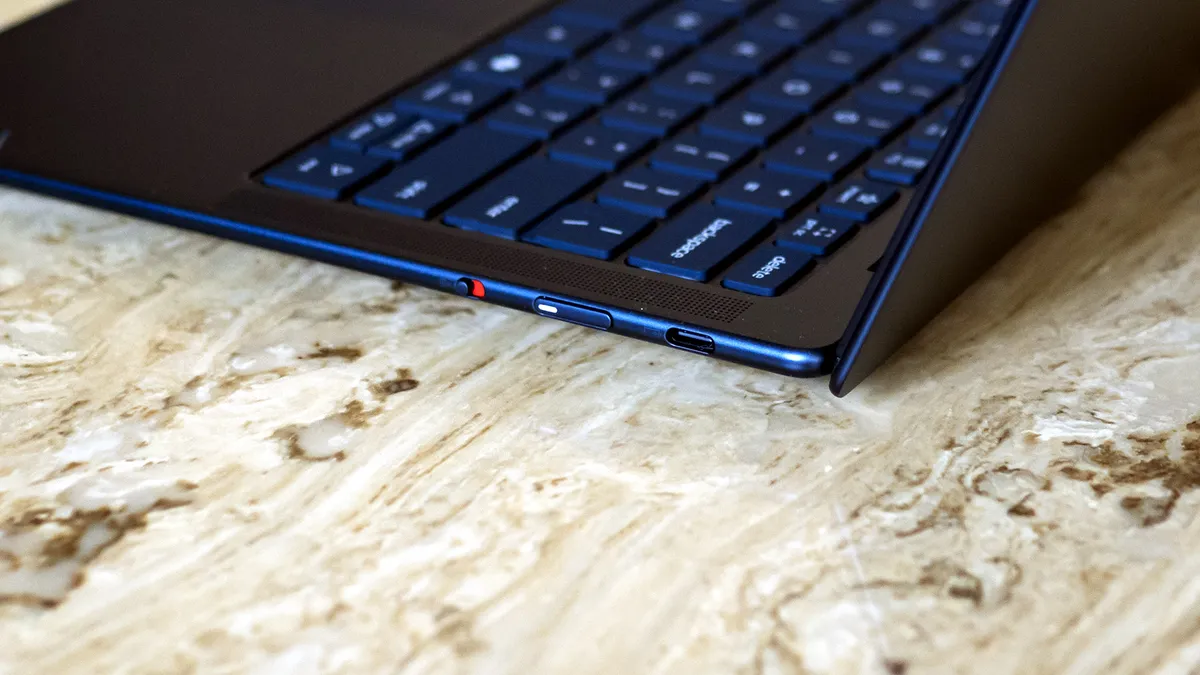
Port selection is limited to just three USB4 ports. There’s not even a headphone jack, so be prepared to take adapters. The power button and the webcam privacy shutter e-switch are on the right edge.
View Original

View Original

Lenovo Yoga Slim 7x Specifications
CPU |
Snapdragon X2 Elite X2E-88-100 |
Graphics |
Adreno X2-90 (integrated) |
Memory |
32GB LPDDR5X-9523 |
Storage |
1TB PCIe 4.0 SSD |
Display |
14-inch, 1920 x 1200, OLED, 60 Hz, touch |
Networking |
Wi-Fi 7, Bluetooth 5.4 |
Ports |
3x USB4 |
Camera |
9MP IR |
Battery |
70 WHr |
Power Adapter |
65 W (USB-C) |
Operating System |
Windows 11 Home |
Dimensions (WxDxH) |
12.28 x 8.7 x 0.55 inches (312 x 221 x 13.9 mm) |
Weight |
2.58 pounds (1.17 kg) |
Price (as configured) |
$1,579 |
Productivity Performance on the Lenovo Yoga Slim 7x
We tested the Yoga Slim 7x with its top CPU, the Snapdragon X2 Elite X2E-88-100. It features 18 cores, 6 of which are high-performance, and boosts up to 4.7 GHz on two cores. The system also features 32GB of onboard memory and a 1TB PCIe 4.0 SSD.
Our comparison systems match the performance focus of this system. Apple’s 13-inch MacBook Air ($1,299) uses a 10-core M5, followed by two 14-inch laptops: Dell’s XPS 14 ($2,199) leverages a Core Ultra X7 358H while Lenovo’s Yoga Slim 7i Aura Edition ($1,629) uses a Core Ultra 7 355. Asus’ 16-inch Zenbook A16 ($1,699) fills the last spot using an even higher grade of CPU than our Slim 7x – the Snapdragon X2 Elite Extreme X2E-94-100, which boasts 18 cores like the X2E-88-100 but offers a wider 192-bit (as opposed to 128-bit) memory bus for 228GB/s versus 152GB/s of bandwidth.


View Original
View Original
View Original
View Original
On Geekbench 6, the Slim 7x’s single-core score (3,822 points) was practically tied ith Asus (3,807), leaving only the MacBook Air with a higher score (4,168). The Intel-based systems were left well behind. The Slim 7x also produced impressive multi-core results, though its 20,563 points weren’t in the same league as the Asus (22,733), which uses the X2 Elite Extreme.
Get Tom's Hardware's best news and in-depth reviews, straight to your inbox.
The Slim 7x made an excellent showing in our 25GB file transfer test, averaging 1,934.78 MBps to tie the MacBook Air (1,924.84 MBps) and land ahead of the Asus (1,744.38 MBps). The XPS 14 trailed the group (1,419.76 MBps).
On Handbrake, the Slim 7x completed the 4K to 1080p video transcoding in 2 minutes and 11 seconds, just three seconds slower than the Asus and easily outgunning the others – Apple finished in 4:41 while the Slim 7i trailed at 5:56.
To stress test the CPU in laptops, we run 10 loops of Cinebench 2026. The system started with a score of 5,926 but dropped to 5,168 on the second run, where it stayed within a few points for the remaining runs. During the test, the P2 cores ran at an average of 3.34 GHz while the P1 cores ran at 3.94 GHz.
Graphics on the Lenovo Yoga Slim 7x
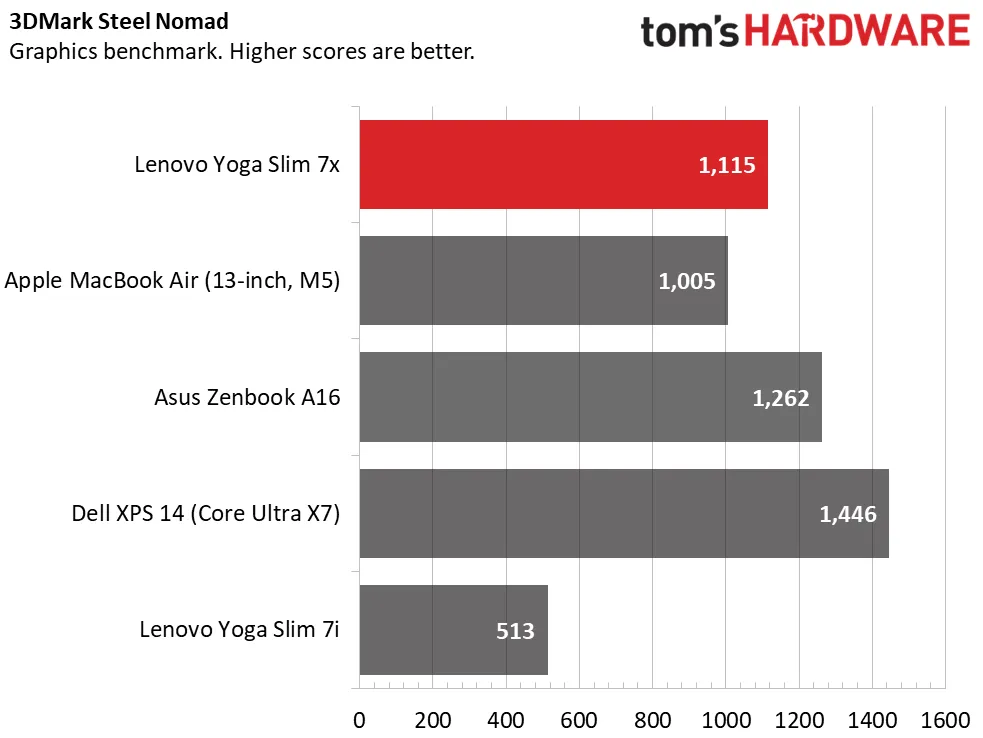
We run 3DMark Steel Nomad to gauge raw graphics horsepower. The Slim 7x’s Adreno X2-90 GPU scored 1,115 points, just behind the Asus (1,262) featuring the same silicon and bested Apple’s M5 integrated solution (1,005). The XPS 14, however, easily took the top spot with 1,446 points thanks to the potent Arc B390 graphics solution built into its Core Ultra X7 358H. The Slim 7i stood way in the back with just 513 points.
Display on the Lenovo Yoga Slim 7x
Our Yoga Slim 7x comes with a 1920 x 1200 OLED touch panel. It offers a pleasant picture overall, but isn’t a standout due to its modest brightness – an all-white screen barely makes me want to squint in a dim room. Watching Star Wars: Andor, the stormtroopers’ armor and blaster bolts didn’t pop with the intensity I expected. Colors, however, look rich, and space scenes show off OLED’s trademark inky blacks. The 60Hz refresh rate is par for the course. On the plus side, touch input feels smooth and responsive against the solid glass surface.
Lenovo offers a 2880 x 1800 OLED panel on higher-end configurations, which offers nearly twice the HDR brightness (1,100 versus 600 nits) and a 120 Hz variable refresh rate. (This panel was featured in the Yoga Slim 7i Aura Edition we reviewed.)
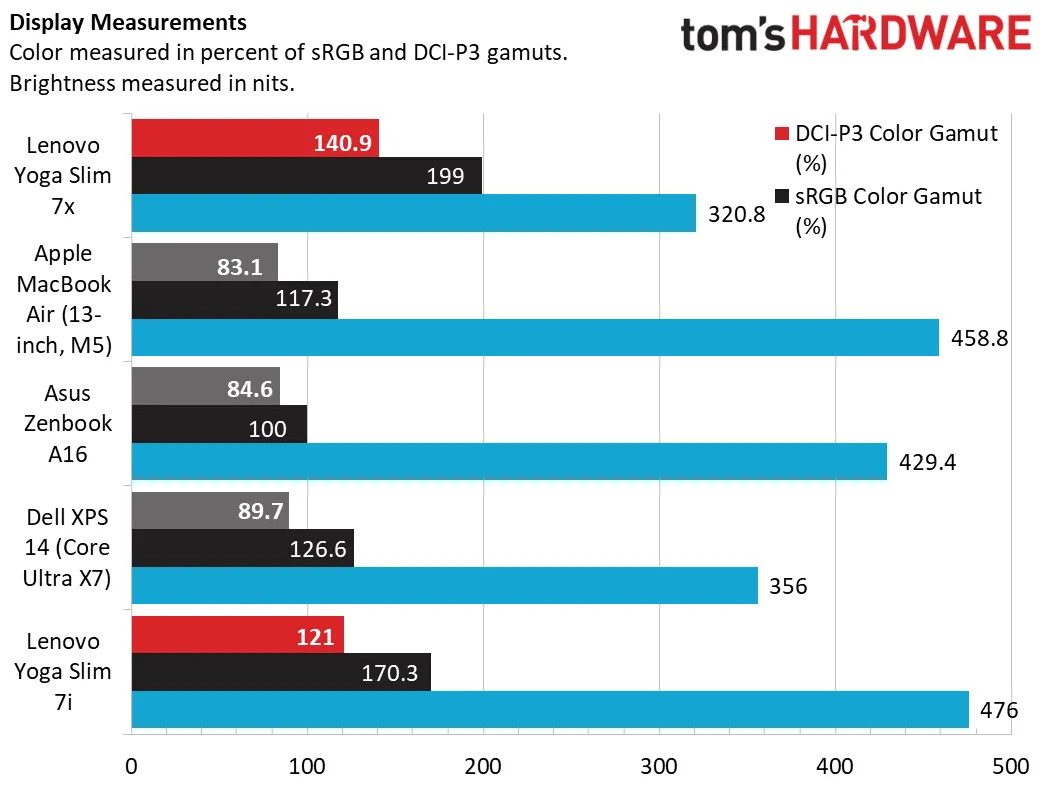
The OLED panel on the Slim 7x offers complete coverage of the DCI-P3 gamut, matching its stablemate, the Slim 7i. Its 321-nit peak brightness, however, isn’t impressive next to the Slim 7i’s 476 nits. Not even the IPS-equipped MacBook Air matches the latter.
Keyboard and Touchpad on the Lenovo Yoga Slim 7x
Lenovo nailed the Slim 7x’s keyboard. The 1.5 mm key travel provides enough movement for your fingers to clearly tell when the key has reached the top or bottom of a stroke. The keys feel springy and snap back with a satisfying sound. Keycaps are slightly scooped with an 0.3 mm dish to help orient your fingers to the center of the key. I felt immediately comfortable on this keyboard, hitting 123 words per minute with 99% accuracy in MonkeyType on the first try. White backlighting, toggled with Fn + spacebar, provides excellent visibility.
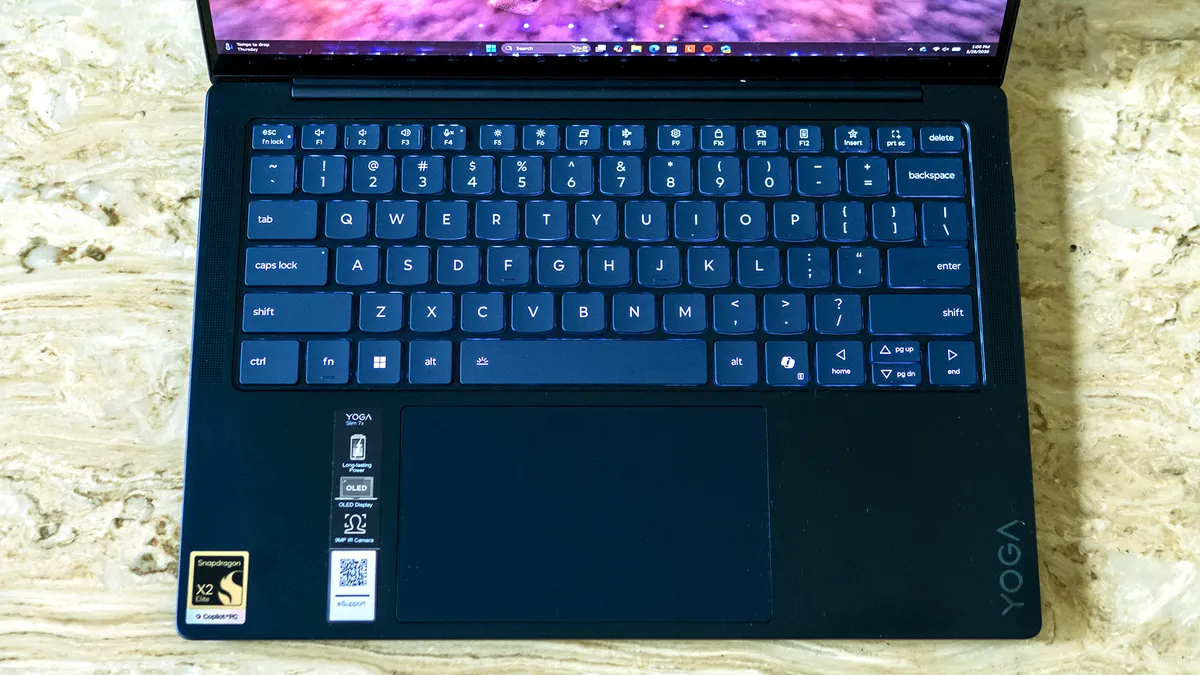
Lenovo’s touchpad is also first-rate. Its matte surface is large relative to the 14-inch display. Physical clicks – this is a mechanical pad, not haptic – feel precise, require just the right amount of effort, and aren’t too loud.
Audio on the Lenovo Yoga Slim 7x
The Slim 7x produces decent audio, with enough volume and fullness that you won’t regret forgetting your headphones. Clarity is a bit muffled by default, but enabling the Detailed equalizer in the Dolby Access app goes a long way towards addressing that, sharpening the soundstage.
Listening to William Black’s “Bleed 4 U”, I heard good separation between vocals and instruments, though the bass drop wasn’t that satisfying due to the lack of low-end response. This followed into Star Wars: Andor where explosions and footsteps didn’t quite have the impact for an immersive experience. Overall, though, two people in a quiet room can be easily entertained by this setup.
Upgradeability of the Lenovo Yoga Slim 7x
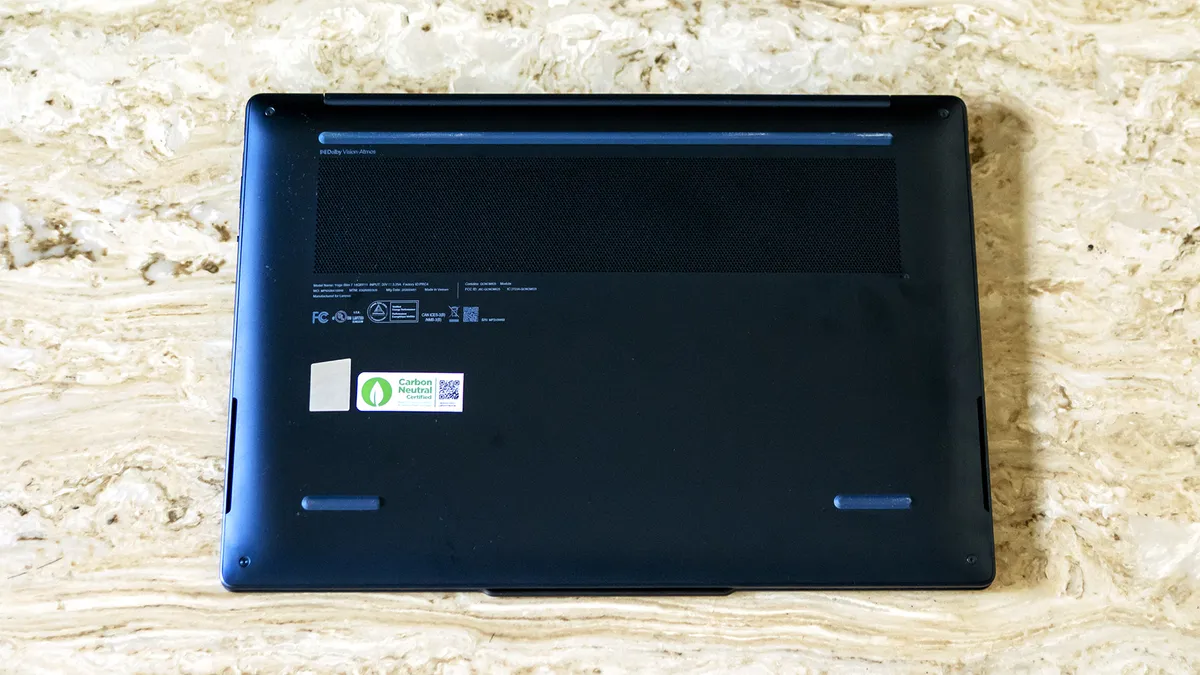
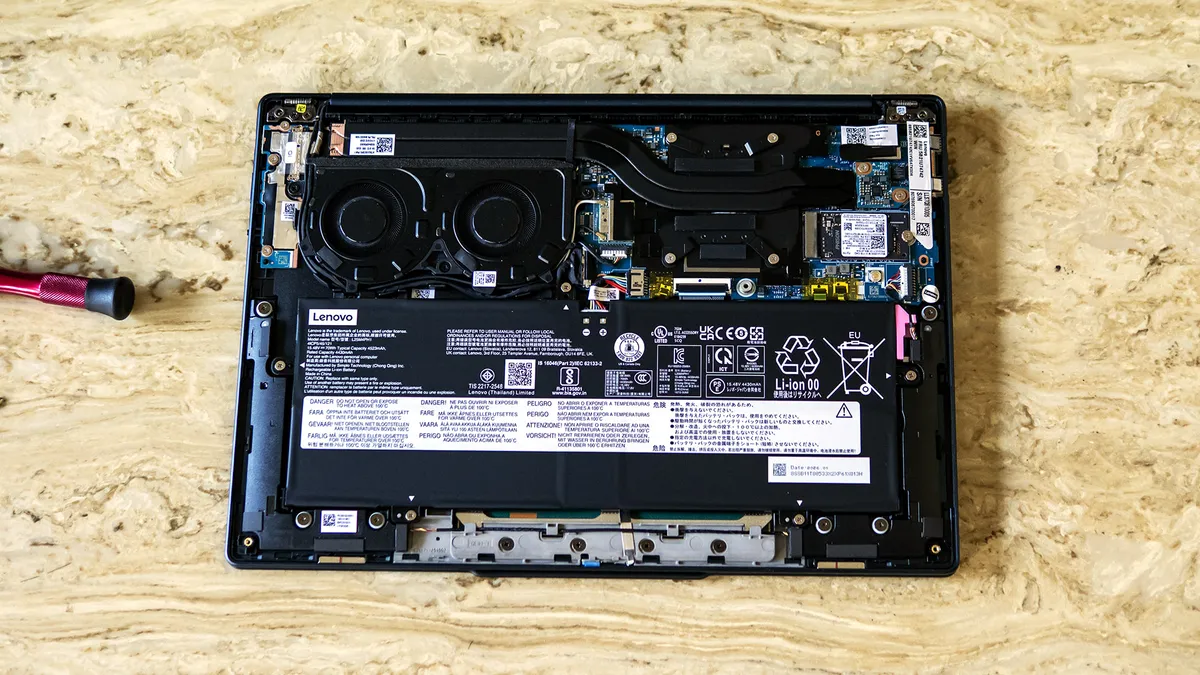
Four Torx T6 screws secure the Slim 7x’s bottom cover, with the front screws (below the palm rest) shorter than the rear ones. I used a plastic trim tool to pop the clips around the perimeter, starting in the speaker cutouts. The panel still felt stuck after I did this – it turned out a foam pad in the center had some adhesive on it. A gentle lift with my fingertips finally broke it free.
As Snapdragon laptops use nearly all soldered or integrated components, upgradeability is limited – here, just the M.2 2230 SSD and the battery can be changed out.
View Original

View Original

Battery Life on the Lenovo Yoga Slim 7x
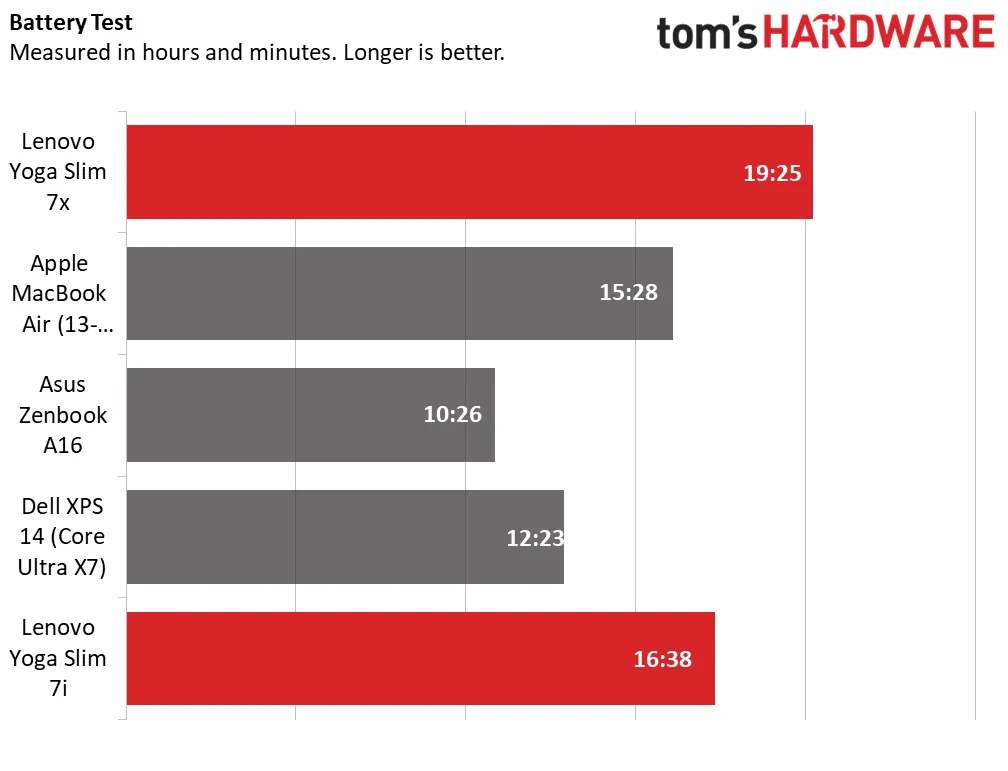
Our battery rundown test sets the screen brightness at 150 nits while the system runs web browsing, streaming video, and light OpenGL tests while connected to Wi-Fi. The Slim 7x was in a class of its own, lasting 19 hours and 25 minutes. The next longest-lasting units were the Slim 7i (16:38) and the MacBook Air (15:28). The Asus lasted just 10:26 despite also using the same capacity battery as the Slim 7x.
Not shown in the charts, we tested a second version of the XPS 14 without the OLED screen and with a standard Core Ultra 7 355, which ran for an even more impressive 20:41.
Heat on the Lenovo Yoga Slim 7x
We measure laptop surface temperatures while running our 10-loop Cinebench 2026 stress test. Peak surface temperatures on the Slim 7x were 70 degrees Fahrenheit on the touchpad, 87 F between the G and H keys, and 100 F on the underside. The laptop felt only lukewarm to the touch. I could hear the fans running, but they weren’t loud enough to
We’re unable to report chip temperatures since the HWInfo tool we use to collect data doesn’t yet support precise enough monitoring on Qualcomm’s latest Snapdragon silicon.
Webcam on the Lenovo Yoga Slim 7x
Lenovo’s 9MP webcam offers excellent video quality. The 1440p video resolution shows fine details – holding my wrist next to my face a couple feet away, I could read the rather small typeface on my Apple Watch and see the links on my necklace. Noise reduction is also superb, with no noticeable grain even in the shadows below my head. The camera furthermore works well in challenging lighting situations – it managed to expose my face properly despite a bright lamp behind me, which was also exposed properly and didn’t look like a blur.
The camera includes an infrared sensor for facial logins with Windows Hello. There’s no physical privacy shutter, but a switch on the laptop’s right edge disconnects it from the laptop, an arguably more secure solution.
Software and Warranty on the Lenovo Yoga Slim 7x
Lenovo’s software stack starts with the familiar Vantage app. In addition to software updates, diagnostics, and support access, it features a security advisor which verifies you have antivirus, a firewall, and are connected to a safe wireless network. Available system settings include a battery lifespan protector that caps the charge at 80% and power mode, with adaptive (the default), battery saver, or maximum performance toggles. The app also includes upsells for Lenovo’s Smart Lock and Smart Performance subscription services.
Some unwanted software is present, including a McAfee trial.
Lenovo includes a standard one-year warranty.
Lenovo Yoga Slim 7x Configurations
We tested the Slim 7x with a 1920 x 1200 OLED touch display, Snapdragon X2 Elite X2E-88-100 processor, 32GB of memory, and a 1TB SSD. Its retail price was $1,579 from Best Buy, discounted from an $1,849 MSRP.
Models start at $1,049 from Lenovo.com with a Snapdragon X2 Plus X2P-42-100, 16GB of RAM, and a 1TB SSD, with a step-up $1,449 configuration offering an X2 Elite X2E-80-100 and 32GB of RAM. The range-topping $1,619 model upgrades to the X2 Elite X2E-88-100 and the 2880 x 1800 OLED display, which features a higher brightness rating and 120 Hz variable refresh rate.
The Slim 7x is priced on the lower side of Snapdragon X2 Elite laptops. Best Buy had Asus’ Zenbook A16 for $1,699 with 48GB of RAM. I also saw a 14-inch HP OmniBook Ultra featuring a 3K OLED screen for $2,049.
Bottom Line
Lenovo’s Yoga Slim 7x is a compelling case for an ARM laptop. Powered by Qualcomm’s Snapdragon X2 Elite, it pushes performance and battery life to new heights among 14-inch ultraportables. Aside from its USB-C-only approach, it offers standout usability thanks to its comfortable input devices, lightweight design, and crisp webcam. While its OLED touch screen is perfectly usable, the visually discerning will find its optional 2880 x 1800 panel worthwhile.
Competition is tight – Apple’s MacBook Air remains a benchmark while Dell’s XPS 14, and Lenovo’s own Slim 7i offer strong Windows alternatives. But if you’re not tied to x86 software, the Slim 7x’s mix of performance, battery life, and pricing is hard to beat.

Charles Jefferies is a freelance reviewer for Tom’s Hardware US. He covers laptop and desktop PCs, especially gaming models.
-
ezst036 How easy is it to upgrade to Linux on these newest ARM-packing devices?Reply
................. ya could have tested that. -
palladin9479 This is very interesting, especially if you can alter the OS. For traveling and doing email, conferencing and writing code it's probably super useful.Reply -
1_rick Reply
At this point in time, you probably can't at all. Last I looked a few months ago, the prior generation Snapdragons had incomplete support, and these are just rolling out. (I have a midrange Snapdragon X, a Zenbook 14, that I've been semi-daily driving since October or so.)ezst036 said:How easy is it to upgrade to Linux on these newest ARM-packing devices?
................. ya could have tested that. -
1_rick My question is, how is the ghosting on this panel? Last fall I looked at about a dozen Snapdragon laptops at a Best Buy and most of them at the testufo dot com ghosting site were anywhere between not good and horrible. I bought an Asus Zenbook 14 because it had very good characteristics.Reply -
bit_user Reply
There was recently a Phoronix article about Linux support for it being added:ezst036 said:How easy is it to upgrade to Linux on these newest ARM-packing devices?
................. ya could have tested that.
https://www.phoronix.com/news/Lenovo-Yoga-Slim-7x-Gen11-Linux
A user claimed that Ubuntu 26.04 installed just fine, on it.
Qualcomm has been making a more concerted effort on Linux support, for this generation. To that end, they made a big hire last year.1_rick said:At this point in time, you probably can't at all. Last I looked a few months ago, the prior generation Snapdragons had incomplete support, and these are just rolling out.
https://www.phoronix.com/news/Hans-Joins-Qualcomm -
bit_user Reply
That's an anomaly, due to the Lunar Lake being an old model that released before memory prices went crazy.Deleted member 2824971 said:Just went through the online configurator: by the time it's go the same configuration as a Lunar Lake variant I just bought (3k OLED touch, 32GB, 1TB QLC), it was exactly twice the price.
And the LL runs Linux just fine, today.
Two-year-old laptop models normally sell at a discount vs. brand new models, and the Lunar Lake's pricing probably wasn't updated to reflect current memory prices.
This is also a higher-end 18-core CPU (6P + 12E), whereas Lunar Lake is a mid-range 8-core (4P + 4E).
So, it's really not such an informative comparison (IMO). -
bit_user Reply
Okay, but the whole premise of your post seemed to be like "look how overpriced these Snapdragon X2 Elite laptops are!", because you talked about spec'ing it out similarly and never mentioned the discrepancy in CPU power.Deleted member 2824971 said:That's why I am pointing to that opportunity, if your requirements aren't actually a maximum of CPU cores in a laptop
I've long criticized Qualcomm's approach to Snapdragon X pricing, so I'm certainly not saying they represent a good value for money. However, there were so many discrepancies in what you seemed to paint as a fair comparison that I felt it needed to be called out.
I thought Win 10 would be my last Windows, but then my Snapdragon X laptop shipped with Windows 11 on it and I ended up just shrinking that partition instead of overwriting it (I needed to pull firmware images off it, among other reasons).Deleted member 2824971 said:It should also last for a few years and be able to migrate to Linux, as I am mudging the family (and myself) slowly towards a M$-exit.
At least I didn't need to register a Microsoft online account, since the Win 11 image on there was old enough that the workaround still existed. And, for that reason, I'll probably just keep that partition for as long as I have the machine. Not sure I'll use it for much.
LOL, don't put words in my mouth. I never said people should buy the Snapdragon. I just pointed out that your comparison was flawed.Deleted member 2824971 said:And while news outlets traditionally have tended to put less attention to last year's premium models becoming opportunities, in this market the value advantage of premium hardware 'past its prime' is even greater than ever.
Not for you, evidently, but hopefully for others.
I got a better deal on my Snapdragon X IdeaPad 5 than probably most deals you've ever gotten.
It's just their normal product differentiation game, so they get a low entry price and high margins at the upper end of the product stack.Deleted member 2824971 said:And personally, I find it quite funny how Intel tried so very hard to charge hundreds of Dollar premium for 32GB of DRAM over 16GB Lunar Lake models,
Depends a lot on how many cores. For an 8-core, 8-thread laptop, I'd agree much more than a 16-core, 32-thread laptop!Deleted member 2824971 said:There is a good chance 32GB will be overkill for the laptop, or at least not really needed for how it's used.
None of this was about saying you got a bad deal.Deleted member 2824971 said:But when you can get that extra RAM on the cheapar-than-normal and perhaps even below manufacturing cost by Intel, there is a degree of satisfaction in just that.
And the rest of the hardware, the OLED display, the chassis etc. is also way better than today's penny pinching designs, device drivers are mature etc. etc.
: ) -
bit_user Reply
Heh, I ebay'd a couple small M.2 drives when I got that Snapdragon X Plus machine, but stuff like the Linux image wanting to copy firmware blobs off the Windows partition kept me from installing Linux on its own SSD. In the end, I just resized the Windows partition (which required decrypting it - I'm fine with that) and then it dual-booted just fine.Deleted member 2824971 said:I'm glad I still have a few Samsung 970 Evo+ 2TB drives left over, so I can afford to keep a 1TB partition for Windows 11 and Linux each on those "migration candidates".
Uh, maybe if they're sitting on a RAID of HDDs at the other end of the 10 Gbps link? That could have as much or more to do with how prefetching works over a network share than anything else. RAIDs also seem like they'd have worse QD=1 random read performance and especially at small block sizes.Deleted member 2824971 said:some games load slower over a 10Gbit network than from a single 2.5" HDD drive... -
bit_user Reply
Okay, so it is the caching & prefetching behavior over network shares, then.Deleted member 2824971 said:I've extensively explored the Windows file share overhead, opening the same game on near identical hardware locally and across the 10Gbit network: the difference is stark.
Did you try sharing via NFS? I briefly used the NFS client that's included in Windows 10 enterprise, at work. Not enough to get a good sense of how its performance compares with CIFS, but it was very usable for my purposes.
I assume you tried disabling your virus scanner on that directory? In the limited bits of Windows development I've done, we pretty much had to add the build areas to the virus scanner's list of excluded directories, since the impact on build times was simply atrocious.Deleted member 2824971 said:The worst game in my collection in terms of loading performance is ARK Survival Evolved (ASE), which is about 140k files in 430GB with all maps and extensions. It takes ages to load even locally from NVMe, while there seems to be no obvious bottleneck on storage or network, even the CPU shows little activity, because the single-threaded file-open logic so busy, is spread across 16 cores.
Yeah, I'm glad I don't need to buy any SSDs. With DRAM and NAND both being so expensive, I'm sure such drives have risen in popularity.Deleted member 2824971 said:NVMe drives is such an area, where nearly everyone only seems to sell DRAM-less QLC NVMe drives today,