









Tom's Hardware Verdict
The MacBook Air M5 is the sum of years of refinements, with a mix of premium design, strong performance, and solid battery life, even if it's slightly pricier with new base specs. For many, it's the best Mac around.
Reasons to buy
- +
Strong performance and 16GB of RAM minimum
- +
Long battery life
- +
Comfortable keyboard and trackpad
Reasons to avoid
- -
No longer starts at $1,099 (but base model now starts with 512GB of storage)
- -
Display notch is still there, still kind of awkward
Why you can trust Tom's Hardware Our expert reviewers spend hours testing and comparing products and services so you can choose the best for you. Find out more about how we test.
The MacBook Air has topped our list of the best ultrabooks and premium laptops in recent years because of its mix of premium design, battery life, and performance that make it a go-to recommendation for anyone already on a Mac or looking to make the jump from Windows. The latest incarnation, the MacBook Air with M5 ($1,099 to start, $1,299 as tested), continues the trend, capitalizing on the series of subtle tweaks in its predecessors.
Apple has ditched the $999 starting price for the 13-inch system we're reviewing here, likely a mix of component shortages and pricing strategies related to the new budget-focused MacBook Neo. But $1,099 does get you a larger 512GB SSD over the previous 256GB base spec.
Despite the slight price bump, the mix of power, style, and longevity is still enough to easily recommend the MacBook Air to most people, especially those who don't need to run Windows. And all of the features that the MacBook Air offers still give it a clear space in the lineup that's worth saving up for over the Neo, if you can afford it.
Design of the MacBook Air (13-inch, M5)
The MacBook Air with M5 sports the same design that Apple revealed back in 2022, when the M2 Air was the first Mac hardware built specifically around Apple Silicon. The design has aged well, and this one comes in the same colors as last year. Our review unit is a pale "sky" blue, the color introduced in 2025, which could be mistaken for silver in some lighting conditions.


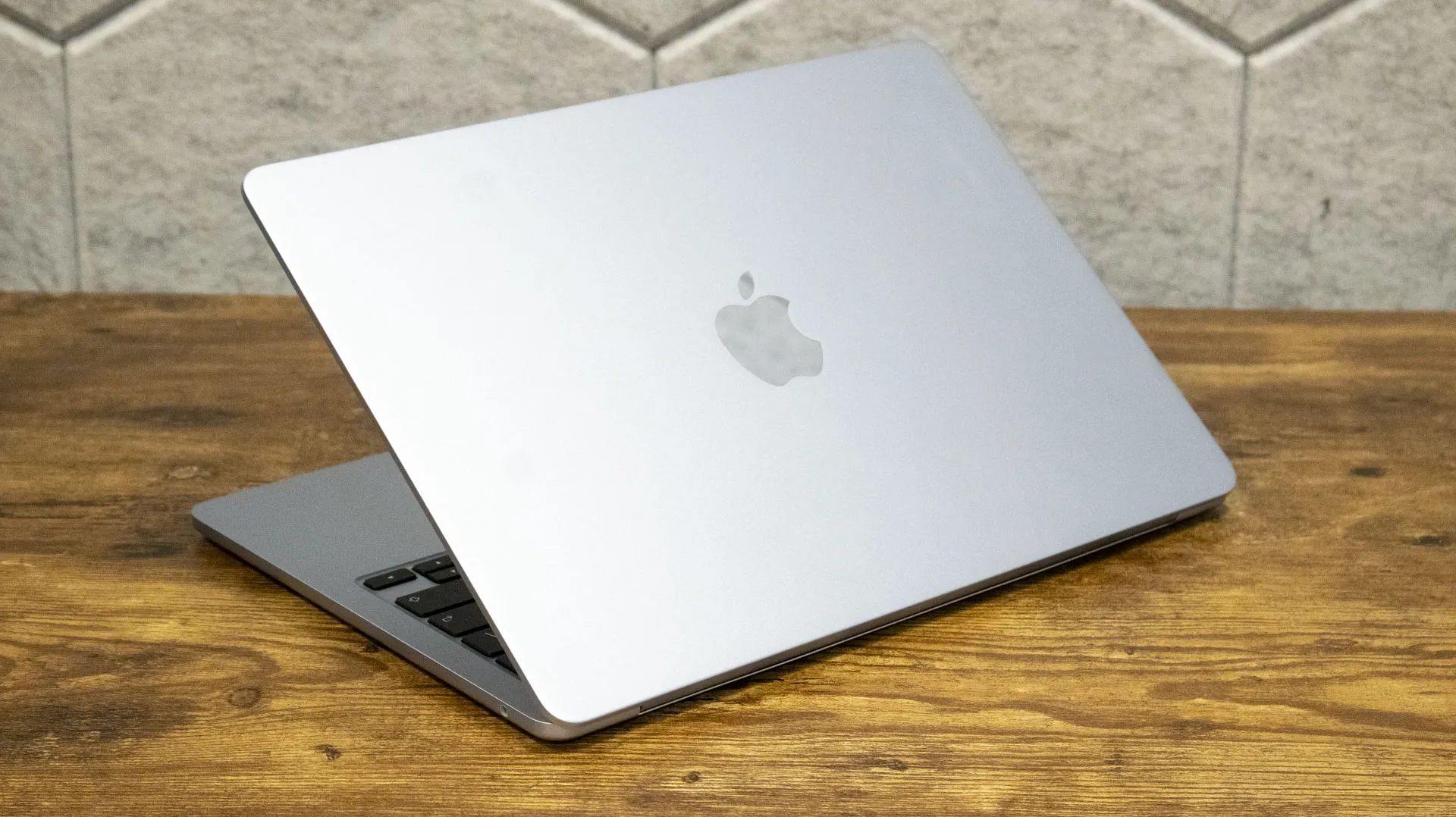

The same aluminum design remains, with rounded edges and flat surfaces. It's handsome, if a bit familiar at this point. When you open the lid, which features Apple's logo in reflective tone-on-tone metal, you're greeted with the one real sin of this design: a notch into the display that houses the webcam. I've never quite gotten over it (in fact, the cheaper MacBook Neo's thicker bezel helped Apple avoid one completely).


View Original

View Original

Most of the MacBook Air's ports are on the left side of the notebook. These include MagSafe for charging and a pair of Thunderbolt 4 ports. On the right side, there's a lone 3.5 mm headphone jack.
At 2.7 pounds and 11.97 x 8.46 x 0.44 inches, the 13-inch MacBook Air can easily slide into a backpack relatively unnoticed. The Dell XPS 14, a Windows laptop noticeably inspired by the design, is 3 pounds and 12.19 x 8.26 x 0.6 inches. Apple's MacBook Neo, the new gateway laptop to the Apple ecosystem, weighs the same as the MacBook Air and is 0.6 mm taller, but has a smaller footprint at 11.71 x 8.12 x 0.5 inches.
Get Tom's Hardware's best news and in-depth reviews, straight to your inbox.
MacBook Air (13-inch, M5) Specifications
CPU |
Apple M5 (10-core CPU) |
Graphics |
10-core GPU (integrated) |
Memory |
16GB LPDDR5 unified memory |
Storage |
1TB SSD |
Display |
13.6-inch, 2560 x 1664, Liquid Retina, IPS, LED, True Tone |
Networking |
Apple N1: Wi-Fi 7, Bluetooth 6, Thread |
Ports |
MagSafe 3, 2x Thunderbolt 4 (USB Type-C), 3.5 mm headphone jack |
Camera |
12MP Center Stage camera, Desk View support |
Battery |
53.8 WHr |
Power Adapter |
40W Dynamic Power Adapter with 60W Max (USB-C) |
Operating System |
macOS Tahoe 26.3.1 |
Dimensions (WxDxH) |
11.97 x 8.46 x 0.44 inches (304.1 x 215 x 11.3 mm) |
Weight |
2.7 pounds (1.23 kg) |
Price (as configured) |
$1,299 |
Productivity Performance on the MacBook Air (13-inch, M5)
The MacBook Air puts Apple's M5 in a fanless chassis. Even without air cooling, the chip is quite powerful.
Our competitors here are the MacBook Pro with M5, which puts the M5 under air, as well as the Dell XPS 14 with a Core Ultra 7 3355 and an Asus ZenBook Duo with Core Ultra X9 388H. For an alternative ARM system, there's the Acer Swift 14 AI with the aging Snapdragon X Elite X1E-78-100). Lastly, there are some comparisons to the 15-inch MacBook Air with M4 that we reviewed last year.


View Original
View Original
View Original

View Original
On Geekbench 6, the Air notched a single-core score of 4,168 and a multi-core score of 17,067. That made the M5's biggest competition itself, but cooler. The M5 MacBook Pro hit a single-core score of 4,288 and a multi-core score of 17,926. Intel's Core Ultra X9 388H had a higher-multi-core score than the Air's M5 at 17,283, but given the Asus that houses it is almost twice the price of the MacBook Air, that's not a huge difference. Apple's M4 didn't do as well as M5, but it's single-core score still beats the Intel chips.
On our file transfer test, the MacBook Air copied 25GB of files at a rate of 1,924.84 MBps, just ahead of the M5 MacBook Pro and faster than both Intel systems tested here.
The M5 MacBook Air took 4 minutes and 41 seconds to transcode a 4K video to 1080p in Handbrake, a slight increase over M4 (4:52). The MacBook Pro did it over a minute faster with air cooling (3:31), while the Zenbook Duo also beat the Air, at 4:22. This was where the Acer Swift 14 with Snapdragon was the most competitive, coming in at 4:46.
On the Xcode Benchmark, the MacBook Air took 165 seconds to compile a large codebase using Apple's developer tools. The MacBook Pro did it in 145 seconds.
It wasn't surprising to see the M5 thermally throttle in this fanless chassis. On our Cinebench 2026 stress test, the chip started with a score of 3,415, slowly decreasing over the first few runs, until it settled in the low 2,300's. Apple doesn't allow monitoring software like TG Pro to access clock speeds, but Cinebench estimates that M5 runs single-core at 4.3 GHz and multi-core at 3.6 GHz in this laptop.
Gaming and Graphics on the MacBook Air
The MacBook Air's integrated 10-core GPU has access to the 16GB of unified memory in our review unit. In this fanless design, the GPU is subject to similar thermal throttling as the CPU.
I tried playing InZoi, the same life simulator game I played on the MacBook Pro with M5 Max, on the Air. In this case, though, I had it set to 1680 x 1050, used MetalFX in performance mode, and very low settings, but still had hardware ray tracing enabled. The game ran between 40 and 55 frames per second, depending on the environment the characters were in.

The Air earned a score of 1,005 on the 3DMark Steel Nomad benchmark, falling behind the cooled M5 in the MacBook Pro at 1,122 and the integrated Intel Arc B390 in the Asus Zenbook Duo's Core Ultra X9 388H (but again, that's a far more expensive laptop). The Air was far more graphically competent than the Dell XPS 14's integrated Intel graphics, which delivered just 532 points. We don't have data for this test for M4, as we've started using it on Macs recently.
Display on the on the MacBook Air (13-inch, M5)
The 13-inch screen on the MacBook Air is actually 13.6-inches, making it 0.6 inches larger than the MacBook Neo. The Air's display has a 2560 x 1664 "Liquid Retina" LED display with IPS and Apple's True Tone, which adjusts the screen's color temperature based on ambient lighting.
I used the MacBook Air to watch the debut trailer for Spider-Man: Brand New Day, the hero's new red and blue suit shone brightly against grayer, darker backgrounds as he dove off a building and confronted the Punisher.

At 83.1% DCI-P3 color Volume and 117.3% sRGB, the Air was on par with the MacBook Pro, despite the latter's mini LED screen. The Asus ZenBook Duo's dual OLED screens, however, were slightly more vivid, while the XPS 14 trailed the group here.
At 458.8 nits, the Air's display gets suitably bright, but the MacBook Pro got almost 100 nits brighter. The Dell XPS 14 beat the Air ever so slightly at 466 nits of brightness.
Keyboard and Touchpad on the MacBook Air (13-inch, M5)
The keyboard on the MacBook Air may not have the most travel, but it's quite comfortable. I love typing on it. The layout just makes sense, with full-sized function keys and inverted-T arrow keys. The power button features Touch ID to log in easily.


View Original

View Original

On the Monkeytype typing test, I hit 114 words per minute with 98% accuracy, which is close to my best.
My only quibble with the MacBook Air's keys is one that is also on this year's MacBook Neo and MacBook Pro lines, as well; Apple has removed the words from the delete, enter, shift, caps lock, and tab keys and replaced them with glyphs that are familiar to those who have used the iOS keyboard. As a touch typist, it's not actually that big of a deal, but I don't think it's as clear as it could be. (For what it's worth, these glyphs have been on alternate language keyboards before. We're just seeing it now in U.S. English.) On the bright side, the modifier keys maintain their text.
Apple's haptic touchpads remain among the best in the industry. They support tons of fluid, accurate gestures, feel good against the fingertip, and have convincing feedback that feels like a real click. Very few others come close.
Audio on the MacBook Air (13-inch, M5)
Apple's quad speakers on the MacBook Pro sound quite good and get loud enough to fill a room. In our photography studio, I listened to Metric's "Victim of Luck" and was pleased by clear vocals, synths, and keys, as well as some snappy drums. The bass isn't as good as the thicker MacBook Pro, but at least there is some, which you rarely get on a laptop this thin.
If you prefer to use the 3.5 mm headphone jack, Apple offers support for high-impedance headphones.
Upgradeability on the MacBook Air (13-inch, M5)
While there are four pentalobe screws on the underside of the MacBook Air, removing them won't get you very far, as the RAM and storage are soldered down. As usual, the recommendation with a Mac is to buy the best one you can at the time of purchase, because you won't be able to adjust down the line.Most people who need repairs are likely to make an appointment at a Genius Bar. For those with access to parts, Apple did drop a repair manual for the MacBook Air on launch day (as well as the Pro and Neo).
Battery Life on the MacBook Air (13-inch, M5)
The MacBook Air lasts long enough on a charge. On our battery test, which involves web browsing, streaming video, and light OpenGL benchmarks with the screen set to 150 nits of brightness, it lasted for 15 hours and 28 minutes. That's roughly the same as the 15-inch M4 model we tested last year (15:14).
And while that's nothing to sneeze at, and is effectively all-day battery life, you can go higher. The MacBook Pro with M5, with a larger 72.4 WHr battery, ran for 18:14. The Dell XPS 14 ran for 20:41, albeit with a lower-resolution display. Another ARM-based competitor, the Snapdragon X Elite-based Swift 14, also ran longer at 17:32.
Heat on the MacBook Air (13-inch, M5)
Despite the lack of a fan, the MacBook Air doesn't get uncomfortably hot. We took skin temperatures while running our Cinebench stress test, and while the system heated up, it was never uncomfortable to the point where you couldn't use it.
The center of the keyboard measured 105.1 degrees Fahrenheit, which is noticeable, but the touchpad was cooler at 96 F. The hottest point on the bottom of the laptop measured 107.9 F.
TG Pro, which measures system temperatures and can control fan speeds, measured the M5 SOC at 63.24 degrees Celsius.
Webcam on the MacBook Air (13-inch, M5)
The MacBook Air has a 12MP webcam in its notch. In everyday usage, I have no complaints. The webcam caught every hair on my head (fortunate!) some wrinkles under my eyes (unfortunate!), and even some detail in our office's industrial ceiling with speckled paint.

The camera, dubbed "Center Stage," is named after a macOS feature that lets the camera focus on you as you move around. I don't use it much, as I tend to sit in one place on calls.
Software and Warranty on the MacBook Air (13-inch, M5)
The MacBook Air comes with the latest version of macOS 26, also known as Tahoe. We went into that more in our review of the Macbook Pro with M5. Tahoe includes the "liquid glass" design overhaul that includes lots of icons and translucent effects, as well as a big update to Spotlight that adds many actions, a built-in clipboard history, and far more automations for shortcuts.
Built-in apps include Safari, Messages, Reminders, Maps, FaceTime, Photos, Apple TV, Music, and more. You still get free versions of Keynote, Pages, and Numbers, though newer versions come as part of Apple's Creator Studio subscription service, along with Compression, Motion, FInal Cut Pro, Logic Pro, Mainstage, and Pixelmator Pro.
Apple sells the 13-inch MacBook Air with a 1-year warranty. AppleCare+, which covers repairs, battery replacement, and priority support, is $6.99 per month or $69.99 per year (it is also available as part of AppleCare One for $19.99 per month, covering up to three products). The 15-inch Air drops up to $7.99 per month or $79.99 annually.
MacBook Air (13-inch, M5) Configurations
We tested a 13-inch MacBook Air with an Apple M5 with a 10-core CPU, 10-core GPU, 16GB of RAM, a 1TB SSD, and a blue "sky" colorway. That configuration costs $1,299.
Apple has eliminated the $999 base price. This year, the 13-inch MacBook Air starts at $1,099, albeit with 512GB of storage rather than the 256GB of storage at the previous starting price. That system also has an 8-core GPU.
If you want more than 16GB, you need the M5 chip with the 10-core GPU, a $100 upgrade on its own. From there, 24GB of RAM is $200 and 32GB is $400. That's pricey, but it's not ridiculous given the price of RAM everywhere else these days.
Apple is now selling the 13-inch Air with a 40W Dynamic Power Adapter with 60W Max. For $20 more, you can get either the 35W Dual USB-C port or a 70W USB-C charger.
The 15-inch MacBook Air now starts at $1,299 with the M5 chip and a 10-core GPU.
Bottom Line
The MacBook Air, despite its place as Apple's new middle child in the Mac laptop lineup, is still the best option for the majority of users, if they can afford it. You get a slim design, strong performance and battery life, a comfortable keyboard, an excellent haptic touchpad, and strong base specs at 16GB of RAM and a 512GB SSD.

Much of Apple's premium competition is actually more expensive now. For example, the Dell XPS 14 starts at $1,349.99 (as of this writing, the price tends to fluctuate) with an Intel Core Ultra 5 325, 16GB of RAM, 512GB of storage, and a 1920 x 1200 screen. That's more money for a lower resolution display and a less powerful chip. (The version we tested, with a Core Ultra 7 355, is up to $1,449.99). Getting Intel's top processors only goes up from there. But if you need to use Windows, you may need to pony up or find alternatives to get a premium ultrabook in your price range.
Meanwhile, Apple's MacBook Neo may be an alternative for some, but if you're doing serious multitasking, the 16GB of memory in the MacBook Air will be a noticeable difference, and you'll also get better speakers, MagSafe charging, an excellent haptic touchpad, a larger, higher-resolution display, better webcam, keyboard backlighting, and a faster chip, to boot. You get a lot extra with the Air, if you can afford it.
That leaves the MacBook Air as a great value in the premium ultraportable space. While I would love to see Apple start bringing its fancier screens and other Pro features down to the Air, this is a laptop that most people can get by on, presuming they're not doing intensive workloads that need constant cooling and heavy graphics prowess. For just $1,100, you can get a lot of Mac. That's getting harder and harder for other companies to say about their PCs, as the RAM and storage crisis continues to drive up prices.

Andrew E. Freedman is a senior editor at Tom's Hardware focusing on laptops, desktops and gaming. He also keeps up with the latest news. A lover of all things gaming and tech, his previous work has shown up in Tom's Guide, Laptop Mag, Kotaku, PCMag and Complex, among others. Follow him on Threads @FreedmanAE and BlueSky @andrewfreedman.net. You can send him tips on Signal: andrewfreedman.01