Processor Temperature Levels

Intel's boxed cooler, which is bundled with retail processor kits, provides adequate cooling and relatively good noise levels.
All Core 2 Duo boxed processors are bundled with the same heat sink and fan that comes with Pentium D processors. It has a copper core and countless fins to provide a large surface. Its 4-pin connector provides the motherboard with fan control, which it controlles by using the processor's temperature readings. Even under high processor load the fan speed did not exceed 2,400 RPM during our tests. This is an amazingly low level when compared to the 4,500 RPM it runs on a busy Pentium D 840 system. Unless there are other noisy components installed a system, using exactly the same hardware (including the boxed cooler) with Core 2 Duo will give you a more quiet system than a Pentium D.
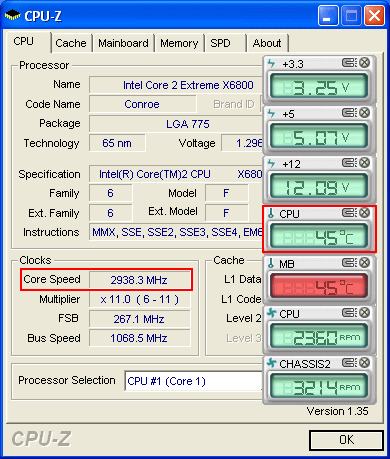
The Core 2 Extreme does not exceed 45 °C CPU temperature using the Intel retail cooler in an office environment.

Core 2 Extreme With SpeedStep Enabled
You should care to enable SpeedStep, because it reduces the processor clock speed to 1.6 GHz when idle. This will cause the processor fan to drop its rotation speed to as little as 1,500 RPM. Eventually, we measured an average CPU temperature level of only 25°C (77°F). That's almost room temperature!
All you need to do to enable SpeedStep is switching the Windows power scheme from "Home/Office" to "Portable/Laptop":
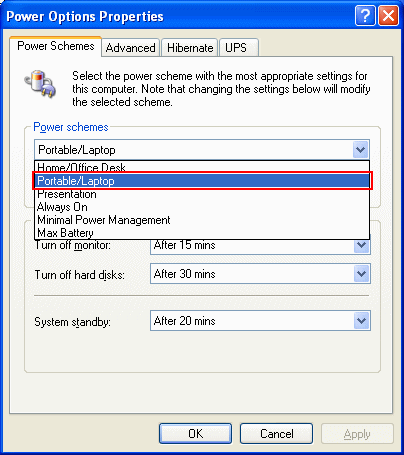
No drivers are needed to enable SpeedStep: All you have to do is to activate this setting in Windows' power options. Make sure that SpeedStep is enabled in your motherboard BIOS, though.
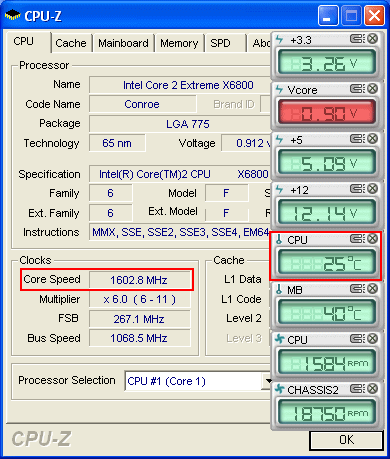
Intel Core 2 Extreme with SpeedStep will drop CPU temperature to approximately 25 °C (77°F).
... Versus AMD Athlon 64 FX-62
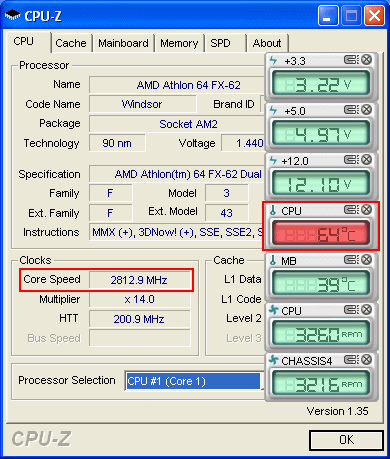
AMD's Athlon 64 FX-62 untreached 64 °C under high load.
Of course we took AMD's current processor top model, the Athlon 64 FX-62, and ran the same series of temperature tests. We measured a processor temperature of 64°C under high load and 31°C for idle operation with Cool & Quiet activated. Both is considerably hotter than with Core 2 Extreme.
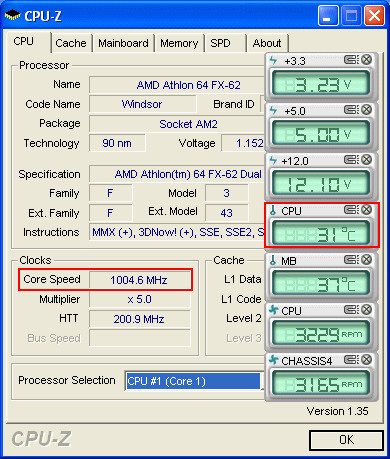
AMD Athlon 64 FX-62 with Cool'n'Quiet enabled: 31 °C
