









Why you can trust Tom's Hardware Our expert reviewers spend hours testing and comparing products and services so you can choose the best for you. Find out more about how we test.
Testing Part 1: Pump speed vs. dBA
To test the NL-CL1, we decided to deviate from our usual procedure. Usually, we take AIO’s as they come and pit them against each other in a real-world scenario using a closed case and standard onboard fan curves. However, with the improvements Noctua has made to the pump assembly, we wanted to really focus on the impact of this different pump on both acoustic and thermal performance.
To do this, we’re pitting the NL-CL1 against the Phanteks Glacier One M25 G2 and the Lian Li Hydroshift II LCD-C 360N – but instead of using their included fans (the Lian Li doesn’t come with any), we’re installing the three NF-A12x25 G2 fans that come with the Noctua.

The reason we’re testing this way is because I feel that the primary audience that would be interested in this AIO, is also the type that would fan-swap an existing cooler. It’s also to take the fan variable out of the equation – we know Noctua’s fans are better than any other (they sit atop our Best PC Fans list just for that reason), and what we really want to know is how much better this pump unit really is.
These two competing coolers cost about $150 each, and if you were to install three NF-A12x25 G2’s on them, that brings the total cost to about $250, which is in-line with Noctua’s pricing. So, what do you get for the same money with the old method, vs the new, official Noctua cooler?
Meanwhile, for the purists among you, we’re also adding the legendary NH-D15 G2 air cooler to the test at the end. The main reason to contemplate a Noctua AIO is to minimize pump noise – and for a few, up until today, that simply meant not using an AIO at all, rather sticking to air cooling with fewer moving parts.
Test Setup

We’re using an MSI Godlike X870E motherboard with a 9950X3D CPU and some Kingston Fury Renegade DDR5-6000 memory. We also have a PNY RTX 5080 installed, though it’s there only for display purposes and will be kept at its zero-RPM mode.
We’re doing these tests on an open test bench, as to expose as much of the pump as possible.
Get Tom's Hardware's best news and in-depth reviews, straight to your inbox.
Testing Part 1: Pump speed vs. dBA
For the first series of tests, I ran the three AIO’s pumps through their RPM ranges independently, by themselves. To get the system quiet enough, we ensured the GPU’s fans were not spinning, there was no load on the CPU (and thus no whining VRMs or PSU fan), and disconnected the CPU fans – the only moving part was the pump itself – that’s all we’re trying to figure out here.

What’s clear from the results is that the Noctua pump is notably quieter at most speeds, right up until about 2300 RPM, where Phanteks’ Glacier One becomes quieter, and Noctua’s pump actually makes a big jump up in noise levels.
What’s also interesting is that up until about 1900 RPM, the pump on Noctua’s cooler is almost indistinguishable from the noise floor of the room. That’s very impressive if you consider that the dB meter was placed at a mere 20cm from the pump, at night, in a room treated for acoustics.
I debated testing with dB-C weighting, as this is more sensitive to low frequencies, but decided against this. C-weighting spans across a wider range of frequencies, which technically speaking, would offer results more representative of the entire sound spectrum.
However, dB-A weighting is geared more toward the sensitivities of human hearing – and Noctua specifically engineered the pump cover to shift the pump’s sound profile towards lower frequencies, where they would be less bothersome.
With that in mind, I do want to mention that the dB reading alone really doesn’t tell the whole story. As mentioned, the Noctua pump ends up louder than the Phanteks, at least as far as decibels are concerned.
As I was testing, I saw these numbers, and I thought: that’s not right. How can that be? The Noctua sounded much quieter to my ears.
So, I went back, re-installed the Phanteks, and lo-and-behold, it put out the exact same figure it did before – quieter than the Noctua on the dB meter, but my ears told a different story.
Using dB(A) weighting should have compensated for that difference, but it didn’t. So, perhaps my dB meter is wrong, or Noctua knows more about human hearing than dB(A) weighting accounts for.
However, what may also play a role is the differences in pump assembly and how they impact flow rate. If, for example, the Phanteks pushes more fluid per rotation than the Noctua, then it’d be only logical that it’s louder too – but I doubt it does.
Either way, we’ll be going back and testing with subjective noise levels in addition to these objective figures for a complete picture.
Testing Phase 2: AIO Objective Noise-Normalized, + Min and Max
In order to account for the pump’s engineering, I’ll be running a noise-normalized test that has the NF-A12x25 G2 fans spinning at the same 1200 RPM speed on each cooler, on every test. I’ll be running the three pumps at speeds that have matching noise levels, which we’ve figured out in the previous testing phase with the dB meter.
This is not a test meant to simulate real-life performance -- we run the fans at a fixed speed of 1200 RPM, and keep the CPU at stock settings to limit power draw to exactly a hair under 200 watts under all scenarios, so that all coolers make it through the test and to remove any variables. The only factors influencing the thermal results are the pump, its mounting offset, the flow resistance, and the radiator – all factors over which we ultimately have no influence.

This is where things started to get very interesting. Let us start with the minimums and maximums – you’ll note that at the minimum pump speed, the Noctua has the CPU running much hotter than the other two coolers. I’d like to clarify that the minimum and maximum tests are not noise-normalized, but have the pump running at their minimum and maximum speeds. Noctua’s LC1 has an extremely wide RPM range to work with, which the other two coolers don’t. And running a 200W workload with a pump running at just 750 RPM isn’t going to do great things for thermals. It does, though, mean that in low-load situations, the pump can run completely quietly.
However, in the noise-normalized test between 29 dB(A) pump noise and 32 dB(A) pump noise, we saw some shocking results. Noctua’s cooler, even when it has its pump running at a barely perceptible noise level of just 29 dB(A), still runs significantly cooler than both the Glacier One and the Hydroshift with their pumps running at full speed.
Of course, it must be noted that there are more factors at play here than just the pump – the LC1 offers a 7mm offset mount for Ryzen systems which we used, a different cold plate design, and a radiator that’s slightly thicker than its competition.
Testing Phase 3: Subjective Noise-Normalized
As mentioned earlier, according to my ears, some of the pump’s acoustics don’t match up with what my dB meter shows. For this reason, I’m repeating the previous batch of tests, but instead of looking at the dB meter, I’m trusting my ears to guide me in picking an RPM setpoint for each pump that I deem fits the description. If you see a result missing, it’s because the criteria weren’t met. The RPMs of the pumps are in the chart below.

To determine the RPM levels, I first ran the pump at the highest speed at which it was still completely inaudible. I then figured out a middle point where I was happy to tolerate the noise level under load. And finally, I pushed the pump speed up further, and found the lowest value at which its noise started to annoy me.
To give some additional context, I’d like to emphasize that I have highly sensitive hearing, and I’m someone that likes to run their gear as close to inaudible as possible. This is also a very subjective test – you may hear something where I didn’t – but on the flipside, what annoys me, you may be just fine with, so do take these findings with a grain of salt.
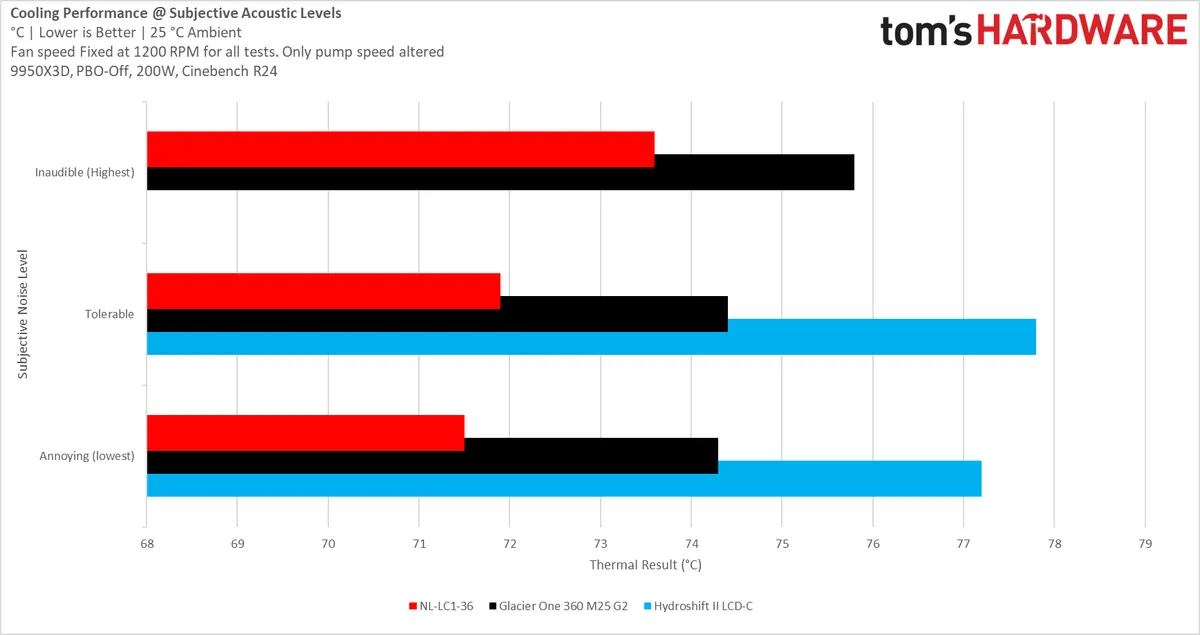
Then, with those numbers, I ran the thermal tests again, all with the fans at 1200 RPM to remove any other variables.
Here, the Noctua started to really stand out from the crowd. Even pushing the Glacier one to annoying noise levels couldn’t make it keep up with the thermals produced by Noctua pump running inaudibly. That’s honestly quite staggering.
I contemplated for a moment whether to adjust the fan speeds in this test to match the annoyance factor, but this would make comparison difficult, and I really am trying to focus on the difference the pump makes here, and nothing else.
What’s really important to note here, though, is that from my experience, I can truly say that the dBA figure means almost nothing in practice. The subjective noise profile of the pump matters way more than the dBA, and whereas the Noctua might, strictly speaking, be louder than the Phanteks at higher speeds, it’s also far smoother. Whatever they did with the PNA1, it’s working.
Meanwhile, though, from the results it’s also clear that there is no need to run the Noctua at these higher pump speeds, as there is very little additional benefit.
And that’s not to even mention the Lian Li pump, which is always audible. Consequently, I had to omit it from the inaudible category entirely, and I can tell you from experience, there are many AIOs that are unable to run their pumps at inaudible levels. This is not an isolated case.
Testing Phase 4: Air vs Water (Noise-Normalized)
As mentioned, we also added the NH-D15 G2 to the mix, as it is Noctua’s most powerful air cooler and the most surefire way to avoid pump noise entirely, and I’m sure many of you who want nothing except Noctua, actually want to know how the new liquid cooler compares to Noctua’s finest air cooler – not a bunch of AIO’s you wouldn’t buy anyway.

TheD15 air cooler has – as its name implies – much larger 150mm fans. Consequently, to test fairly against the NH-D15, we decided to set two noise targets, based on the AIO’s internal pump limiters selected with the switch on quiet and balanced.
|
Quiet |
Balanced |
Maximum |
Pump Speed |
2100 |
2600 |
3700 |
LC1 Fan Speed |
1000 |
1500 |
1800 |
LC1 dB(A) |
29.6 |
35.4 |
40.6 |
D15 dB(A) |
29.6 |
35.5 |
43.8 |
D15 Fan Speed |
825 |
1180 |
1550 |
The test we’re performing here is more representative of real-world performance than the previous bunch. For the quiet and balanced pump profiles, I set the AIO’s fans to a speed that I felt matched up nicely, where the fan and pump noise blended smoothly. I measured the total dB(A) produced, then figured out which fan speed the NH-D15 G2 had to run at to produce the same overall noise level.
For the maximum speed test, dB(A) figures were ignored – all gear was run at full speed.

The results speak for themselves. Noctua’s NL-LC1-36 offers vastly superior performance to the NH-D15. Even with the NH-D15 G2 air cooler running at full tilt, producing a highly annoying 43.9 dB(A), it still runs 6 degrees hotter than the LC1 running in the quietest profile with the fans barely even trying at just 1000 RPM, producing only 29.6 dB(A).
Noctua has been defeated. Long live Noctua.

Niels Broekhuijsen is a Contributing Writer for Tom's Hardware US. He reviews cases, water cooling and pc builds.
-
F00F if you were measuring in Sones rather than dB(A) SPL, you'd probably see the difference in perceived loudness in the dataReply -
wakuwaku ReplyYes, it can easily be removed with a light wipe of Acetone or nail polish remover. Just be careful not to work it too hard if you want to keep the Noctua label, as it does discolor the paint a bit, too.
This method makes it look a lot more uglier than just a plain black sticker or leaving it alone. Also doing just hiding/removing the Asetek label makes it off center which makes its even more uglier. Just remove/hide the whole thing. Or print something out and cover it, and I meant a normal paper printer. Then again if you can afford noctua products, you can afford 3d printers. -
dwd999 Since they've officially announced that the all chromax.black version will be coming in a few months, I can wait.Reply -
helper800 I am curious as to why Albert did not do the review, and why there was no Arctic LF3 to compare against.Reply -
thestryker I somehow missed Asetek switching to a 30mm radiator as an option already. That being said I still feel like this is a missed opportunity due to timing. Noctua is bringing out a premium AIO at the same time Asetek is showing the V3 with improved pump, coldplate and optional high performance radiator. That means there's a decent chance of better performing AIOs coming this year which will cost less.Reply
As it is if you're on AM5/LGA 1851 the Arctic LFIII Pro is going to be around the same performance and if you added Noctua's fans still be about $60-70 cheaper. Noctua is in the same price bracket as other high performance AIOs which have screens and other flashy gimmicks. While I don't care for them that does seem to be driving the higher price market not performance.
I still hope this is a successful move for them because I really want higher performing cooling without moving from an AIO (without power limits my cooler can handle Cinebench, but not OCCT Extreme) and this one still isn't quite there. Hopefully their thermosiphon will bring with it higher performance levels along with no pump noise.
Right now I'm mostly just waiting for NVL/Zen 6 launches to see if new coolers appear. Even with better manufacturing processes the higher core count models are definitely going to be capable of using a lot more power than current CPUs.
Of course maybe Arctic will release a new cooler with a better pump and/or coldplate then just dominate the AIO market. -
wussupi83 I believe I commented on Tom's original news article announcing Noctua was releasing an AIO that I was disappointed they weren't making it in house but that I'd wait and see. And to their credit, this cooler did deliver and would make a fine addition to my PC case. I was also very happy to see it compared to the HydroShift as this was an AIO I have recently considered. That being said, (apologies if I skimmed past it) I really would have liked to see a more extreme power usage scenario as 200W is within reach of entry level AIOs. I don't operate any of my PCs in a sound sensitive environment so noise is not really a purchase consideration. But cooling performance during overclocked, high wattage power loads would be of interest.Reply -
VizzieTheViz Reply
If you don’t mind a bit of noise you should probably look to other brands than noctua.wussupi83 said:I believe I commented on Tom's original news article announcing Noctua was releasing an AIO that I was disappointed they weren't making it in house but that I'd wait and see. And to their credit, this cooler did deliver and would make a fine addition to my PC case. I was also very happy to see it compared to the HydroShift as this was an AIO I have recently considered. That being said, (apologies if I skimmed past it) I really would have liked to see a more extreme power usage scenario as 200W is within reach of entry level AIOs. I don't operate any of my PCs in a sound sensitive environment so noise is not really a purchase consideration. But cooling performance during overclocked, high wattage power loads would be of interest.
Noctua is great for silent performance at a pretty steep price, but if it’s just the performance you want there’s usually a cheaper option with the same performance or something that performs better at the same price.
I’m running a Noctua air cooler myself (forgot which one since I built my pc in the times when hardware was reasonably priced) because I do care about a silent pc, but it wasn’t the best price performance bargain by any means if you don’t take noise into account. -
8086 Why hide the truth of what it really is and why bother to take the time to remove it (the label)?Reply -
cknobman Looks like a great product for a Noctua fan!Reply
If I was doing a themed build this would be a must buy. -
PEnns Reply
Seriously!8086 said:Why hide the truth of what it really is and why bother to take the time to remove it (the label)?
And it's not like Noctua is a bad / unknown company not famous for excellent products!