Specifications, Pricing, Warranty And Accessories
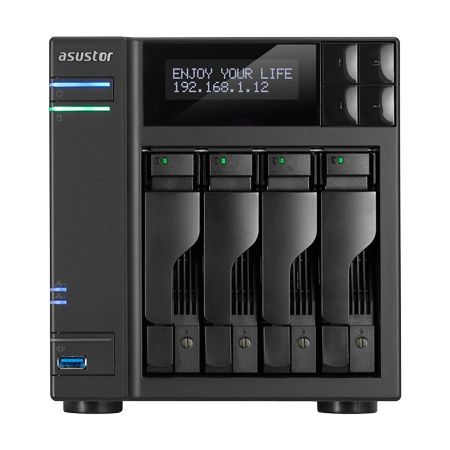
Another black-box NAS may seem soporific, but the Asustor AS6204T packs Intel's latest Braswell-based SoC. That Celeron N3150 consumes very little power and adds hardware-accelerated AES encryption to a lower price point.
Asustor was actually the first NAS vendor to incorporate Braswell into its appliances. Four models were introduced at the end of 2015 packing Intel's latest: two sporting four drive bays and two others with a pair of bays round out the company's AS6x0xT family. Between them, Asustor employs two different processors. The AS6102T and AS6204T feature a dual-core Celeron N3050 that runs at 1.6GHz and accelerates to 2.16GHz. The AS66202T and AS6204T get a quad-core Celeron N3150 that maintains a 1.6GHz base clock but only speeds up to 2.08GHz Turbo Boost frequency.
The new SoCs come armed with Intel's AES-NI to speed up data encryption and decryption. Most home users probably won't bother with encryption, but any office that works with sensitive information will welcome the opportunity to reduce the compute requirements of keeping it safe. Encrypted volumes are nothing new to powerful storage appliances, but most are subjected to a large performance penalty with the feature enabled. AES-NI helps circumvent this to a degree.
Latest Videos FromTom's Hardware
Braswell improves performance further by arming the new Celerons with dual-channel memory controllers. More bandwidth enables 4K video playback with up to 7.1-channel audio, for instance.
MORE: Best SSDs For The Money
MORE: Latest Storage News
MORE: Storage in the Forums
We've come to expect a lot of I/O from Asustor and the AS6204T doesn't disappoint. Its ports expand the number of roles the platform can play, giving it utility beyond just a medium-capacity file server.
Of course, that remains its main job. You get four hot-swap drive bays and a healthy list of supported RAID types. Two eSATA and four USB ports on the back facilitate external expansion in case you run out of room on the internal disks. Further, a single USB 3.0 port up front allows quick backups to the appliance; pressing the button surrounding that port automatically pulls in data from the attached device.
The AS6204T also supports several multimedia capabilities through its HDMI 1.4b port and S/PDIF audio interface. Beyond its ability to pipe out movies, the HDMI connector also lets you see what's happening on as many as 25 IP camera streams (though you'll need to buy extra licenses if you expand beyond four cameras).
Dual gigabit Ethernet ports are responsible for moving data to and from the system. They can be configured a number of ways, though most folks will simply hook one port up to a home or small business network. We're starting to see proper 802.11ad link aggregation exposed on small business routers and switches, which Asustor supports. The AS6204T also includes other network performance-enhancing modes, in addition to some for fail-over.
Pricing, Warranty And Accessories
The AS6204T is already available in the U.S., and we found it online for just over $575. Asustor covers the platform with a three-year warranty that activates from the date of purchase.
Bundled along with the appliance is an external power adapter and two Ethernet cables. Screws are supplied for both 2.5-inch and 3.5-inch drives. Separately, Asustor offers a remote control (model number AS-RC10) for use with Kodi and other supported multimedia applications. The company also sells single- and four-pack camera licenses for Surveillance Center.
Current page:
Specifications, Pricing, Warranty And Accessories
Next Page Software