Releasing The Brake - ECC Checking
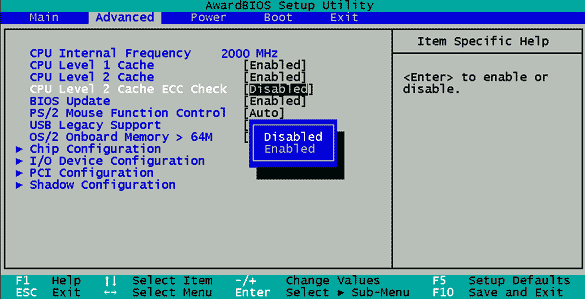
Brake: The "ECC Checking" feature should always be disabled.
It is possible to boost performance by a whole 1 percent by disabling the "ECC Checking" switch in the BIOS. In doing so, the data flow is no longer permanently supplemented with a checksum, whose function costs additional time.
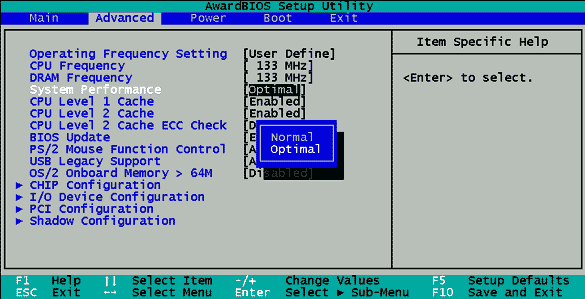
Some boards offer the "Optimal System Performance" function, which essentially implies fast memory timing.

The picture above shows a function that is not featured in all motherboards.
Optional Feature: Onboard Graphics
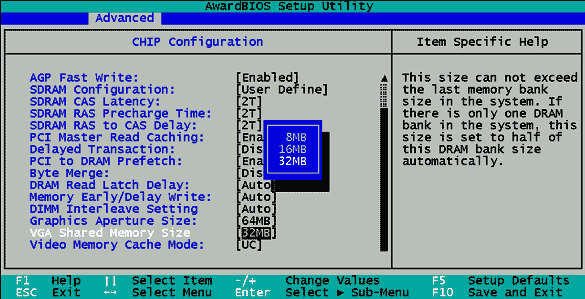
For boards featuring onboard graphics (e.g. Intel 815 chipset), a portion of the RAM is used as the graphics memory. The picture shows that 32 MB are used as graphics memory.
Boards with onboard graphics such as an Intel 815E chipset use a portion of the RAM for storing graphics data. To do this, however, the onboard graphics function must be enabled, as otherwise the external graphics card is addressed via the AGP port. When onboard graphics are used, it is possible to adjust the size of the graphics memory via the BIOS, with 32 MB constituting the maximum limit for boards currently available.