Shop for Computers
4GB Extreme III SDHC Memory Card 4GB Extreme III SDHC Memory Card

Compare the top 5 lowest prices by hovering your mouse over the product names on the left

$49.99
4GB Memory Stick Pro Duo 4GB Memory Stick Pro Duo $53.98
8GB Cruzer Micro USB U3 Flash Drive 8GB Cruzer Micro USB U3 Flash Drive $49.79
Voyager 8GB Flash Drive Voyager 8GB Flash Drive $30.99
8GB Memory Stick PRO Duo 8GB Memory Stick PRO Duo $119.99

See More Products...

PDP Patriot Extreme Performance PC3-10666 Low Latency

PDP Patriot sent us its part number PDC34G1333LLK, were the LLK at the model number's end stands for low latency (dual-channel) kit. Offering the same CAS 7 timings as Kingston's high-end HyperX and OCZ's midrange Platinum Edition, these modules also provide something we didn't see in the other kits: 4 GB of capacity. While most brands offer 4.0 GB kits to customers, Patriot is on the only one to supply this capacity for an overclocking and under-latency competition.

That Patriot is confident enough to supply high-capacity modules for a speed race says a lot about its confidence in these parts, as tight timings and high speeds become more difficult to accomplish as capacities are increased. Like Kingston and OCZ, however, the company suggests that builders should enter BIOS and raise DIMM voltage from 1.50 to 1.70 volts before manually setting the rated DDR3-1333 speed for its 7-7-7-20 timings.
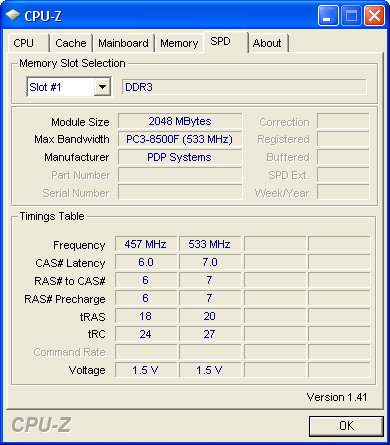
In fact, a DDR3-1333 SPD value isn't even found in Patriot's SPD table, but the 7-7-7-20 timings are found for operation at DDR3-1066 (533 MHz clock) using a system's default 1.50 volts. For builders who are comfortable in BIOS, the change is usually as simple as setting the speed and voltage using the detected 533 MHz timings.

A 457 MHz (DDR3-914) SPD value is also found, which allows FSB-800 processors to operate with DDR3-800 memory speed via automatic configuration prior to any manual BIOS changes.

Lacking any DDR3-SPD values, our sample kit defaulted to DDR3-1066 on both Gigabyte and Asus motherboards using FSB-1333 and FSB-1600 processors.


Talkback

dv8silencer 05/07/2008 2:45 AM
Hide
-0+
dv8silencer
I have a question: on your page 3 where you discuss the memory myth you do some calculations:


"Because cycle time is the inverse of clock speed (1/2 of DDR data rates), the DDR-333 reference clock cycled every six nanoseconds, DDR2-667 every three nanoseconds and DDR3-1333 every 1.5 nanoseconds. Latency is measured in clock cycles, and two 6ns cycles occur in the same time as four 3ns cycles or eight 1.5ns cycles. If you still have your doubts, do the math!"

Based off of the cycle-based latencies of the DDR-333 (CAS 2), DDR2-667 (CAS 4), and DDR3-1333 (CAS8), and their frequences, you come to the conclusion that each of the memory types will retrieve memory in the same amount of time. The higher CAS's are offset by the frequences of the higher technologies so that even though the DDR2 and DDR3 take more cycles, they also go through more cycles per unit time than DDR. How is it then, that DDR2 and DDR3 technologies are "better" and provide more bandwidth if they provide data in the same amount of time? I do not know much about the technical details of how RAM works, and I have always had this question in mind.
Thanks
Deleted profile 06/27/2008 2:08 AM
Hide
-0+
Latency = How fast you can get to the "goodies"
Bandwidth = Rate at which you can get the "goodies"
Deleted profile 06/27/2008 11:23 AM
Hide
-0+
So, I have OCZ memory I can run stable at
7-7-6-24-2t at 1333Mhz or
9-9-9-24-2t at 1600Mhz
This is FSB at 1600Mhz unlinked. Is there a method to calculate the best setting without running hours of benchmarks?

Note You are going to post a comment as anonymous.