Best offers
|
Edge Z30 Midsize Desktop (2.66GHz... | $1099.00 Velocity Micro More info |
|
iMac All-In-One Desktop (3.06GHz... | $1699.00 ABT More info |
|
Pavilion p6210f Mini-Tower Desktop... | $599.98 STAPLES More info |
|
Compaq Presario CQ5210F Mini-Tower... | $399.98 STAPLES More info |
|
iMac All-In-One Desktop (3.06GHz... | $1169.00 MacConnection More info |
Popular Searches
- registry error blue screen
- need xp setup source files
- windows server 2003 and blank blue screen
- pe builder usb
- search button does not work windows server 2003
- use welcome screen registry
- windows xp blue screen error registry error
- registry error blue screen xp
- how to burn service pack for windows xp home to cd
- registry error blue screen install xp
- windows registry error blue screen
- nero burn button
- how to run iso files on windows xp
- how to run an iso file in windows xp
- windows xp search button is blank
Partners
The Games selection
violent :
More Mindless Violence
Basic shooting game, but still so powerful! Use the mouse to take aim and shoot at the little beasties before they get to you. Use Space to reload....
|
action :
Yoyo the Star
Yoyo is a young girl who recently graduated and dreams to become a movie star (don't we all). You'll have to guide her on the path to stardom,...
|
Ads
Sponsored links
12:02 PM - 01/12/2005 by
Daniel Schuhmann
- Email |
- Print |
- Comments (3) |
- Share
The requirements to create a BartPE DVD are few. You need:
- Installation CD for Windows XP (Home or Professional) or Windows Server 2003. In the case of Windows XP, at least Service Pack 1 must be installed. We also recommend installing Service Pack 2 (see also Installing WindowsXP and Service Pack 2 with 1 CD ).
- CD burning software to burn ISO files; we use Nero Burning Rom.
- PE Builder by Bart Langerweij
- Additional tools for inclusion on the DVD
Creating The BartPE CD
PE Builder is downloaded as a ZIP file to your computer. It does not contain a setup program, so simply unzip it to a folder of your choice and run PEBUILDER.EXE.
The selection for the Windows source files appears when you click Next on the welcome screen. If the Windows CD is already in the drive, PE Builder finds it automatically, otherwise press the Search button to cause the program to look for it again. The path to a folder can be entered in the field below it for burning to the DVD, including all subfolders.

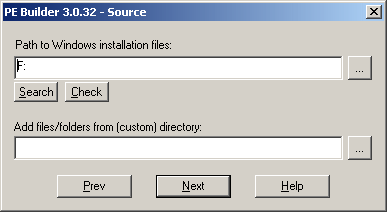
Selection of source and special folders
Topics being discussed on the forums
- My Antec True430 ps blew! Has it happened to any? [CPU & Components]
- Is windows 98 SE still better for gaming [Windows 95/98/ME]
- New 8440 - 400gig HD - partition?? [Systems]
- I think I just killed my video card... Bad flash. Very. Bad. [Graphic & Displays]
- GA-M750SLI-DS4 and Hyper-V [Motherboards & Memory]
Questions? Ask Tom's community!


Amazing
Many times booting from xp cd , choosing the repair R option and using chkdsk /r solves the problem
there is program called winconsole.exe, make a bootable disk from your XP install disk that does all the necessary thing that you need a boot disk to do, great for saving data when you can't get the repair disk to do what you need