Introduction
Already quite a while ago I saw the urgent need to clarify the situation and status of 3D-benchmarking as a tool to evaluate 3D-accelerator chips and cards. Except for the crazy Rambus-hype, there's hardly any other area in the PC-testing scene where as much wrong information, misunderstanding and false conclusions are published as in the 3D-arena. The reason is quite simple and reminds me a bit of my medical practice. Everybody who is using 3D-cards and particularly the so-called 'hard core gamers' are convinced they know lots about 3D graphics, simply because they are using it. It's just the same as all those people who give medical advices or who think they can tell their doctors what kind of medical treatment he should give them, simply because everybody thinks he knows something about medicine, due to the fact that everyone has a body and some kind of experiences with diseases or injuries. The generalization of those experiences is typically human and I don't blame anybody for it, but I'd like to point out that it can have very damaging effects. Adding to the confusion is what we doctors call third-hand or tertiary literature, the typical 'medical advice columns ' that you find in any rainbow/yellow press magazine. The same holds true for hardware websites. 3D is hip and even though the knowledge isn't deep, it's still good to write about it.
3D Games Have Become The Common 3D Benchmark Applications
Today it has finally become common to use 3D-games or at least game-like 3D-scenes as benchmarks for 3D chips and cards. The traditionally most commonly used software for 3D benchmarking is Id's Quake-family, consisting of Quake, Quake 2 and Quake 3 Arena. However, Quake's archenemy Unreal and now Unreal Tournament have also become some kind of benchmark standard, because Unreal Tournament's graphic engine is simply the best looking on the market. Benchmarking with either of the two produces very different results however.
When you run Quake 3 or Unreal Tournament as 3D benchmark your system is under heavy demand. The processor has to do a lot of work and so has the 3D card. While the processor's performance is impacted by the motherboard chipset and the memory, the 3D chip is impacted by its video or onboard memory as well. This makes 3D-benchmarks so beautiful; they test almost every component of your system except for the mass storage devices like the hard drive and CDROM. Unfortunately a 3D benchmark is only producing one number, called the 'frame rate'. This number can only express the complete 'unity' of all the system devices listed above. It's more difficult to pinpoint components with 3D-benchmarks, but it is possible. Let's list the three most important factors on the frame rate score of a 3D-benchmark:
1. The Impact Of The Platform
(Processor, Motherboard/Chipset, System Memory, Graphics Bus Type and Software + 3D Card Driver)
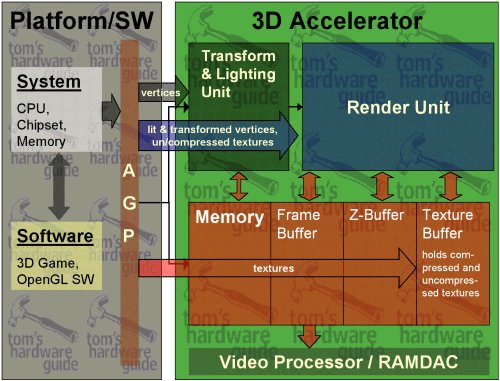
The motherboard with the chipset, the memory, the processor and the PCI or AGP-slot can be seen as a unity when you want to benchmark a graphics card. For simplicity I will call those components 'the platform' from now on.
The platform is responsible to provide the 3D-scene with all its players, objects, light sources for each frame and it's calculating the 'game AI' as well as any special kind of motion. The geometry calculations, today called 'transform and lighting', have to be done either entirely (for cards without T&L) or in parts (for cards with T&L) by 'the platform' as well. Once a frame is calculated, the vertices and textures need to be sent to the 3D-card, obviously through the bus, which is PCI or AGP 1x, 2x, 4x. The faster 'the platform' is, the more frame data it can send to the 3D card. If 'the platform' is not fast enough it is stalling the 3D card and thus lowering the frame rate.
What is important to note is that 'the platform' doesn't care whatsoever about the screen resolution of the 3D game. For 'the platform' it's just the same if Quake 3 runs at 320x240 or at 1920x1440. The reason why is simple. 'The platform' sends VERTICES over to the 3D chip. The relative coordinates of those vertices don't change with different resolutions.
The system also doesn't care much about the color depth. OK, it does care about it in terms of memory and bus bandwidth to some extent (especially if 32-bit textures should be used), but this is negligible in most of the 3D benchmarks that are used right now.
We can conclude, that 3D-benchmarks will hardly show any performance change over the different resolutions and color depths if 'the platform' is the bottleneck.