Overclocking Part 3
The best and pretty well known tool for overclocking graphic cards is Powerstrip from EnTech, Taiwan. In the 'Advanced Options, About the Powerstrip'-menu there is a submenu 'Performance', which lets you switch to fast memory settings and which provides sliders for adjusting the memory and chip clock.
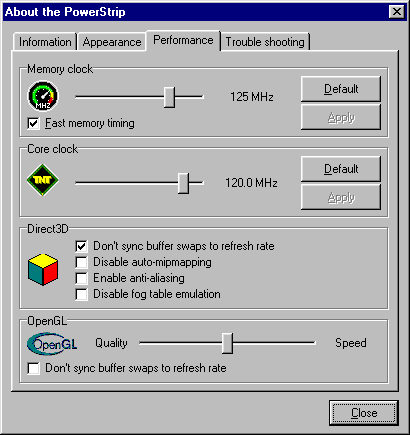
To make sure that a card can really cope with the new speed, I was running my 24 minute Quake2 'tbone.dm2' demo, which is based on my favorite map 'sewer64'. This demo is giving the whole system a really hard time and will make any unstable card crash. Sometimes you only see triangle drawing errors, which is a safe sign that you overclocked too much. Here are the results that I found:
| Product | Highest Chip Clock Setting | Highest Memory Clock Setting |
|---|---|---|
| Asus V3400TNT | 120 MHz | 125 MHz |
| Creative Graphics Blaster RIVA TNT | 105 MHz | 115 MHz |
| Diamond Viper V550 | 105 MHz | 115 MHz |
| Elsa ERAZOR II | 100 MHz | 120 MHz |
| Hercules Dynamite TNT | 115 MHz | 125 MHz |
| STB Velocity 4400 | 100 MHz | 120 MHz |
The best memory seems to be used by Asus and Hercules and those two would also allow the highest chip clocks due to their active cooling devices. Diamond and Creative let the chip clock go up to 105 MHz, but the memory can't cope with more than 115 MHz.
