Dual-Display Hardware - Taking Stock
NVIDIA
Commercially-available cards in the GeForce FX family support all four of the dual-display modes described above. These modes are managed by the nView software, which is part of the driver software. Once the driver is installed, a hardware assistant detects whether a second display is present and aids in finding the right settings for the PC and monitor.
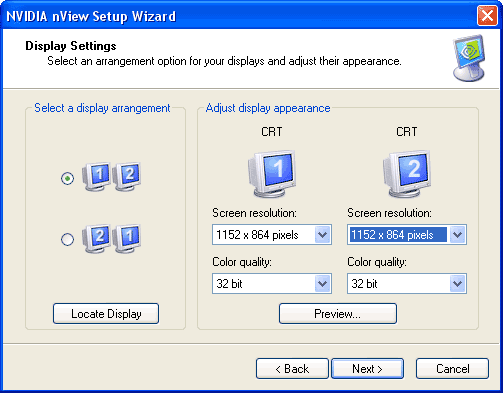
The nView desktop is a great help when frequently switching between different desktop profiles. After becoming familiarized with the software, creating different profiles for different requirements is simple. For example, you could create one dual-display profile for work, giving you two screens with 1280x1024 each, and one for games using horizontal span for a resolution of 2048x768.
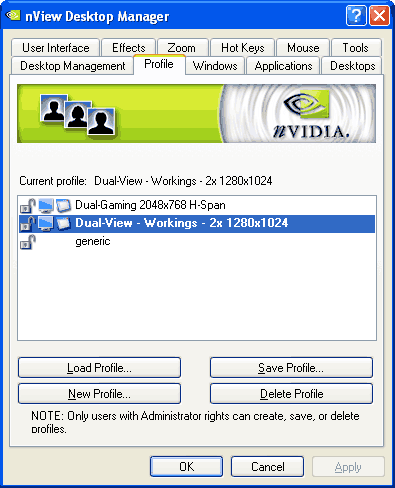
Important: Before changing the settings, make sure you create a new profile through the Profile menu of the nView desktop-manager (for example: work-desktop). Then select the desired settings such as Dual-View in the nView driver menus, return to the profile manager and save the profile . Next, you can create another profile for dual-display gaming using horizontal span. Again, don't forget to save your settings to the profile.

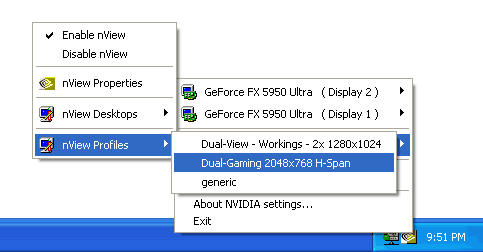
Once the profiles have been created, you can quickly switch between them using the NVIDIA symbol in the taskbar.