TrashBench, a hardware enthusiast and YouTuber that we've covered in the past, has a specific talent for clever-but-chaotic PC experiments. In his latest video, he's managed something that has tripped up far bigger channels before him: he successfully ran a desktop PC at –28°C inside a household freezer, benchmarked it, overclocked it, and pulled the hardware out afterward cold and bone-dry.
The concept of the freezer PC is obviously not a new idea. Plenty of creators, including Linus Tech Tips, have tried putting PCs in freezers, only to be defeated by condensation, thermal instability, or both. TrashBench's twist was realizing that the freezer itself was the limiting factor, and that solving the problem wasn't about exotic coatings, or insane insulation, or extreme temperatures, but instead, size and patience.
Article continues below 
By 2026 standards, this is firmly 'old hardware,' but that's exactly the point. If something went catastrophically wrong, the loss was survivable, and just as importantly, these parts draw far less power than modern high-end CPUs and GPUs. Lower heat output matters when your 'cooling system' is a household freezer with a compressor designed to deal with groceries, not a 600 W load spike.
Instead of resting components on shelves or freezer walls, TrashBench completely emptied the freezer and instead suspended them in mid-air using flexible straps. Cables were carefully routed and sealed to minimize moisture ingress from outside air. At the bottom of the chest freezer, he placed silica gel packed into breathable socks, acting as an active desiccant system. That combination of large freezer volume, minimal airflow turbulence, and aggressive moisture control is what allowed the system to stabilize instead of instantly fogging up and dying.
TrashBench tested performance before freezing, inside the freezer at stock clocks, and again after manual GPU overclocking. The benchmarks included 3DMark Time Spy, 3DMark Fire Strike, Cyberpunk 2077, Far Cry 6, and Shadow of the Tomb Raider, all venerable tests well-suited to the 2016-vintage hardware. Simply placing the PC components into the –28 °C freezer resulted in very marginal performance improvements. In most cases, the difference was within the noise; the only clear hardware-level gain was a 51 MHz increase in sustained GPU clock, thanks to lower operating temperatures.

Manual GPU overclocking of around +240 MHz on the core produced more noticeable gains, albeit still nothing earth-shattering. The largest uplift was in Shadow of the Tomb Raider, which gained about 8% (102 FPS to 110 FPS), and then 3DMark Fire Strike improved about 7%. Other tests showed smaller improvements, and TrashBench didn't specify exact in-game settings, so the results should be taken as directional rather than definitive. In other words: freezing your PC won't magically turn a GTX 1070 into a monster.
After benchmarking, TrashBench was able to remove the parts from the freezer and verify that they were not only still cold (at just 9°C), but in his words, "dryer than a GPU market." In YouTube comments, he added that he didn't actually expect the experiment to work at all. So why did his test work when others failed? The secret wasn't that the freezer was cold — it's that it was big. Smaller freezers heat up almost instantly under load, causing rapid temperature swings and repeated crossings of the dew point, which happen to be the exact conditions that create condensation.
In contrast, a large chest freezer acts less like an air conditioner and more like a cold reservoir. Hundreds of liters of air pre-cooled to –28 °C can absorb several hundred watts of heat for minutes before warming significantly, thanks to thermal inertia slowing temperature changes, reduced hot air recirculation thanks to open space, more cold wall surface area for passive heat absorption, and lower relative humidity spikes, even with minor air leakage.
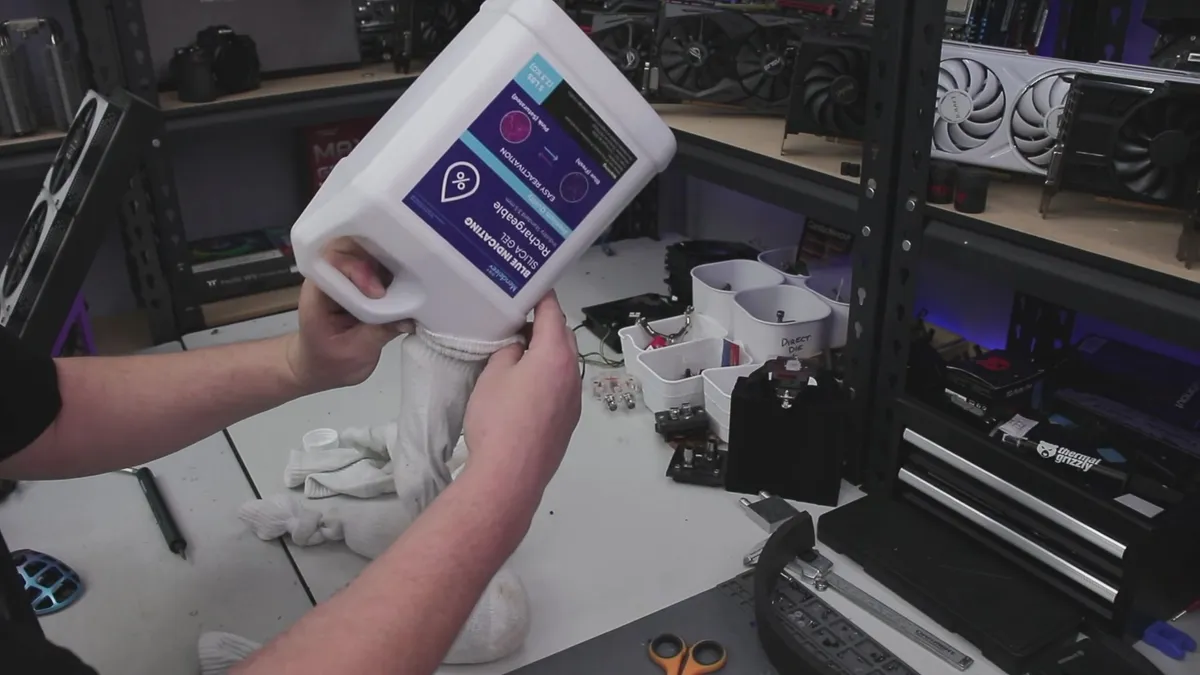
The silica gel worked because the environment was stable. In a small freezer, the desiccant is quickly overwhelmed. In a large one, it actually has time to scrub moisture from the circulating air. TrashBench didn't try to make the freezer continuously cool a running PC, which would be an impossible task. He treated it as a temporary thermal battery, spent carefully during the benchmark runs.
TrashBench's conclusion is cheeky in a typically-Australian way: 'Like everything in life, size does matter.' He also notes that this kind of setup only really makes sense if you're planning to push overclocking harder than he did here — and doing that for long would almost certainly overstress the freezer's compressor. The takeaway: size matters, but so do expectations.

Follow Tom's Hardware on Google News, or add us as a preferred source, to get our latest news, analysis, & reviews in your feeds.