









Why you can trust Tom's Hardware Our expert reviewers spend hours testing and comparing products and services so you can choose the best for you. Find out more about how we test.
Comparison Products
We included the Intel SSD 660p (SM2263EN + Micron 64L QLC), Mushkin Helix-L (SM2253XT + Micron 64L TLC), Adata XPG SX6000 Pro (Realtek RTS5763DL + Micron 64L TLC), and Crucial’s SATA MX500 (SM2258 + Micron 64L TLC) in our test pool. Additionally, we included the Mushkin Pilot-E (SM2262EN + Micron 64L TLC) and Corsair Force MP510 (Phison E12 + Kioxia 64L TLC) as more costly alternatives. We also threw in a 6TB WD Black, a 7200-RPM HDD, for good measure.
Game Scene Loading - Final Fantasy XIV
The Final Fantasy XIV StormBlood benchmark is a free real-world game benchmark that easily and accurately compares game load times without the inaccuracy of using a stopwatch.

The Kingston A2000 delivers leading-edge game load performance. With a total load time of 18.80 seconds, Kingston’s A2000 took first place, leading even the Mushkin Pilot-E.
Transfer Rates – DiskBench
We use the DiskBench storage benchmarking tool to test file transfer performance with our own custom 50GB block of data. Our data set includes 31,227 files of various types, like pictures, PDFs, and videos. We copy the files to a new folder and then follow up with a reading test of a newly-written 6.5 GB file.


View Original
View Original
During our file transfer tests, the A2000 delivered similar performance to other entry-level NVMe SSDs. It averaged 501 MBps when copying the 50GB test folder, outperforming the HDD by five times. It also read back the 6.5GB file at 1.5 GBps, ranking fourth overall in read performance.
Trace Testing – PCMark 8 Storage Test 2.0
PCMark 8 is a trace-based benchmark that uses Microsoft Office, Adobe Creative Suite, World of Warcraft, and Battlefield 3 to measure the performance of storage devices in real-world scenarios.


View Original
View Original
Kingston’s A2000 did amazingly well in PCMark 8. With a score of 5,103 points and an average bandwidth of 708 MBps, it scores second place, landing ever-so-slightly behind the Corsair Force MP510.
Get Tom's Hardware's best news and in-depth reviews, straight to your inbox.
Trace Testing – SPECworkstation 3
Like PCMark 8, SPECworkstation 3 is a trace-based benchmark, but it is designed to push the system harder by measuring workstation performance in professional applications. The full suite consists of more than 30 workloads, but we've opted to only run the storage benchmark which uses only 15 of them and categorizes the results into 5 market segments for scoring: Media & Entertainment, Product Development, Life Sciences, Energy, and General Operations.


View Original
View Original
View Original
View Original
View Original
View Original
View Original
The Kingston A2000 completed the benchmark in just over 40 minutes and placed third overall. It scored more closely to the Pilot-E and Force MP510 than its entry-level competitors. The drive certainly stands out if you're looking for consistent performance.
Synthetic Testing - ATTO
ATTO is a simple and free application that SSD vendors commonly use to assign sequential performance specifications to their products. It also gives us insight into how the device handles different file sizes. We tested at the default queue depth value of 4.


View Original
View Original
ATTO reaffirms the A2000’s official sequential performance specifications. The drive hit 2,200 MBps read, and actually broke the spec for write performance with a peak of 2,200 MBps.
Synthetic Testing - iometer
iometer is an advanced and highly configurable storage benchmarking tool that vendors often use to measure the performance of their devices.


View Original
View Original
View Original
View Original
View Original
View Original
View Original
View Original
View Original
View Original
View Original
Kingston’s A2000 peaked at 2,281/2,212 MBps in sequential read/write throughput. Random performance at QD (queue depth) 1-4 was also very responsive. Surprisingly, the DRAMless Mushkin Helix-L is a bit more responsive and was able to deliver slightly faster synthetic read results. The A2000’s random performance peaked at 184,000/267,000 read/write IOPS.
Sustained Sequential Write Performance
Official write specifications are only part of the performance picture. Most SSD makers implement a pseudo-SLC cache buffer, which is a fast area of SLC-programmed flash that absorbs incoming data. Sustained write speeds can suffer tremendously once the workload spills outside of the pSLC cache and into the "native" TLC or QLC flash. We use iometer to hammer the SSD with sequential writes for 15 minutes to measure both the size of the pSLC buffer and performance after the buffer is saturated.


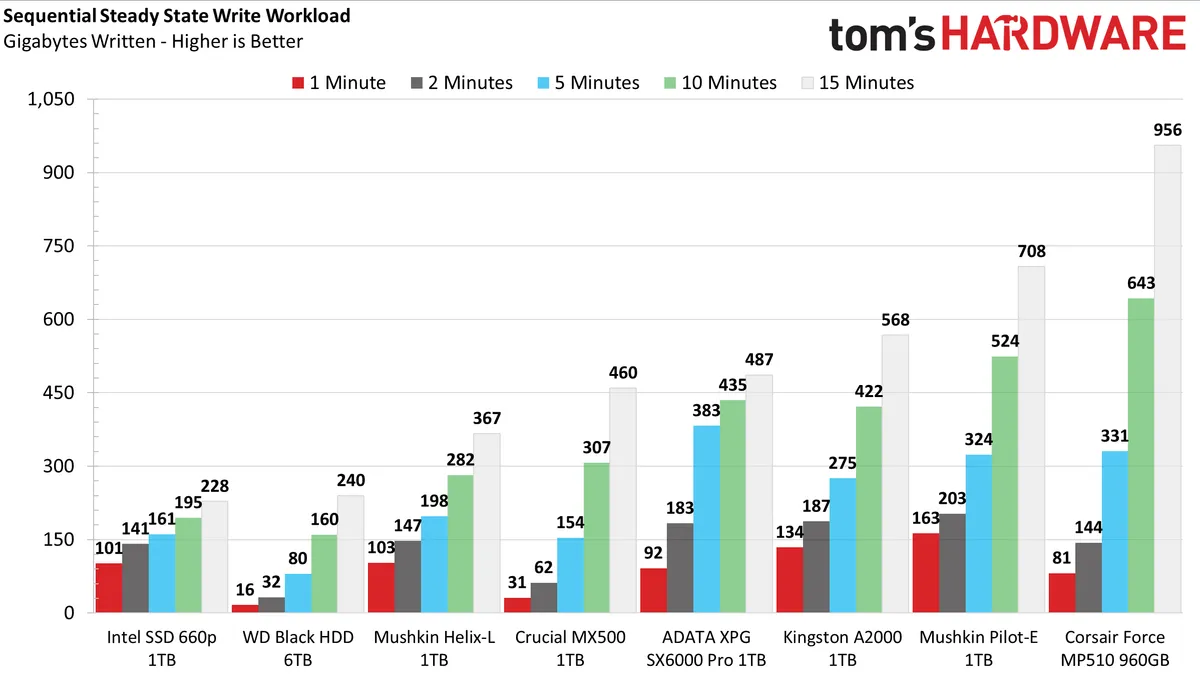

As mentioned, the Kingston A2000 features a pSLC write cache. The drive can absorb about 165GB of writes before performance degrades from 2,200 MBps down to roughly 490 MBps.
It is also worth noting the very consistent write pattern after write performance degrades. This is significantly better than the performance the DRAMless Mushkin Helix-L. The A2000 also wrote significantly more data during the test, too.
Power Consumption
We use the Quarch HD Programmable Power Module to gain a deeper understanding of power characteristics. Idle power consumption is a very important aspect to consider, especially if you're looking for a new drive for your laptop. Some SSDs can consume watts of power at idle while better-suited ones sip just milliwatts. Average workload power consumption and max consumption are two other aspects of power consumption, but performance-per-watt is more important. A drive might consume more power during any given workload, but accomplishing a task faster allows the drive to drop into an idle state faster, which ultimately saves power.


View Original
View Original
View Original
View Original
View Original
The A2000 ranks in the middle of the pack when it comes to efficiency during the file transfer workload. The A2000's onboard DRAM causes the A2000 to have higher power consumption than the Helix-L, hence the lower efficiency score even though both averaged similar speeds.
When at idle, the A2000 consumed just 12mW when ASPM is enabled, and a little over 600mW when we disabled the feature. So, it is still a good upgrade choice for your next laptop or efficient small form factor PC.
MORE: Best SSDs
MORE: How We Test HDDs And SSDs
MORE: All SSD Content

Sean is a Contributing Editor at Tom’s Hardware US, covering storage hardware.
-
nofanneeded Sorry but 600TBW for 1TB is not respectable endurance.Reply
1-Corsar MP510 960GB , TBW : 1700
2-PNY XLR8 CS3030 , 1TB , TBW : 1665
3-Gigabyte NVME SSD , 1TB , TBW : 1600
4-Patriot Viper VPN100 , 1TB , TBW : 1670
600 TBW for 1TB SSD is nothing by today standards. -
tomspown The ssd is not that great Atto results are all over the place, my sansung 850 evo is faster in scanning with antivirus and malwarebytes than a2000, this was a bad buy but my return window is gone so stuck with it. Cant post screanshot this site doesnt seem to allow.Reply -
seanwebster Reply
The thing is, these are warranted endurance ratings. They don't necessarily correspond to actual product endurance. And, they match high-end drives like the Samsung 970 EVO Plus and WD Black SN750.nofanneeded said:Sorry but 600TBW for 1TB is not respectable endurance.
1-Corsar MP510 960GB , TBW : 1700
2-PNY XLR8 CS3030 , 1TB , TBW : 1665
3-Gigabyte NVME SSD , 1TB , TBW : 1600
4-Patriot Viper VPN100 , 1TB , TBW : 1670
600 TBW for 1TB SSD is nothing by today standards.
As well, how much endurance actually matters? What is your workload? Do you know how much PC users write to their drives on average? It's 5-10TB a year, at most 20TB, usually with write amplification from what I've gathered.
Considering 600TB is 6x more than a high-average (100TB) of writes over 5-years, I'd say its respectable. That gives it about a 30-year life span when it comes to writing endurance alone if the real-world endurance result actually matches the rating.
Hmm, could have some configuration issues. Does Crystal Disk Info report full link speed? Got enough free space? Did you just clone or migrate all your data to the drive? if so, you may just need to envoke Windows Optimize/Trim and let it have some idle time, maybe leave it on overnight, to recover.tomspown said:The ssd is not that great Atto results are all over the place, my sansung 850 evo is faster in scanning with antivirus and malwarebytes than a2000, this was a bad buy but my return window is gone so stuck with it. Cant post screanshot this site doesnt seem to allow. -
USAFRet Reply
In your experience, what is the most TBW you've personally put on a consumer level drive?nofanneeded said:Sorry but 600TBW for 1TB is not respectable endurance.
1-Corsar MP510 960GB , TBW : 1700
2-PNY XLR8 CS3030 , 1TB , TBW : 1665
3-Gigabyte NVME SSD , 1TB , TBW : 1600
4-Patriot Viper VPN100 , 1TB , TBW : 1670
600 TBW for 1TB SSD is nothing by today standards. -
nofanneeded ReplyUSAFRet said:In your experience, what is the most TBW you've personally put on a consumer level drive?
My use is not "delete" intensive , so I never had an SSD die from TBW limit.
I get your point , but when the market already has 1600+ TBW on cheap NVME drive , for the sake of choosing the better , the Pro cant be "respectable" for a 600TBW , this is not fair for other products at the same price and size. -
nofanneeded Replyseanwebster said:The thing is, these are warranted endurance ratings. They don't necessarily correspond to actual product endurance. And, they match high-end drives like the Samsung 970 EVO Plus and WD Black SN750.
As well, how much endurance actually matters? What is your workload? Do you know how much PC users write to their drives on average? It's 5-10TB a year, at most 20TB, usually with write amplification from what I've gathered.
Considering 600TB is 6x more than a high-average (100TB) of writes over 5-years, I'd say its respectable. That gives it about a 30-year life span when it comes to writing endurance alone if the real-world endurance result actually matches the rating.
Hmm, could have some configuration issues. Does Crystal Disk Info report full link speed? Got enough free space? Did you just clone or migrate all your data to the drive? if so, you may just need to envoke Windows Optimize/Trim and let it have some idle time, maybe leave it on overnight, to recover.
it is not about me , it is about the review itself , the NVME SSD I put there are at the same price range and it is not fair for them that you put on inferior TBW product a Pro .. that pro is not right. if this 600TBW is respectable then what will you call 1600TBW and the same price and speed ? it is almost 3X ...
Not fair for ther product and not fair for the other products.
as for some mnufacturer cheat in the TBW numbers , well this can be said for the Reviewd 600TBW SSD as well .. because you never tested any TBW to be sure who is lying and who is not. -
seanwebster Reply
Sure, Phison E12 and E16 based SSDs have 3x the rated endurance, of this, but who knows, will they all actually last as long as stated? Will they last longer? Matching the Samsung 970 EVO and WD Black SN750's endurance values as an entry-level NVMe SSD at a fraction of the price, I'd say that's a Pro for the drive. It's not class-leading, but it's respectable none the less.nofanneeded said:it is not about me , it is about the review itself , the NVME SSD I put there are at the same price range and it is not fair for them that you put on inferior TBW product a Pro .. that pro is not right. if this 600TBW is respectable then what will you call 1600TBW and the same price and speed ? it is almost 3X ...
Not fair for ther product and not fair for the other products.
Unless it is going to be used in a professional workflow, I fail to see where 600 TB of write endurance is less than adequate for most consumers. Much higher than the QLC SSDs hitting the market too. If one is planning on bombarding their drives with writes, then, of course, one would turn to purchase a product of higher endurance. But, for the average user, it's much more than enough. -
nofanneeded Replyseanwebster said:Sure, Phison E12 and E16 based SSDs have 3x the rated endurance, of this, but who knows, will they all actually last as long as stated? Will they last longer? Matching the Samsung 970 EVO and WD Black SN750's endurance values as an entry-level NVMe SSD at a fraction of the price, I'd say that's a Pro for the drive. It's not class-leading, but it's respectable none the less.
Unless it is going to be used in a professional workflow, I fail to see where 600 TB of write endurance is less than adequate for most consumers. Much higher than the QLC SSDs hitting the market too. If one is planning on bombarding their drives with writes, then, of course, one would turn to purchase a product of higher endurance. But, for the average user, it's much more than enough.
What you said about the Phison mite not last 1600 TBW as the say CAN BE ALSO SAID ABOUT the Kingston a2000 , who knows that it will even last 600TBS ??? you can only say that when you test the TBW (which is almost impossible at Tomshardware)
Matching Samsung has nothing to do with it , Samsung are not known for good endurance. you ae mixing potatoes with apples here ..
Yes Samsung is super fast , but one of Samsung cons is low TBW .. so you cant give a "pro" comapred to a "con" just because Samsung is faster.
and again , I dont care anout averag use of TBW , when the technology reaches 3X the TBW , you cant give a pro for 1X ...
and again this is not fair fr readers who dont know about the 3X TBW drives and trust your review .. personally I would never get the A2000 , because here is no gain over similar products , the speed is not that super to sacrifice the TBW for it -
USAFRet Reply
Even as far back as the 840 EVO, TBW on Samsung's was not an issue.nofanneeded said:Matching Samsung has nothing to do with it , Samsung are not known for good endurance. you ae mixing potatoes with apples here ..
(and this is on small drives of 120-250GB. Larger drives scale linearly)
https://techreport.com/review/26058/the-ssd-endurance-experiment-data-retention-after-600tb/"By far the most telling takeaway thus far is the fact that all the drives have endured 600TB of writes without dying. That’s an awful lot of data—well over 300GB per day for five years—and far more than typical PC users are ever likely to write to their drives. "
"At this rate, even the 840 Series may reach a petabyte of writes before burning out. "
https://www.anandtech.com/show/7173/samsung-ssd-840-evo-review-120gb-250gb-500gb-750gb-1tb-models-tested/3"Endurance isn't a concern for client systems using the 840 EVO. " -
seanwebster Reply
Of course the A2000 could fail before, but then again, does that matter? Again, this is just warranted endurance we’re talking about. Something we can’t necessarily test within the week of getting a drive to review. But, impossible to test? No.nofanneeded said:What you said about the Phison mite not last 1600 TBW as the say CAN BE ALSO SAID ABOUT the Kingston a2000 , who knows that it will even last 600TBS ??? you can only say that when you test the TBW (which is almost impossible at Tomshardware)
Matching Samsung has nothing to do with it , Samsung are not known for good endurance. you ae mixing potatoes with apples here ..
Yes Samsung is super fast , but one of Samsung cons is low TBW .. so you cant give a "pro" comapred to a "con" just because Samsung is faster.
and again , I dont care anout averag use of TBW , when the technology reaches 3X the TBW , you cant give a pro for 1X ...
and again this is not fair fr readers who dont know about the 3X TBW drives and trust your review .. personally I would never get the A2000 , because here is no gain over similar products , the speed is not that super to sacrifice the TBW for it
Having Samsung endurance as an entry level drive, for half the price, it’s a pro. The Samsung is twice the price per GB... Both are NVMe SSDs, completely apples to apples.