Sharp Edges vs. Anti-Aliasing
Nvidia and AMD build their OpenGL drivers using unique strategies, each with its own pros and cons. The resulting visual differences aren’t solely a result of hardware architecture, since they also show up on boards based on the older VLIW4 and Fermi GPUs.
Meanwhile, there are hardly any differences in the way these competitors output DirectX content, aside from somewhat darker shadows on the FirePro cards.
Let’s compare two scenes from Maya that illustrate both companies' philosophies well. These pictures diverge in the same way we’re used to seeing from older titles like LightWave.

Maya 2013: Shaded

Maya 2013: Shaded + SSAO + MSAA
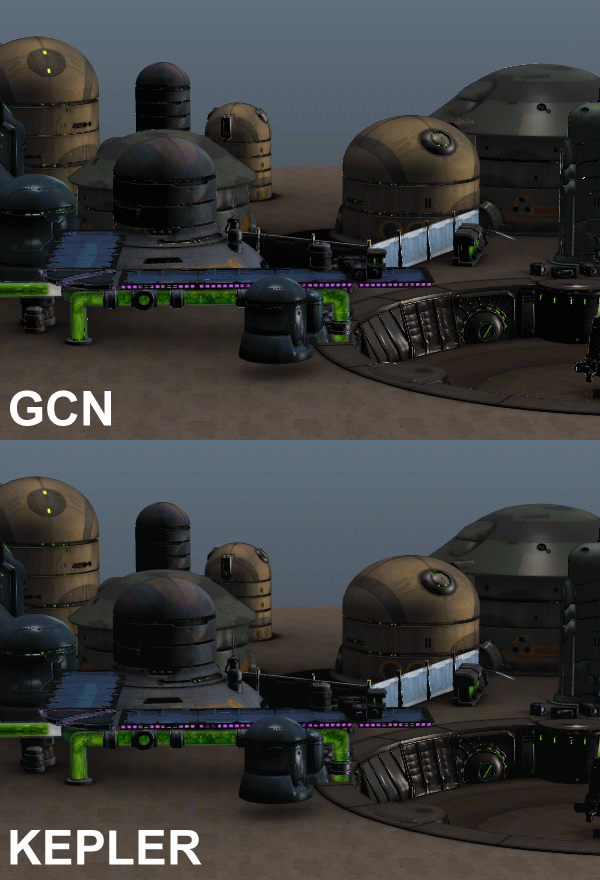
Regardless of whether MSAA is turned on or not, the FirePro workstation graphics cards produce sharper edges and some additional detail (z-buffer). Then again, transitions aren’t as smooth as those produced by Nvidia's Quadro cards, instead suffering from unsightly “flashes.”
Once movement is added to the scene, the flashes turn into flickering that even AMD’s MSAA technology can’t fully get rid of. Nvidia’s MSAA implementation doesn’t have this problem. However, if the camera is positioned in such a way that polygons are stacked closely together, the z-buffer loses track and smaller surfaces can get lost with Nvidia’s MSAA.
Looking at the output from NX 8.0, there are some easily-noticeable differences that you'd spot right away, depending on the output options you use. These are consistent with the observations we just made, validating our impressions so far.
NX 8.0: Shaded
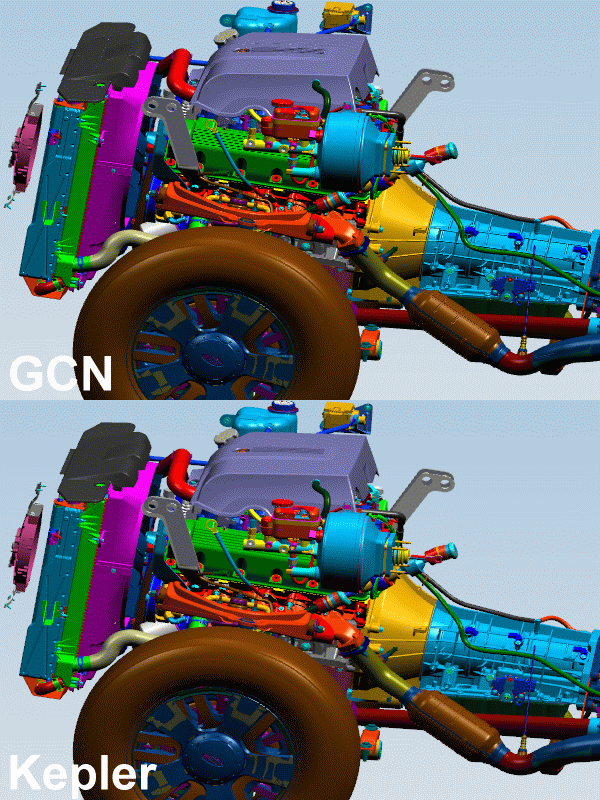
NX 8.0: Shaded + Edges + AA
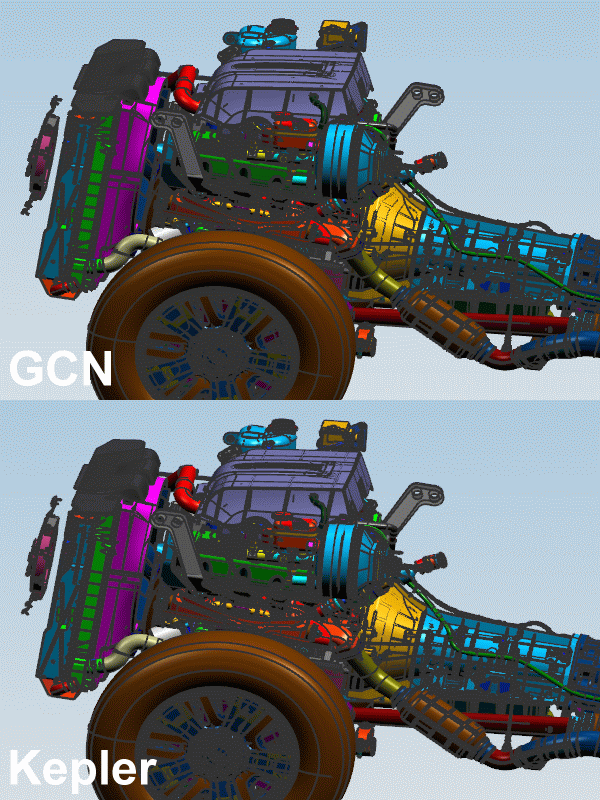
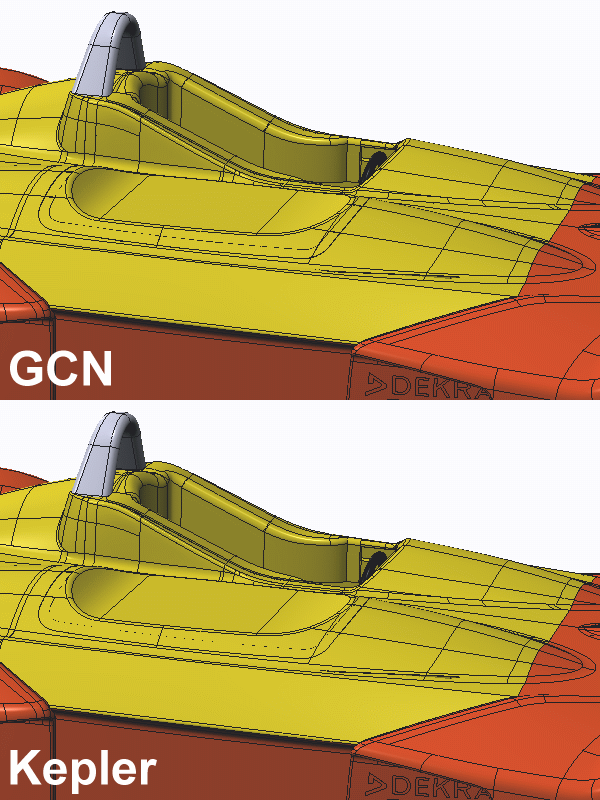
Aliased edges are more tolerable in the workstation space, as opposed to the realism-dependent gaming market, so long as they're the price you pay for additional detail. Creo 2 makes a good example. There are significant differences between AMD and Nvidia in some places. My preference is the FirePro's wireframe output, which is sharper than Nvidia’s smooth picture.
Consumer Graphics Cards with Gaming Drivers
Time and time again, we've shown that desktop graphics cards with their gaming-optimized drivers don’t fare well when it comes to professional tasks. They're sometimes able to skate by in the private and semi-professional sector, depending on the application (and especially if it's DirectX-based). But as soon as you start messing with complex OpenGL applications, it's over.
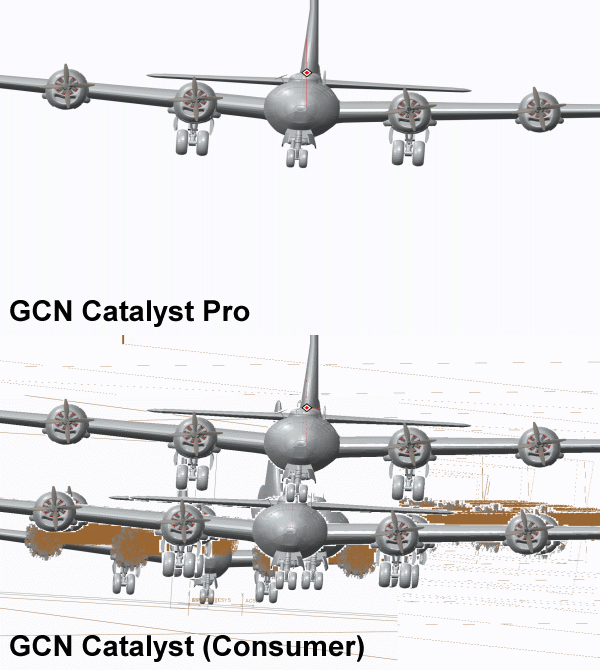
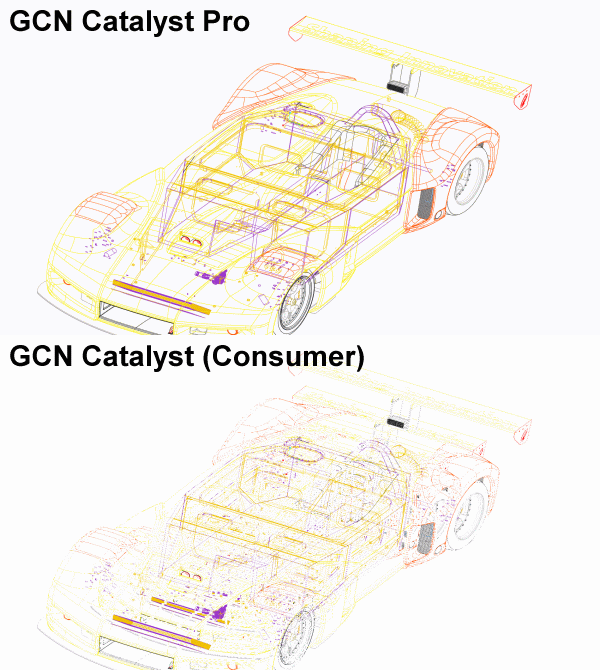
AMD’s Catalyst driver fails miserably twice in a row. Nvidia’s GeForce driver doesn't run into those egregious display errors. However, it slows down so much that performance simply isn't usable.
In the example below, AMD completely drops the ball in a Creo 2 scene with transparent backgrounds. Our first example shows how parts of previous frames are retained in later frames.
The second example illustrates how the wireframe display doesn’t work when it comes to hiding invisible polygons (hidden), or anti-aliasing.
At this point, we'd like to speak up in defense of more entry-level workstation graphics cards, which often look weak in benchmark charts next to the highest-end boards. Most folks won't use models as complex as the ones tested in SPECviewperf 12, using all of the high-detail settings we benchmarked. Under less taxing conditions, it's often better to use a slower pro card than to try shoehorning a gaming board into a business machine.
- Introducing Our Benchmark System
- CATIA V6 R2012
- Results: CATIA V6 R2012
- Creo 2
- Results: Creo 2
- Energy
- Results: Energy
- Maya 2013
- Results: Maya 2013
- Medical
- Results: Medical
- Showcase 2013
- Results: Showcase 2013
- Siemens NX 8.0
- Results: Siemens NX 8.0
- SolidWorks 2013
- Results: SolidWorks 2013
- CPU Scaling
- Image Quality And Desktop Drivers
- SPECviewperf 12: A Much-Needed And Welcome Update
When AMD releases the mighty 16GB FirePro 9100 based on Radeon R9-290X core will be competitive to the Quadro K6000 in performance.
I find that internal benchmarking the only way to really understand the value of workstation cards. W7000 for example - it was awesome in our internal testing. While good, the cards is much better than these benchmark results suggest. Not sure why I would look at another SPEC benchmark when I will still need to test the cards in-house to really know how good they are for our applications and models.
Unfortunately, testing in the real applications (using something like APCapc) requires actual licenses of the software apps. Many of these vendors (CATIA, NX, etc) simply don't make temp licenses available for reviewers/journalists or other non-users.
VP12 should be quite good enough to help make informed evaluations of GPU hardware. If you are concerned about seeing in-application performance measurements for particular apps, you can ususually find the data with a bit of googling, although take results you find posted on the internet by "regular Joe's" with a grain of salt.
Adam Glick
Sapphire Technologies
tsk tsk tsk
About CPU Scaling: "In the second set of our scaling results, only SolidWorks responds to CPU frequency. Core and thread count don't make a difference.¨
This is not entirely true. It goes as far as 10% at 4.5 GHz.
I find that internal benchmarking the only way to really understand the value of workstation cards. W7000 for example - it was awesome in our internal testing. While good, the cards is much better than these benchmark results suggest. Not sure why I would look at another SPEC benchmark when I will still need to test the cards in-house to really know how good they are for our applications and models.
tsk tsk tsk
It is so problematic to read the posts above too? I wrote:
And for your information: AMD (Sapphire included) was not able to send me a R9 295X2 to my lab here in Germany! So I had to wait for Chris' card (yes, we've paid 550 bucks only for FedEx Priority from U.S. to Germany) and I was so lucky to handle two launch articles at the same time. The day has 24 hrs only, sorry for my laziness.
You get the complete W9100 story (the updated SPECviewperf12 is only a part of this) on 17 pages, don't worry, but it must be translated first.
Titan is good for compute, the SPECviewperf12 is more graphics related. No chance for consumer cards.
"Don't bother with anything else because Nvidia K6000 is the fastest."
You see the results of the consumer cards inside? The Titan is a little bit slower than the tested GTX 780 Ti, the Titan Black is in such cases 2-3% faster. But both are slower than a 780 Ti OC and the results of this card are in the most cases absolutelly worthles. I've tested the consumer cards belong the workstion graphics only for demonstration purposes.
But it really makes no sense to run pro-apps with non-certified hardware and drivers!
A better question is this. The 780 TI OC is faster than a titan black? And are these tests with the normal 780 TI driver? If so for working not he road a 780 ti rig will do the job.